
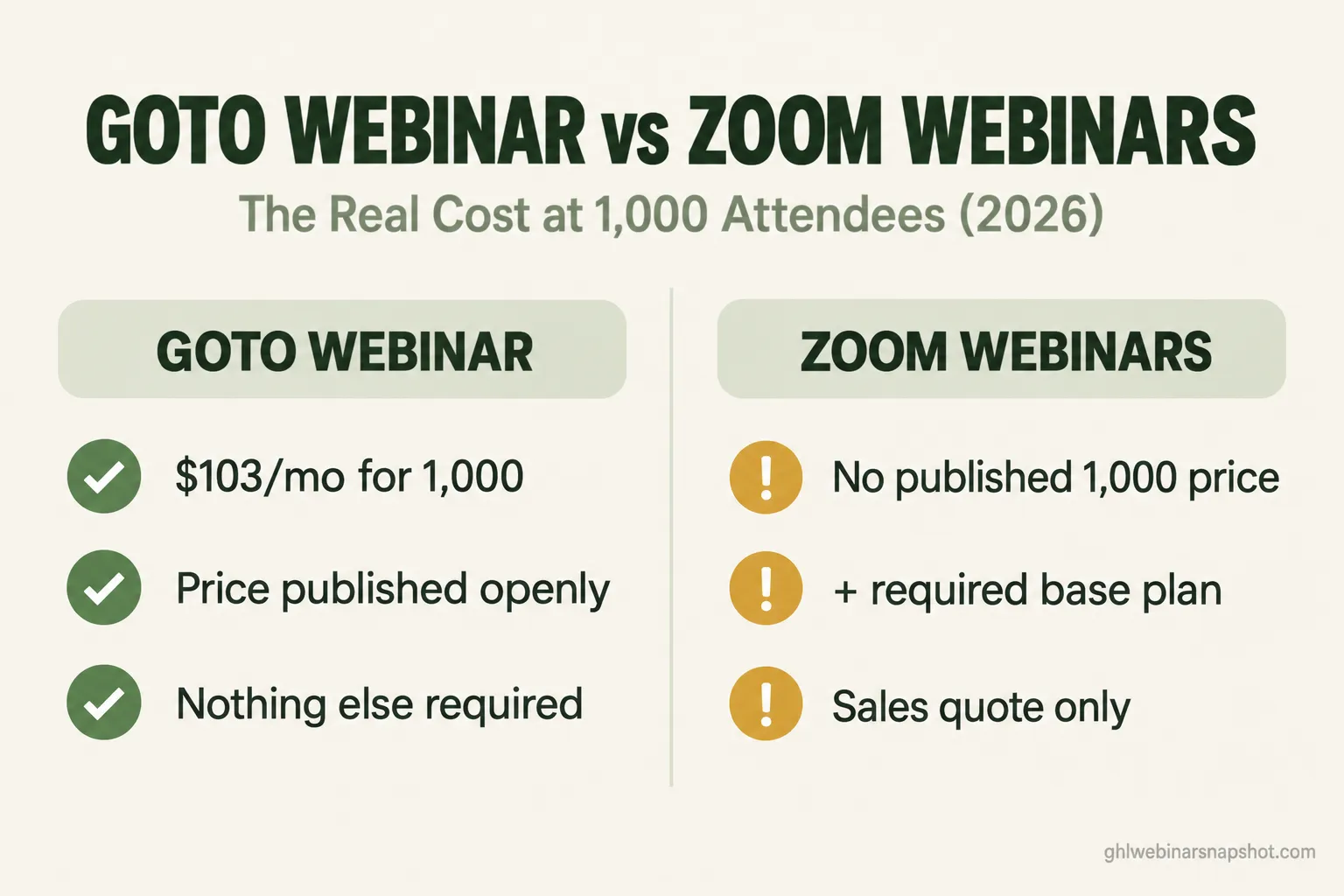
It’s two weeks before your biggest webinar of the quarter. Marketing promised the VP that 1,000 people will be in the room, and you have one job: pick the platform and buy the seats. You open two tabs, GoTo Webinar and Zoom Webinars, and within ten minutes you are annoyed. One gives you a clean number. The other sends you to a sales form, a required base plan, and a slider that goes to 100,000 but never shows a price.
Here’s the short answer. For a one-off 1,000-attendee webinar, GoTo Webinar is the simpler buy: its Elevate plan is listed publicly at about $103 a month billed annually for up to 1,000 participants, with nothing else required. Zoom can host 1,000 too, but at that size it stops publishing a price, requires a separate Zoom Workplace Pro license underneath it, and quotes the real number through sales. If your team already lives in Zoom, the familiarity may be worth the hassle; buying webinar capacity on its own, GoTo is cheaper and clearer. But both leave the same expensive hole: neither fills the room or follows up after, which is where the money actually is.
Table of contents
- What picking wrong actually costs you
- GoTo Webinar vs Zoom Webinars, criterion by criterion
- The price at 1,000, charted honestly
- Which one wins for your situation
- The layer neither platform includes
- The compliance line most teams miss
- Common objections, answered
- FAQ
What picking wrong actually costs you
At 100 attendees almost any tool works and the price is a rounding error. At 1,000 the math changes: a crash is now public, and the gap between sticker price and invoice gets wide enough to matter to finance. In the 2026 CMI and MarketingProfs research, 52% of marketers named speaking events and webinars among their most effective thought-leadership channels, so the tool you pick is a pipeline decision.
Start with attendance, because every downstream number multiplies off it. Livestorm’s 2026 benchmark (33,786 sessions, 7M-plus registrations) puts the average live show-up rate at 47.7% in 2025, down from 48.9% the year before. For your 1,000 registrants, plan on roughly 477 in the room, and the average attendee watches only 26 of a 68-minute session.
Those numbers decide a 1,000-registrant event: the average gets you 477 in the room; a cadence that lifts show-up to 60% gets you 600, a swing that beats any feature on either platform’s page.
Attendees from 1,000 registrants at the 2025 average of 47.7% versus 60%. The platform decides what you pay for the room; the cadence decides how many registrants you actually talk to.
GoTo Webinar vs Zoom Webinars, criterion by criterion
The eight things that decide a 1,000-attendee webinar. Every figure is sourced, and where a vendor hides a number I say so.
GoTo Webinar vs Zoom Webinars at scale (2026, reported figures)
| Feature | GoTo Webinar | Zoom Webinars |
|---|---|---|
| Published price for 1,000 attendees | Elevate: ~$103/mo annual ($129 monthly), listed openly | No fixed price; sales quote or pay-per-attendee |
| Price at 500 attendees | Reach: ~$59/mo annual | Webinars: ~$83/mo annual, before base plan |
| Separate base plan required? | No, seats are bundled | Yes, Zoom Workplace Pro (~$14.16/user/mo) |
| Organizer / host seats | 1 on Reach, 3 on Elevate | Per host license, each needs the base plan |
| Billing model | Annual (14-20% off) or monthly | Annual on the Webinars product (reported) |
| Pay-as-you-go option | Flex: $29/mo + ~$299 per 1,000 event | Pay-per-attendee, ~$2.50 over prepaid |
| Review scores | G2 4.2 (795); Capterra 4.5 (2,073) | G2 4.5 (387, Events & Webinars) |
| Gated behind higher tiers | Payments, source tracking, certificates need Complete | Advanced interaction and analytics on Plus / Events |
1. Price at 1,000 attendees
GoTo wins on clarity. Its Elevate plan is listed at about $103/mo billed annually (or $129 monthly) for up to 1,000 participants and three organizer seats, per an August 2026 capture of its pricing page. You can read it, sign up, and run your event without talking to a human.
Zoom is the opposite. Its entry Webinars product sits around $83/mo billed annually, but that tier caps lower, and the pricing page shows a slider to 100,000 with no price at the 1,000 point. To buy 1,000 live seats you end up on a sales call. The number exists; Zoom just won’t print it.
Where it breaks: teams assume Zoom’s advertised entry price is the 1,000 price. It isn’t. Get the quote in writing before you promise finance a figure.
2. What’s actually included, and the add-on trap
This is where Zoom’s real cost hides. Its higher webinar tiers require a Zoom Workplace Pro license underneath them, roughly $14.16/user/mo billed annually, on top of the webinar fee, for every host. GoTo bundles its organizer seats, so the price you see is closer to the price you pay. It has its own gates, though: payments, source tracking, and completion certificates only unlock on the quote-only Complete plan.
Where it breaks: both look cheaper at checkout than on the renewal invoice. Price the base plan, the host seats, and any gated feature you actually need before you compare.
3. Reliability and reputation at scale
At 1,000 people, reliability is the whole game. The review data is close and slightly favors Zoom on raw score: G2 lists Zoom Events and Webinars at 4.5 from 387 reviews and GoTo Webinar at 4.2 from 795 reviews. GoTo, the older webinar-specific product, carries a 4.5 across 2,073 reviews on Capterra, 89% of them above four stars. Both are proven at scale.
Where it breaks: rolling averages hide recent outages. Filter reviews to the last few months, read the one- and two-star ones for “crashed” and “kicked out,” then run a full dress rehearsal at your real attendee count.
4. Engagement during the webinar
Zoom Webinars is built for broadcast: a presenter talks, attendees watch, interaction is limited. Reviewers describe its automation, analytics, and customization as basic. GoTo offers polls, Q&A, handouts, and certificates and leans a little more toward structured interaction. Neither is a high-energy sales room the way a Demio or WebinarJam is.
Where it breaks: if your event is a sales pitch that needs chat energy and live offers, both feel flat. They fit training, town halls, and B2B demos better.
5. Registration and reminders, the show-up lever
Both handle registration and send a basic reminder email. Neither builds the multi-touch cadence that moves show-up rate: no native SMS sequence, no go-live text, no branching for people who open but don’t click. A reminder email or two is the ceiling.
This matters more than any other row in the table: reminders are the difference between 477 and 600 people in a 1,000-registrant room. We cover the exact sequence in our webinar SMS reminder playbook, and why show-up stays low in this breakdown of the causes.
Where it breaks: teams treat the single reminder email as “handled” and wonder why half the room never shows.
6. Replay and on-demand tracking
Both record and share a replay link. What neither does is tell you who watched, how far they got, and whether that should raise a lead score. You get a recording and maybe a view count, not a signal sales can act on. See how we turn replay views into a scored pipeline inside your CRM.
Where it breaks: the replay becomes a dead archive, because nobody can see who engaged.
7. Analytics and CRM attribution
Both integrate with common CRMs and export attendance data. But attribution, tying a registrant to a campaign and then to closed revenue, is thin in both. GoTo keeps source tracking on its quote-only Complete tier; Zoom’s is light. For a B2B event feeding a sales team, that is a real limitation.
Where it breaks: finance asks what the webinar drove in pipeline and you can’t answer past “attendees.” The platform tracks the room, not the revenue.
8. Contracts, commitment, and lock-in
GoTo’s annual discount (about 14% off Reach and 20% off Elevate) comes with a 12-month commitment and auto-renewal. Zoom is generally sold on annual billing too, and because Workplace Pro sits underneath it, unwinding the stack is messier. Run webinars only a few times a year? GoTo’s Flex pay-per-event option (a $29/mo base plus roughly $299 for a 1,000-attendee event) beats either annual plan.
Where it breaks: you sign an annual deal for an event you run quarterly. Match billing to your real cadence, not the discount.
The price at 1,000, charted honestly
At 500 attendees both publish a price. At 1,000, GoTo still does while Zoom’s real cost depends on a quote plus its required base plan.
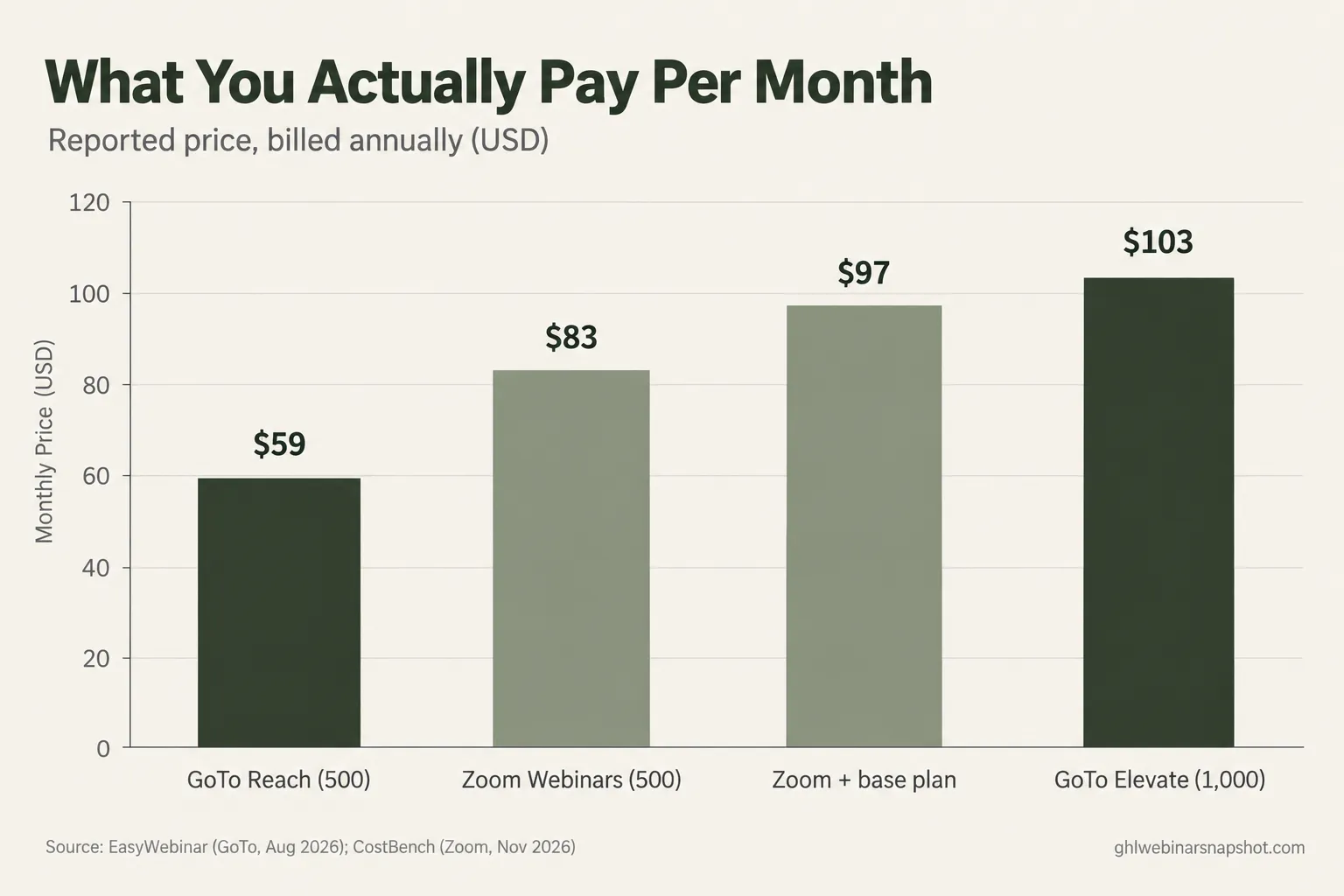
Reported monthly price, billed annually, in USD. GoTo figures from an August 2026 capture of GoTo’s pricing page; Zoom figures from CostBench, verified November 2026. The “Zoom + base plan” bar adds the ~$14.16/user Workplace Pro license. Zoom publishes no fixed 1,000-attendee price, so it cannot be charted.
The takeaway is not “GoTo is always cheaper.” It is that once you add Zoom’s required base plan, its 500-attendee cost already brushes GoTo’s published 1,000-attendee price, and Zoom’s actual 1,000 number is a quote you have to go get. For a straightforward capacity buy, that clarity is worth real money.
Which one wins for your situation
The right answer changes with how you run webinars. The honest call for three common operators:
Small team running an occasional big event. Three or four 1,000-person webinars a year, not a monthly program. Buy GoTo on the Flex pay-per-event plan: a $29/mo base plus about $299 per 1,000-attendee event beats an annual seat you use four times. Skip Zoom; its base-plan requirement makes occasional use expensive.
Mid-size B2B team running a monthly program. 1,000-ish registrants every month, feeding a sales team. GoTo Elevate’s published ~$103/mo annual with three organizer seats is the clean pick. Choose Zoom only if your company already standardizes on it. Either way, budget separately for the follow-up layer, because that is what turns a recurring webinar into recurring pipeline.
Enterprise already standardized on Zoom. Your org lives in Zoom, security has approved it, and your hosts hold Workplace licenses anyway. The marginal cost of adding Zoom Webinars is lower for you than for anyone else, and the familiarity reduces the chance of a mid-event mistake. Get the 1,000-attendee quote in writing, confirm which analytics sit behind Plus or Events, and stay.
For a wider field than these two, our best webinar platform for B2B demand generation roundup and full 2026 pricing teardown go deeper.
The layer neither platform includes
Whichever logo you pick, you are buying a room, not a result. The three things that move revenue sit outside both tools.
The reminder cadence. A registrant who gets one email the morning of the webinar shows up far less than one who gets a confirmation, a day-before nudge, a one-hour text, and a go-live push. Beating the 47.7% average is almost entirely about this cadence:
Replay-watch tagging. Tag the people who watch 50% or more of the replay as warm and route them to sales automatically, instead of letting a recording link sit in a dead archive.
Call booking and attribution. Put a one-click booking link in front of the people most likely to buy, and tie every registrant back to the campaign that drove them.
This is the layer we build. If you run on GoHighLevel, you can start GoHighLevel through our partner link and we’ll wire the reminders, replay tagging, and call booking around whatever platform you choose. (Affiliate link: we earn a commission at no extra cost to you.) On another stack? Our connect your webinar platform to your CRM guide covers the plumbing.
The compliance line most teams miss
The reminder cadence above is where compliance quietly becomes your problem, and it is the part teams skip until a carrier blocks their texts.
SMS reminders are regulated. US business texting runs through A2P 10DLC. To send reminder texts at volume you need a registered 10DLC campaign and documented consent: a registrant opting in to SMS reminders with a clear opt-out, not a buried checkbox. The TCPA governs this and the penalties are per-message, so at 1,000 registrants the exposure adds up fast. Neither GoTo nor Zoom registers your campaign for you.
Email reminders fall under CAN-SPAM. Every reminder and follow-up email needs a working unsubscribe, a real physical address, and an honest subject line, under the FTC’s CAN-SPAM rules.
Recording the room can trigger consent laws. If you record attendee audio or video, two-party consent states (California, Florida, Pennsylvania, Illinois and others) can apply. A clear notice at registration and at the start is the baseline; our webinar compliance laws for 2026 walks through the rest.
Common objections, answered
“We already pay for Zoom for everything. Isn’t adding Webinars the obvious move?” Often yes, and that’s a legitimate reason to pick Zoom: the familiarity and approved security posture lower your risk. Just go in knowing the 1,000-attendee price is a quote and that Workplace Pro sits underneath it for every host.
“GoTo looks dated. Does that matter?” For a sales-energy launch, maybe. For a B2B demo, town hall, or training, not really. The interface is plainer, but its 4.5 Capterra rating across 2,073 reviews says it does the core job reliably. Reliability at 1,000 beats a prettier room.
“Do I need to be technical to run either?” No. Both are built for non-technical marketers and will get a 1,000-person webinar live without a developer. The only real technical work is connecting the platform to your CRM and building the follow-up automation, identical either way.
“Can’t I just use the built-in reminders and skip the extra layer?” You can, and you’ll land around the 47.7% average or below. The built-in reminder is one email; teams clearing 60% run a confirmation, a day-before nudge, a one-hour text, and a go-live push. That cadence is the cheapest pipeline you’ll build, and neither tool hands it to you.
FAQ
GoTo Webinar vs Zoom Webinars: quick answers
Which is cheaper for 1,000 attendees, GoTo Webinar or Zoom Webinars?
GoTo is cheaper and clearer: its Elevate plan is listed at about $103/mo billed annually for up to 1,000 participants. Zoom publishes no fixed 1,000 price and requires a separate Zoom Workplace Pro license, so its real cost comes from a sales quote.
Does Zoom Webinars require a separate Zoom plan?
Yes. Zoom's higher webinar tiers require a Zoom Workplace Pro base license, reported at about $14.16 per user per month billed annually, on top of the webinar cost for every host. GoTo bundles its organizer seats.
Can both platforms actually handle 1,000 live attendees?
Yes. GoTo Elevate supports up to 1,000 and Complete goes to 3,000; Zoom scales well past 1,000 through higher tiers and pay-per-attendee options. The difference is transparency: GoTo prints the 1,000 price, Zoom quotes it.
Which is more reliable for a big B2B webinar?
They're close. On G2, Zoom Events and Webinars scores 4.5 and GoTo Webinar 4.2; GoTo holds 4.5 on Capterra across 2,073 reviews. Both are proven at scale. Filter recent reviews for outage complaints and run a full-size rehearsal first.
Do GoTo or Zoom send SMS webinar reminders?
Neither builds a native multi-touch SMS sequence; both send a basic reminder email. The go-live text and the full cadence that lifts show-up have to be built on top, usually in your CRM, with a registered A2P 10DLC campaign and documented consent.
Is there a pay-per-event option instead of an annual plan?
GoTo offers Flex: a $29/mo base plus roughly $299 for a 1,000-attendee event, cheaper than an annual plan if you run webinars only a few times a year. Zoom leans toward annual billing plus pay-per-attendee overage at about $2.50 over prepaid.
Which should a company already using Zoom choose?
If your org has standardized on Zoom and IT won't support a second tool, Zoom Webinars is the lower-friction pick despite quote-based pricing. If you're buying webinar capacity on its own, GoTo is cheaper and more transparent at 1,000.
It’s launch day. The room fills to 612 of your 1,000 registrants, because you spent the two weeks building the reminder cadence instead of agonizing over the logo. The tool you picked did its one job and held the room without crashing. The sales team books 40 calls off the replay the next morning, because the people who watched 50% got tagged and routed automatically. That is the real comparison: GoTo versus Zoom decides what you pay for the room, and what you do around the room decides what the webinar is worth.