
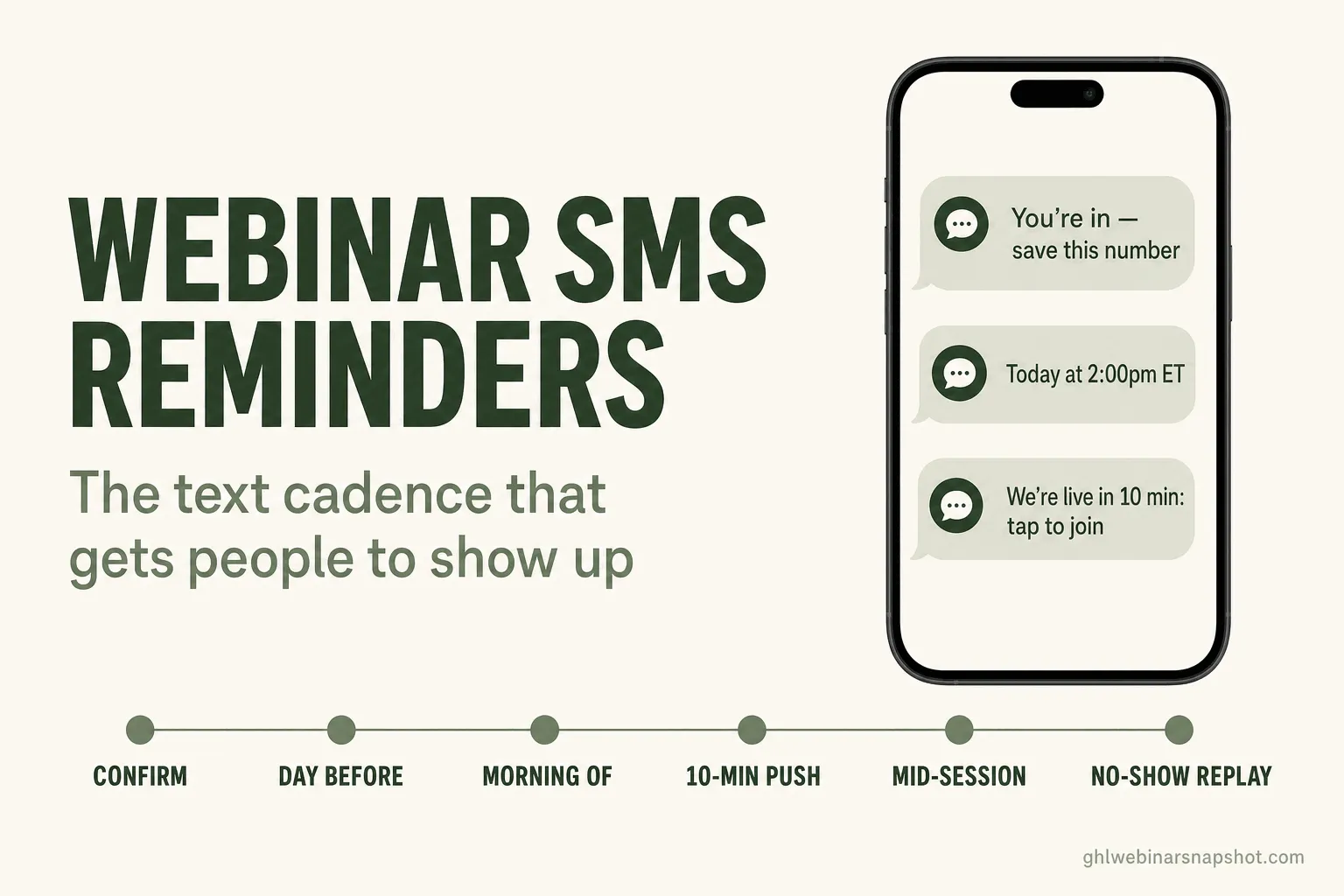
A webinar SMS reminder cadence is a short, timed series of texts that pulls a registrant from “I signed up three weeks ago” to “I’m clicking the link right now.” Six texts do the whole job: an instant confirmation, a day-before nudge, a morning-of note, the ten-minute “we’re live” push that does the heavy lifting, an optional mid-session text, and a no-show text that sends the replay. Email alone leaves money on the table, because a reminder email can sit unopened past your start time while a text gets read in minutes. This guide gives you the exact cadence, the real copy to steal, the way each text quietly fails, three plans by list size, and the TCPA and A2P 10DLC rules you have to clear first.
It is 1:58pm. Your webinar starts at 2:00. The registration report says 412 people signed up. Your live room shows 71. Between the opt-in and the start time, 341 people forgot, got busy, or never saw the email reminder buried under 60 others. That gap is not a content problem. Your webinar is fine. It is a reminder problem, and the cheapest fix is a phone you already have permission to text.
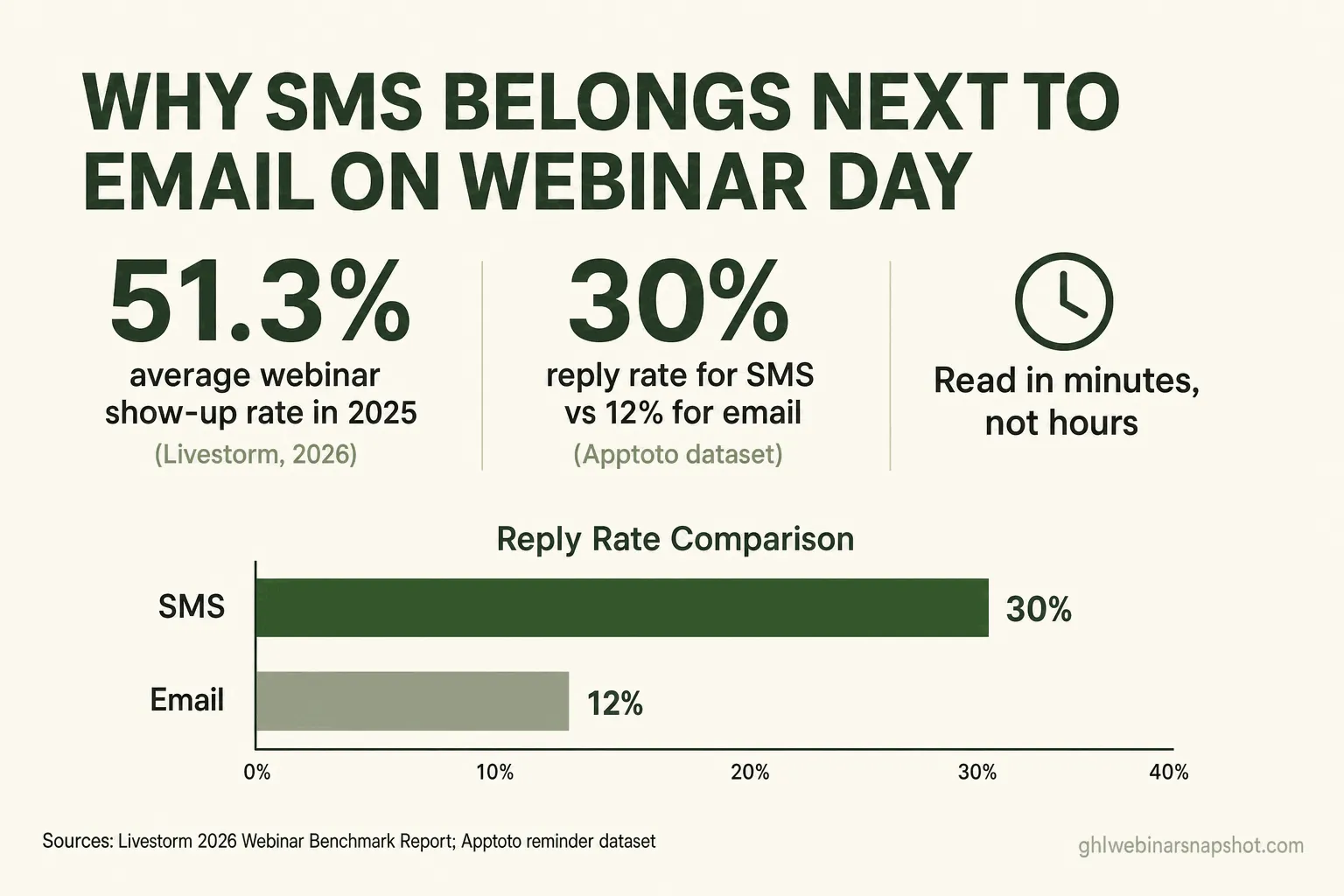
Most operators treat SMS as a nice-to-have bolted onto email. That is backwards. The text layer defends your show-up rate in the last 24 hours, after email has done everything it is going to do. Live webinars averaged a 51.3% attendance rate in 2025, up from 48.9% the year before, across more than seven million registrations. The shops clearing that bar are almost never email-only. They text.
Table of contents
- Why SMS reminders beat email on the last mile
- What a no-show actually costs you
- The six-text cadence, in order
- Text 1: The instant confirmation
- Text 2: The day-before nudge
- Text 3: The morning-of note
- Text 4: The ten-minute “we’re live” push
- Text 5: The mid-session “doors closing” text
- Text 6: The no-show replay text
- Three plans by list size
- The compliance layer you cannot skip
- Objections, answered
- FAQ
Why SMS reminders beat email on the last mile
SMS wins the last 24 hours before a webinar because it gets read when it lands, and email does not. This is not an argument that texting beats email in general. Email is still where you sell the registration, send the confirmation and calendar invite, and run the multi-day nurture, covered in full in the webinar email sequence guide. But in the final stretch the job changes. You are not persuading anyone. They already said yes. You are interrupting a busy person at 1:50pm to say “it is starting, here is the link.” That is a text’s job, not an email’s.
The numbers back the split. In a dataset of roughly 178,000 appointment-reminder messages compiled by the scheduling vendor Apptoto, SMS was replied to 30% of the time while email managed 12%. The same analysis found the best result came from sending a text and an email together, not choosing one. That is the whole strategy in one line: email for depth, SMS for speed, both firing on the day.
What each channel is actually good at on webinar day
| Feature | SMS reminder | Email reminder |
|---|---|---|
| Read speed | Minutes, usually on the lock screen | Whenever they next open their inbox |
| Best job | Last 24 hours and the go-live push | Confirmation, calendar invite, long nurture |
| Character budget | Tight, one idea, one link | Room for detail, images, multiple links |
| Deliverability gate | A2P 10DLC registration + consent | Domain auth (SPF/DKIM/DMARC) + list hygiene |
| Cost per message | Fractions of a cent per segment | Effectively free at list scale |
| Fails when | You skip consent or over-text | It lands in Promotions and nobody opens it |
The takeaway is not “replace your emails.” It is “stop relying on email for the one moment it is worst at.” A reminder email sent at 1:45pm for a 2:00pm webinar is a coin flip on whether it gets seen in time. A text sent at 1:50pm is read before 1:52.
What a no-show actually costs you
A no-show is a lead you already paid to acquire, walking out at the most expensive possible moment: after the ad spend, after the opt-in, right before the pitch. Run the math and the reminder layer stops looking optional.
Say you drive 400 registrations. At a 30% show-up rate, 120 attend. Lift that to 50% with a tighter cadence and 200 attend. Those 80 extra attendees cost you nothing new; you already paid for them at registration. If even one in forty books a call on a high-ticket offer, the reminder cadence paid for a year of SMS credits in one afternoon.
That is the frame for everything below. You are not building a texting program for its own sake. You are plugging the single biggest leak in a webinar funnel, which is the stretch between “registered” and “in the room.”
The six-text cadence, in order
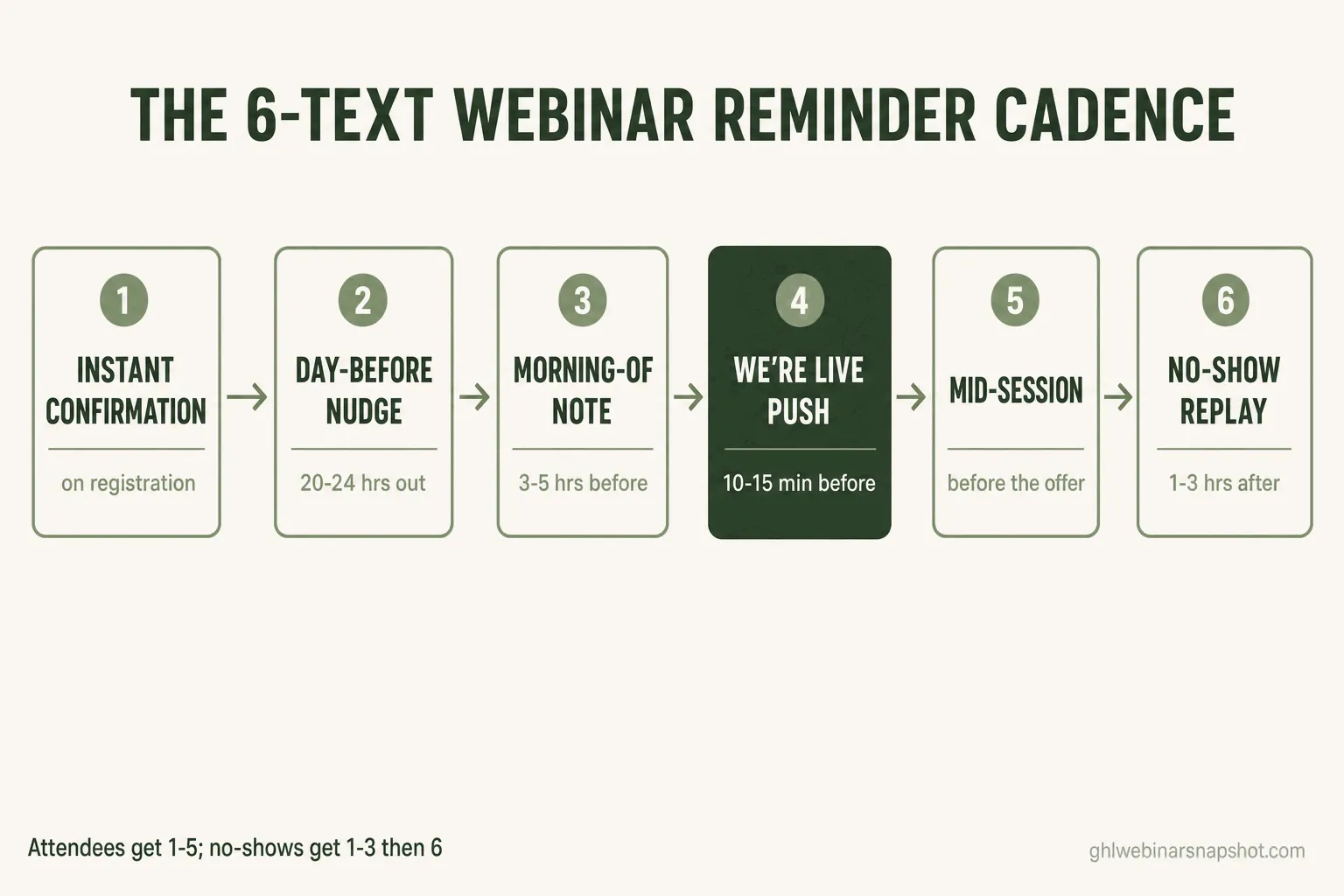
Here is the whole sequence before we take each one apart. Six texts, each with one job.
- Instant confirmation fires the second someone registers. It confirms, sets the time in their words, and asks them to save the number.
- Day-before nudge lands about 24 hours out. It reminds and raises anticipation with one concrete reason to show.
- Morning-of note goes out the morning of a live session, or for evergreen, a few hours before their chosen slot.
- The ten-minute “we’re live” push is the money text. It fires ten to fifteen minutes before start with the live link.
- The mid-session “doors closing” text is optional and fires during the webinar, timed to the offer or the Q&A.
- The no-show replay text goes to anyone who registered but never joined, with the replay link and a short window.
Attendees get texts 1 through 5. No-shows get 1 through 3, then 6. The branching happens on attendance, which means your system has to know who actually showed, a point we come back to in the compliance and tooling notes.
Text 1: The instant confirmation
The job: confirm the registration in the first minute, while intent is at its peak, and get your number saved as a contact so the later texts are not from a stranger.
Timing: immediately on registration. Not an hour later. The confirmation text should beat the confirmation email to the phone.
Steal this copy:
How it breaks: the common failure is no opt-out language and no clear sender. A text from an unknown number that does not say who it is reads as spam and trains the reader to ignore your later texts. The second failure is stuffing it with links. This text’s only job is “save the number.”
Text 2: The day-before nudge
The job: resurface the webinar about 24 hours out, when it has fallen off the reader’s radar, and give them one concrete reason to block the time.
Timing: 20 to 24 hours before start. For an evergreen webinar, 24 hours before the slot they picked.
Steal this copy:
How it breaks: the day-before text fails when it is generic. “Reminder: your webinar is tomorrow” earns nothing. Name the one thing they will get. The other failure is sending the live link now. Hand it over 24 hours early and people click it, find a dead page, and never come back. Hold the link for the push text.
Text 3: The morning-of note
The job: put the webinar on today’s list. This is the text that moves a registrant from “sometime this week” to “this afternoon.”
Timing: the morning of a live session, roughly three to five hours before start. For evergreen, two to three hours before the chosen slot.
Steal this copy:
How it breaks: operators skip this one to “avoid over-texting,” then wonder why the push text underperforms. The morning note is what makes the push expected instead of a surprise. Its other failure is a missing time zone. If your list is national, state the zone every time. “2pm” with no zone is the fastest way to lose a West Coast registrant.
Text 4: The ten-minute “we’re live” push
The job: deliver the join link at the moment it is most clickable, when the reader can act on it right now. This is the text that moves the number most.
Timing: 10 to 15 minutes before start for live. For evergreen, right at the top of the chosen slot, or a few minutes before.
Steal this copy:
How it breaks: two ways. First, sent too early. A link 40 minutes out gets clicked, the person sees a countdown, closes the tab, and forgets. Ten to fifteen minutes is the window where “I’ll click it” and “I’m here” are the same action. Second, clutter. The push text is one sentence and one link. No agenda recap, no second link to the slides. Every extra word is a reason to put the phone down before tapping.
If you want this cadence running without hand-building every trigger, tag branch, and opt-out path, that is exactly what our done-for-you system installs: the full reminder sequence, the attendance tagging that sorts attendees from no-shows, and the booking flow, loaded into your GoHighLevel account.
Text 5: The mid-session “doors closing” text
The job: pull back the people who joined, drifted, and tabbed away before the part that matters. This text is optional, and it is powerful when the drop-off before your offer is a known problem.
Timing: during the webinar, fired a few minutes before the offer or the Q&A, to attendees only.
Steal this copy:
How it breaks: it fails hard if it goes to no-shows, because it tells people to “jump back in” to something they never joined. That makes attendance tagging non-negotiable: the system has to know, in real time, who is in the room. The second failure is timing it to the clock instead of the content. Fire it when you are genuinely about to deliver the thing. If attendees keep leaving right before your pitch, the deeper fix is the transition itself, covered in why attendees drop off before the offer.
Text 6: The no-show replay text
The job: recover the registrants who never showed by handing them the replay with a reason to watch now, not someday.
Timing: one to three hours after the webinar ends, to registrants tagged as no-shows.
Steal this copy:
How it breaks: it fails when it has no deadline. “Here’s the replay” with an open-ended link gets saved for never. A real window, even a soft one, drives the watch. The other failure is sending it to people who did attend, which reads as “were you even paying attention.” Again, an attendance-tagging problem, not a copy one. The full recovery sequence is its own playbook, in webinar no-show recovery.
A note that applies to all six texts: the link in every push should carry your tracking so a booked call traces back to the channel that delivered it. If you cannot tell whether SMS or email drove a given booking, you are flying blind on where to spend. The multi-touch attribution guide covers how to wire that up.
Three plans by list size
The cadence is the same for everyone. What changes is how much of it you run, how you handle time zones, and where the cost lives. Here is how it plays out at three sizes.
Solo coach, list under 1,000. Run all six texts. The volume is tiny, so cost is a rounding error and the attention is personal. Write in your own voice and use the first name. You will likely register a Sole Proprietor brand for A2P rather than a full business brand, with lower throughput limits that are fine at your volume. The whole cadence can live inside one platform that owns registration, the CRM, the texts, and the calendar, which is the simplest build with the fewest gaps. GoHighLevel bundles the funnel, SMS, and booking in one place and starts at $97/mo. Affiliate link: we may earn a commission if you start GoHighLevel through it, at no extra cost to you.
Mid-size course seller, list 1,000 to 10,000. Run all six, and get serious about time zones and throughput. Your list now spans the country, so the morning-of and push texts should send in each reader’s local zone, which means storing a time zone per contact. You will register a standard business brand on A2P 10DLC for the throughput to text a few thousand people in a ten-minute window. Watch that number: if you have 4,000 attendees and your number sends 10 texts a second, the last person gets the “we’re live” push well after you have started.
B2B team, list 10,000 plus. The cadence holds, but now it is an operations problem. You need a dedicated A2P campaign with high throughput, a provider that can fan out the push text fast, and tight list hygiene so dead numbers do not tank your deliverability. Consent is also a sales-ops liability here, so the opt-in has to be clean, logged, and auditable per contact. The reminder layer sits inside a larger stack, covered in the webinar tech stack guide. B2B teams care most about tying texts to pipeline, because one closed contract dwarfs the entire SMS bill.
The compliance layer you cannot skip
Texting registrants is regulated, and the rules are not optional. Clear them before your first reminder sends, or carriers block you and you expose yourself to real legal risk. This is the part operators most want to skip and least can afford to.
TCPA. The Telephone Consumer Protection Act governs texts the same way it governs calls. Marketing messages require prior express written consent; informational ones require prior express consent. A reminder to someone who opted in to that webinar is on solid footing; the same text blasted to a purchased list is not. The FCC’s TCPA framework is the authority, and the safe posture is simple: only text people who gave you their number for this, keep a record of when and how, and honor STOP instantly.
The one-to-one consent rule that is not in effect. You may have read that an FCC “one-to-one consent” rule was coming to change how webinar and lead forms collect consent. It was vacated. In January 2025 the Eleventh Circuit struck it down on the eve of its effective date, holding the FCC had overstepped its authority, and the FCC later removed the text from its rules. So the stricter standard is not law right now. What did not change: you still need genuine prior express written consent for marketing texts, and state consent laws still apply. Do not relax your opt-in because a headline said a rule died. The floor is still a real, documented yes.
A2P 10DLC registration. Separate from consent is the carrier question. Since early 2025, US carriers block application-to-person texts from unregistered 10-digit numbers. You register through The Campaign Registry in two parts: a Brand that says who is sending, and a Campaign that says what you send and how people opted in. Twilio’s A2P guidance is blunt that a weak opt-in description is the top cause of rejection. Your Campaign needs a real consent path, your site needs a visible privacy policy stating opted-in phone data is not sold, and your texts need “Msg & data rates may apply” and “Reply STOP to cancel.” Register first, because approval can take one to three weeks.
For the full walkthrough of consent capture, opt-out handling, and A2P setup specific to webinars, we have a dedicated primer: SMS reminder compliance for webinars. Read it before you send. None of this is legal advice, and a short consult with a lawyer who knows TCPA is cheap next to a class action.
Objections, answered
“Won’t the texts annoy people and get me opt-outs?” Some people will opt out, and that is the system working. Someone who replies STOP to a webinar reminder was never going to show. The ones who stay want the link on their phone. Annoyance comes from volume and vagueness, not from texting itself. Six specific, well-timed texts is not spam. Sixteen texts, or one generic “don’t forget” a day for a week, is. Respect the cadence and the opt-out rate stays low.
“I already send email reminders. Do I really need SMS too?” You need both, doing different jobs. Email is where the registration, the calendar invite, and the long nurture live. SMS is where the last-24-hours defense lives. The data on channel speed is consistent: texts get read and replied to far faster than email, which is exactly what you want in the ten minutes before you go live. Running SMS does not replace a single email. It plugs the one gap email cannot cover, which is the real-time “we’re starting now” moment.
“Do I need to be technical to set this up?” No, but the plumbing has to be right. The texts are easy. The hard part is the branching: the system has to tag who attended versus who no-showed, so text 5 goes to attendees and text 6 to no-shows, and log consent per contact for compliance. That logic is fiddly to hand-build and easy to get subtly wrong, which is why operators buy a pre-built system instead of wiring triggers one at a time.
“What about the cost per text?” It is tiny, and it is the wrong thing to optimize. Each message segment costs a fraction of a cent. Six texts to 400 registrants is a few dollars. Weigh that against even one booked call from a high-ticket offer and the cost question answers itself. The expensive number in a webinar funnel is the no-show, not the text that prevents it.
FAQ
How many text reminders should I send before a webinar?
Six across the whole lifecycle: an instant confirmation at registration, a day-before nudge, a morning-of note, the ten-minute we're-live push, an optional mid-session text to attendees, and a no-show replay text afterward. Attendees get up to five; no-shows get the first three plus the replay text.
When should the we're-live link text go out?
Ten to fifteen minutes before start for a live webinar, right at the top of the chosen slot for evergreen. Earlier than that and people click, see a countdown, and forget. That window is where tapping the link and joining are the same action.
Do I need legal consent to text webinar registrants?
Yes. Under the TCPA, marketing texts require prior express written consent. A reminder to someone who opted in to that specific webinar with a clear consent checkbox is on solid ground. Texting a list that never opted in is not. Keep a record of consent and honor STOP instantly.
What is A2P 10DLC and do I have to register?
A2P 10DLC is the carrier framework for business texting from standard 10-digit numbers. Since early 2025, US carriers block texts from unregistered numbers, so yes, you register a Brand and a Campaign through The Campaign Registry before sending. Approval can take one to three weeks, so start early.
Is the FCC one-to-one consent rule something I need to follow?
No. The Eleventh Circuit vacated the one-to-one consent rule in January 2025 and the FCC removed it from the rules, so it is not in effect. The baseline TCPA requirement for genuine prior express written consent still applies, as do state consent laws, so your opt-in still has to be real and documented.
Should I send SMS instead of email reminders?
No, run both. Email handles confirmation, the calendar invite, and the long nurture. SMS handles the last 24 hours and the go-live moment, where it gets read in minutes. In reminder datasets, texts are replied to far more often than email, so the two together beat either one alone.
How do I make sure the mid-session and no-show texts go to the right people?
You need attendance tagging. The system has to know in real time who joined the room and who did not, then branch the cadence on that tag. Without it, the mid-session text tells no-shows to rejoin something they never attended, and the replay text tells attendees they were missed.
The webinar is never the weak link. The ninety seconds between “it’s starting” and “I’m in the room” is. Get six short texts timed right, keep the consent clean, and you stop paying for registrations that never become attendees. Back at 1:58pm with 412 registered: the shop that texts does not watch 71 people show. It watches the room fill while the link is still warm on everyone’s phone.