
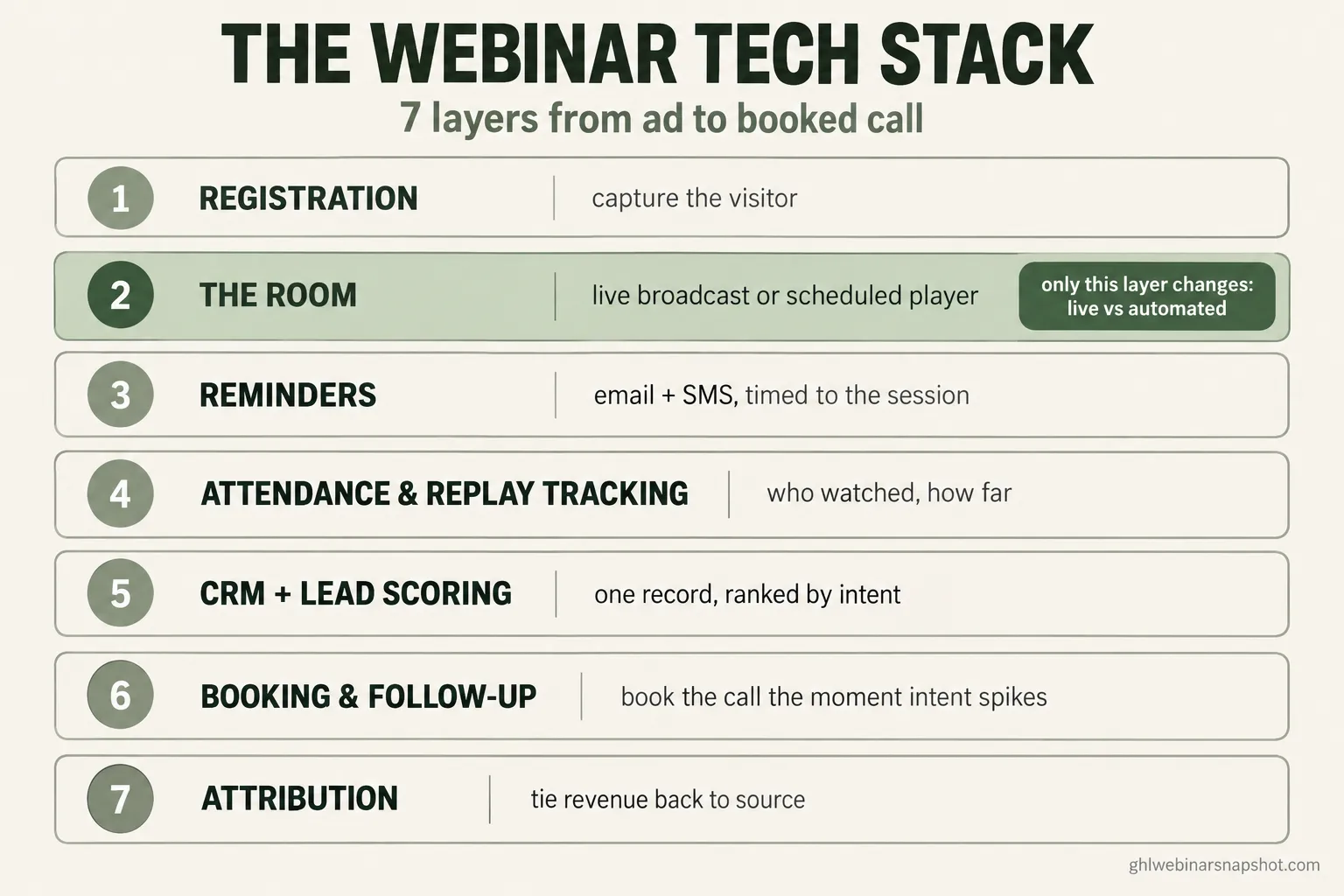
A webinar tech stack is the set of tools that carries a stranger from your ad to a booked sales call: a registration page, the room the webinar plays in, the email and SMS reminders that get people to show up, attendance and replay tracking, a CRM that tags and scores each person, a booking and follow-up flow, and attribution that ties a closed deal back to the source. Live and automated webinars need the same seven layers. The difference is the middle one. Live needs a broadcast room with real-time chat; automated needs a scheduled player. Everything wrapped around that room, the reminders, the tracking, the booking, and the attribution, is identical, and it is where most of the money leaks. This guide walks all seven layers, names the real 2026 tools and prices at each, shows how each one breaks, and gives you three build plans by team size.
Here is the scene that starts most stack conversations. You are paying for a webinar platform, a separate email tool, a scheduling link, a spreadsheet where you paste the attendance CSV after every session, and maybe a Zapier plan holding it all together with tape. A registrant signs up, the confirmation fires from one tool, the reminders from another, the replay link from a third, and the booking from a fourth. Nothing talks to anything else, so you cannot tell who watched to the offer and never booked. That person is the hottest lead you have, and your stack loses them in the gap between two apps.
That gap is the real subject here. Not “which webinar software is best,” but which layers you need, what to run at each one, and where the leaks are. Get the layers right and a modest tool set outperforms an expensive one that is wired wrong.
Table of contents
- What a webinar tech stack actually is
- What a duct-taped stack costs you
- The seven layers, in order
- Layer 1: The registration page
- Layer 2: The room, live broadcast vs scheduled player
- Layer 3: Reminders by email and SMS
- Layer 4: Attendance and replay tracking
- Layer 5: CRM, tagging, and lead scoring
- Layer 6: Booking and follow-up
- Layer 7: Attribution and reporting
- Stitch it together or run it on one platform?
- Three build plans: solo, mid-size, B2B team
- The compliance layer you cannot skip
- Objections, answered
- FAQ
What a webinar tech stack actually is
A webinar tech stack is every tool a registrant touches on the way from your ad to a booked call, grouped into seven jobs: capture, deliver, remind, track, organize, convert, and measure. People collapse the whole thing into “what webinar software should I use,” but the software you present the webinar in only does one of those seven jobs. It runs the room. The other six decide whether anyone shows up, whether you know who they are, and whether the ones who lean in ever get a call on the calendar.
The reason this matters is that webinars are still one of the channels that works. In the 2026 B2B content research, 52% of marketers named webinars among their most effective content types for thought leadership. A working stack is what turns that effectiveness into pipeline instead of a folder of recordings nobody follows up on.
The good news for anyone dreading a rebuild: live and automated webinars use the same seven layers. Only the room changes. That means the decision “should I go evergreen” is not a stack rebuild, it is a swap of one layer. We cover the strategy of that choice in live versus evergreen webinars; this guide is the plumbing underneath both.
What a duct-taped stack costs you
The cost of a stitched-together stack is not the subscription fees. It is the people who fall through the seams. Run 1,000 registration-page visitors through a typical duct-taped stack and a wired one, and the difference is not the room, it is the handoffs.
Nearly three times the booked calls from the same traffic and the same recording. Nothing about the content changed. The wired stack simply stopped losing people in the gaps: it reminded by SMS as well as email, it tracked who watched to the offer, and it opened a calendar the moment intent spiked instead of the next morning. That is the entire argument for treating your stack as seven connected layers instead of a pile of subscriptions.
The seven layers, in order
Every webinar stack does these seven jobs. Skip a layer and the funnel leaks there.
- Registration. The page that turns a visitor into a known contact with an email and, ideally, a phone.
- The room. Where the webinar plays. Live broadcast for a real event, scheduled player for automated.
- Reminders. Email plus SMS, timed to the session, ending with a “we’re live now” push.
- Attendance and replay tracking. Who showed, who left, who watched the replay and how far.
- CRM, tagging, and lead scoring. The database that remembers every behavior and ranks intent.
- Booking and follow-up. The calendar and the sequences that turn intent into a call on the books.
- Attribution and reporting. Tying booked calls and closed revenue back to the source that started it.
The rest of this guide takes each layer in turn: what it does, what to run for live versus automated, the real tools and prices, and the failure mode that quietly kills that layer.
Layer 1: The registration page
The job: capture a visitor as a known contact. Name and email at minimum, plus a phone field if, and only if, you will actually send SMS with consent.
Live vs automated: almost identical. A live page sells a specific date and time. An automated page sells a session “starting in 12 minutes” or a few fixed times today. The form and the promise are the same; only the scheduling widget changes.
Tools and prices: most webinar platforms ship a built-in registration page (Demio, Livestorm, eWebinar all do). The trade-off is that a platform page is hard to customize and lives on their domain. A dedicated funnel builder or a page inside your CRM gives you speed, branding, and, crucially, a form that writes straight into the database that runs the rest of the stack. GoHighLevel, for example, starts at $97/mo and includes unlimited funnel pages plus the CRM behind them.
How it breaks: the classic failure is a slow, generic page that opts in 15% when a focused one would do 30%, so you pay for twice the traffic to hit the same number. The second failure is collecting a phone number and then never texting, which costs you form conversions for no benefit. If you take the phone, use it, with consent. The full teardown is in our webinar registration page guide.
Layer 2: The room, live broadcast vs scheduled player
The job: present the webinar. This is the one layer where live and automated genuinely diverge, and it is the layer everyone over-weights when they shop for “webinar software.”
Live broadcast tools: for a real, one-time event you need a broadcast room with live chat and Q&A.
Live webinar rooms: the honest 2026 rundown
| Feature | Best for coaches / creators | Best for B2B / larger events |
|---|---|---|
| Transparent pricing | Demio (~$63/mo monthly, $45/mo annual, 50 attendees), Livestorm (free tier, then per-attendee credits) | GoTo Webinar publishes Reach (~$59-69/mo, 500) and Elevate (~$103-129/mo, 1,000); Complete (3,000) and Zoom's larger tiers are quote-only |
| Hidden pricing | Rarely an issue at this size | ON24 and BigMarker publish no price; you learn it on a sales call |
| Feel | Clean, fast, brand-friendly, low learning curve | Heavier, more controls, built for scale and compliance |
| Watch for | Attendee caps and add-on hosts | Annual contracts, per-host pricing, implementation fees |
Automated / evergreen player tools: for a pre-recorded session on a schedule, you want a just-in-time player. eWebinar is purpose-built for this and runs $99 to $299/mo depending on active webinars and registrants. Some operators fake evergreen with an unlisted video and a countdown, which works until the reminder and tracking layers need to know when “the session” started.
Here is the entry monthly list price for the transparent-pricing rooms, so you can see how little the room itself costs at the small end.
Entry monthly list price in USD, month-to-month. Zoom’s figure is a reported entry point; its 500/1,000/3,000 tiers are quote-driven. ON24 and BigMarker publish no price and are quote-only (ON24 lands in five figures per year on third-party marketplaces). Sources: Demio, GoTo, eWebinar pricing pages; Zoom via review aggregators; 2026.
How it breaks: the biggest waste in the whole stack is buying the most expensive room and skipping the six layers around it. A Demio Premium seat (reported around $196/mo per host) or a five-figure ON24 contract does not book a single call on its own. The room is necessary and roughly 20% of the result. The other failure is choosing pure on-demand (“watch anytime”) and calling it evergreen, which kills the start-time urgency your reminders depend on. For the tool-by-tool view aimed at coaches, see the best webinar software for coaches, and for the full cost picture, what webinar software actually costs in 2026.
Layer 3: Reminders by email and SMS
The job: get registered people to actually show up. This is the layer with the highest return on the least effort, and it is where email-only stacks quietly bleed attendance.
Live vs automated: same cadence logic, different clock. A live funnel counts down to a fixed date. An automated funnel computes each reminder off the registrant’s chosen session in their time zone. Get the time-zone math wrong on automated and your “we’re live now” text lands three hours late.
Two facts set the strategy. Most registrations arrive late, so people sign up with thin commitment. And the channel decides whether the reminder is even seen: texts are read within three minutes about 90% of the time, while a reminder email can sit unopened until after your session ends. That is why SMS on top of email, not email alone, is what pushes show-up rate toward and past the 51.3% live average.
Tools and prices: an email tool alone is not enough here because it cannot text. You need a platform that fires email and SMS off the same registration event and off the same clock. That is a CRM-plus-messaging job, not a webinar-room job. Building the cadence once is what our webinar email sequence walks through end to end.
How it breaks: email-only is the number-one attendance killer, because the live-now moment is never seen in an inbox in time. The second break is reminders that fire off the wrong clock on an automated funnel. The third is texting without consent, which is not a performance problem, it is a legal one (see the compliance layer below).
Affiliate disclosure: the GoHighLevel links above are partner links. If you start GoHighLevel through them we may earn a commission at no extra cost to you, and it unlocks a discount on the snapshot.
Layer 4: Attendance and replay tracking
The job: know exactly what each person did. Showed live, showed and left early, no-showed, watched the replay, watched the replay to the offer. Every one of those is a different follow-up.
Live vs automated: identical need, and both are easy to get wrong. Roughly half of webinar attendees now engage on demand rather than live, per ON24’s benchmarks, so the replay is not a consolation prize, it is a second funnel. A stack that treats the replay as one “here’s the recording” blast throws that half away.
Tools and prices: most webinar rooms report basic attendance (joined, duration). What they usually do not do is push watch-depth back into your CRM as a tag you can act on. That handoff, “watched past the 40-minute offer mark” becoming a tag on the contact record, is the difference between a scoring surface and a dead report. This is why the tracking layer belongs next to your CRM, not stranded in the webinar tool.
How it breaks: the report-that-nobody-reads problem. Attendance data that lives in the webinar platform and never reaches the CRM might as well not exist, because you cannot trigger anything off it. A no-show who watches 40 minutes of the replay is a hotter lead than a live attendee who left after five, and without a replay-tag pipeline that signal is invisible and everyone gets the same email.
Layer 5: CRM, tagging, and lead scoring
The job: the memory of the whole stack. One record per person that accumulates every behavior (registered, attended, watched to the offer, clicked, booked) and turns it into a score you can act on.
Live vs automated: the same, and this is the layer that most stitched-together stacks are missing entirely. If your webinar tool, email tool, and calendar do not write to a shared contact record, you do not have a CRM layer, you have three lists that disagree.
Tools and prices: this is where a general CRM (or a platform that includes one) earns its place. The scoring does not need to be fancy. Attendance, watch depth, offer clicks, and replay behavior feed a simple hot/warm/cold tag for a small operation, or a numeric score for a larger one. The mechanics are in webinar lead scoring.
How it breaks: the fatal version is no shared record at all, so the person who watched to the offer looks identical to the person who never opened an email. The second break is scoring by hand: “check the attendance report and email the good ones tomorrow” loses the speed advantage and does not survive past a few sessions. Scoring only helps if it is automated.
Layer 6: Booking and follow-up
The job: convert intent into a call on the calendar, fast, and then work the people who did not book yet.
Live vs automated: same. The offer appears, and the moment it does, the booking path opens on every channel at once: a link on screen, a message in chat, and, for consented contacts, an SMS with the calendar link.
Why speed is the whole game: the widely cited MIT and InsideSales.com Lead Response Management study found that contacting a lead within five minutes makes you 21 times more likely to qualify it than waiting 30. An evergreen funnel that emails a booking link the next morning has already lost the person who was ready during the pitch.
Real copy for the in-event booking SMS:
Ready to map this to your business? Book your free 20-min
strategy call here: [calendar link]. Slots this week are
limited. Reply STOP to opt out.
Tools and prices: you need a calendar that books in one step (no “someone will reach out”) and sequences that route by behavior. Hot watchers who did not book get the fastest, most personal touch; no-shows get the replay and a re-invite. A booking tool that does not write back to your CRM re-creates the black box you were trying to close. GoHighLevel bundles the calendar, the pipelines, and the sequences; the full flow is in how to book sales calls from webinars and appointment automation.
How it breaks: routing intent into a “we’ll be in touch” holding pattern instead of a live calendar, and running one follow-up sequence for everyone, which under-serves the hot leads and annoys the cold ones. The recovery path for the ones who slipped is in webinar no-show recovery.
Layer 7: Attribution and reporting
The job: tie the booked call and the closed deal back to the source that started the journey, so you know which traffic to feed and which to cut.
Live vs automated: the same, and it matters more for automated because the funnel runs continuously and you are not watching each cohort by hand.
Tools and prices: attribution only works if the source tag rides the contact from the first click all the way to the closed deal, which means it has to live in the same CRM as everything else. Bolt-on analytics that see the ad and the booking page but not the middle will credit the last click every time.
How it breaks: measuring only registrations in and revenue out leaves the six steps between as a black box, so you cannot tell which layer or which source to fix. The other break is vanity attribution: crediting the booking page instead of the ad or post that actually started it. The fix is multi-touch tracking across the whole funnel, laid out in multi-touch attribution for webinars.
Stitch it together or run it on one platform?
You have two honest ways to assemble these seven layers.
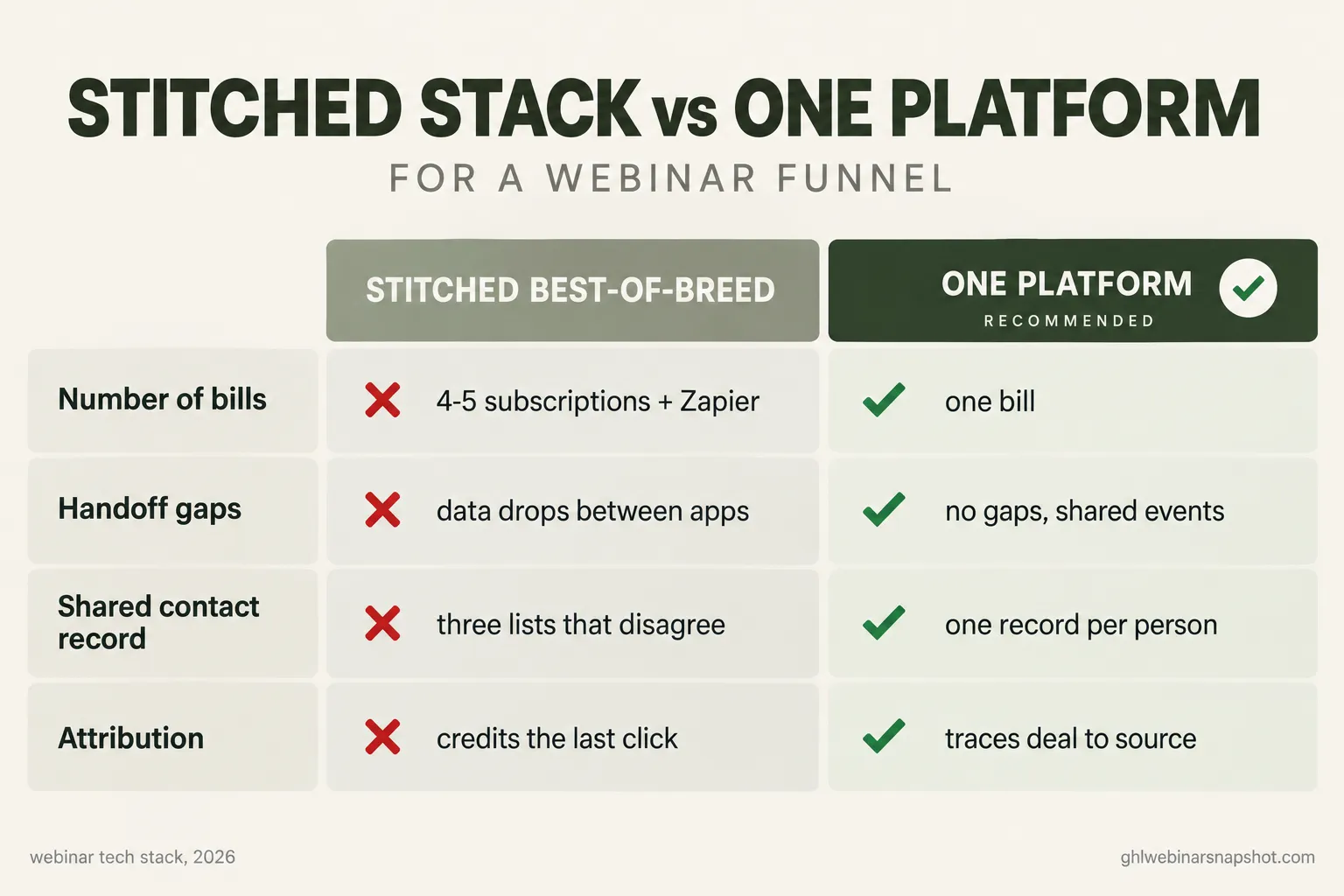
Best-of-breed, stitched. Pick the strongest tool for each job (say Demio for the room, a dedicated email tool, a scheduling app, a CRM) and connect them with an integration layer like Zapier. The upside is you get the best room and the best email tool. The downsides are real: every handoff between apps is a place data can drop, you pay for four or five subscriptions plus the automation tier that glues them, and the attribution is only as good as the weakest connection.
Consolidated, one platform. Run six of the seven layers (everything except the live-broadcast room) on a single platform that shares one contact record. You give up “the absolute best” at any one layer in exchange for zero handoff gaps, one bill, and attribution that works because everything writes to the same database.
How the two approaches actually feel to run
Five subscriptions, a Zapier plan holding it together, attendance pasted from CSVs, and no single view of who watched to the offer. Every new webinar means re-checking that the tape still holds.
One contact record per person, reminders and tracking and booking firing off the same events, attribution that traces a closed deal to its source. New webinars reuse the same wiring.
For most solo operators and small teams, consolidation wins because the failure mode of the stitched stack (leaks between tools) is exactly the thing that costs you booked calls. You can still keep a specialist room you love and run only the funnel layers on one platform. That is the pattern the GHL Webinar Snapshot installs: it wires layers 1 and 3 through 7 as one import, so you point it at whatever room you present in. If you want to see the build-versus-buy math in full, we ran it in snapshot versus DIY.
Three build plans: solo, mid-size, B2B team
The seven layers are the same for everyone. The right configuration is not.
Solo coach or course seller, list under 1,000. Keep it cheap and consolidated. One platform for registration, reminders, CRM, and booking, plus a clean room you already like (Demio at the entry tier, or an evergreen player if you are automating). Lean hard on SMS because your list is small and every show-up matters. Do not over-build scoring; a hot/warm/cold tag is plenty. Your single biggest risk is a passive “watch anytime” link with no reminders, so the registration-plus-reminder layers are 80% of your result. Budget a weekend to wire it once.
Mid-size seller, list 1,000 to 10,000. Now segmentation pays for itself. Run fixed daily sessions if you are evergreen so attendance spreads, and split follow-up by a real lead score. Replay tracking becomes essential because the on-demand audience is a second funnel of its own. Watch your A2P 10DLC throughput: at this volume you need a registered SMS campaign with headroom, or your “we’re live now” texts queue behind your marketing blasts. Attribution matters here because you are likely running paid traffic and need to know which source books calls, not just registrations.
B2B demand-gen team, list 10,000+ or long sales cycle. Fixed sessions read as more credible to a buyer booking around a workday, and the room can justify a heavier platform (Zoom Webinars, GoTo, or an ON24-class tool) for scale and controls. But the offer is usually a demo or a call, not a checkout, so speed-to-lead and the booking-and-confirmation flow are the whole game. Attribution is non-negotiable because you report pipeline to a revenue team, and a registrant who closes 90 days later has to trace back to the webinar. Push the score and the source into your CRM so sales sees context on every call. This is often where the answer is “both”: evergreen for top-of-funnel volume, live for high-intent segments.
The compliance layer you cannot skip
The SMS reminders that make this stack work are also the part with real legal exposure, so treat consent as a first-class feature, not an afterthought.
- TCPA and A2P 10DLC. Texting registrants for marketing in the US is governed by the TCPA and requires a registered A2P 10DLC campaign with documented consent. Collect explicit opt-in at registration with clear language, keep the record, and honor STOP automatically. Because SMS is the highest-impact channel in the stack, this is the compliance step that matters most. The setup is in our TCPA-compliant webinar SMS guide and SMS compliance for webinars.
- CAN-SPAM. Every reminder and follow-up email needs a real physical address and a working one-click unsubscribe. Easy to get right, not optional.
- Recording and consent. If a live session captures attendee audio or video (webcam Q&A, for instance), two-party consent recording laws in states like California, Florida, Pennsylvania, and Illinois can apply. Most pre-recorded evergreen funnels avoid this, but check before you enable any live capture.
- Earnings claims. If you show income or results, the FTC Business Opportunity Rule (16 CFR 437) requires substantiation. Keep proof documented and claims honest.
Consent and opt-out logic are set-once automations. Build them into the stack from the start and they run themselves.
Objections, answered
“Can’t I just use one webinar platform and be done?” A webinar platform runs the room, which is one layer of seven. It will not text your registrants off the right clock, score them by watch depth, book them into a live calendar the second the offer lands, or trace a closed deal to its source. You either add tools around it or run those layers on a platform that includes them. What you cannot do is skip them and expect the room to book calls.
“I already pay for Demio / Zoom / eWebinar. Do I scrap it?” No. Keep the room if it serves you. Those tools are strong at delivery and, for eWebinar, at just-in-time scheduling. What most of them do not own is your CRM, your scoring, your cross-channel follow-up, and your attribution. Run the room where you like it and run the funnel layers on one platform beside it.
“Isn’t consolidating onto one platform just settling for worse tools?” At any single layer, maybe slightly. Across the whole funnel, no, because the thing that actually costs you booked calls is the gap between tools, not the quality of any one tool. A slightly-less-slick email builder that shares a contact record with your room and your calendar beats a best-in-class email tool that cannot see who watched to the offer.
“Do I need to be technical to build this?” No, but you need a plan and the right platform. The seven layers are conceptually simple; the work is in the wiring, especially the time-zone-aware reminders and the consent handling. You can build it in GoHighLevel over a weekend, or import a pre-built system and skip the wiring. Either way, the concepts above are what you are assembling.
FAQ
Webinar tech stack FAQ
What is a webinar tech stack?
It is the full set of tools that carries a registrant from your ad to a booked sales call, grouped into seven jobs: a registration page, the room the webinar plays in, email and SMS reminders, attendance and replay tracking, a CRM that tags and scores each person, a booking and follow-up flow, and attribution that ties revenue back to the source. The webinar platform itself only handles the room; the other six layers decide whether anyone shows up and whether the hot leads ever get a call.
Do live and automated webinars need different tech stacks?
They share six of the seven layers. Only the room differs: live needs a broadcast tool with real-time chat, while automated needs a scheduled or just-in-time player. Registration, reminders, tracking, CRM, booking, and attribution are identical, so moving from live to evergreen is mostly a room swap, not a stack rebuild.
How much does a webinar tech stack cost in 2026?
The room ranges from free tiers (Livestorm) and roughly $63/mo month-to-month for Demio, up to $99 to $299/mo for eWebinar's evergreen tiers, to undisclosed five-figure ON24 and BigMarker contracts you only learn on a sales call. The funnel layers around the room can run on a single platform such as GoHighLevel starting at $97/mo, or as several stitched subscriptions plus an automation tool, which usually costs more once you add it all up.
Should I stitch best-of-breed tools together or use one platform?
Stitching gets you the best tool at each layer but introduces a data-drop risk at every handoff and multiple bills plus an automation layer to glue them. One platform gives up a little polish at each layer in exchange for a shared contact record, one bill, and attribution that actually works. For most solo and small teams, consolidation wins because leaks between tools are exactly what costs booked calls.
What is the most common webinar stack mistake?
Overspending on the room and skipping the six layers around it. An expensive broadcast platform does not book a single call on its own. The room is about 20% of the result; reminders, tracking, scoring, instant booking, and attribution are the other 80%, and they are where a duct-taped stack loses its hottest leads.
Is SMS legal for webinar reminders?
Yes, with consent. Texting registrants for marketing in the US is governed by the TCPA and requires a registered A2P 10DLC campaign with documented opt-in. Collect explicit consent at registration, honor STOP automatically, and keep the record. SMS is the highest-impact channel in the stack because texts are read almost immediately, so it is worth setting up correctly rather than skipping.
If you want the funnel layers built for you instead of wired by hand, the GHL Webinar Snapshot installs registration, reminders, tracking, scoring, booking, and attribution as one import, with TCPA and A2P handled from the start. Point it at whatever room you present in.
About the author: Derek Haywood, GHL Automation Engineer (Denver, CO). Derek is the person operators call when a workflow “just isn’t firing.” A former B2B SaaS sales engineer, he moved into GoHighLevel implementation and now obsesses over the plumbing behind webinar funnels: tags, triggers, lead scoring, and the replay-tag pipelines that surface buyers without manual CSV scrubbing. He has a low tolerance for broken automations and an even lower one for vague compliance hand-waving.
Related posts: Live versus evergreen webinars · What webinar software actually costs in 2026 · The best webinar software for coaches · The webinar email sequence · Webinar lead scoring · Multi-touch attribution for webinars