
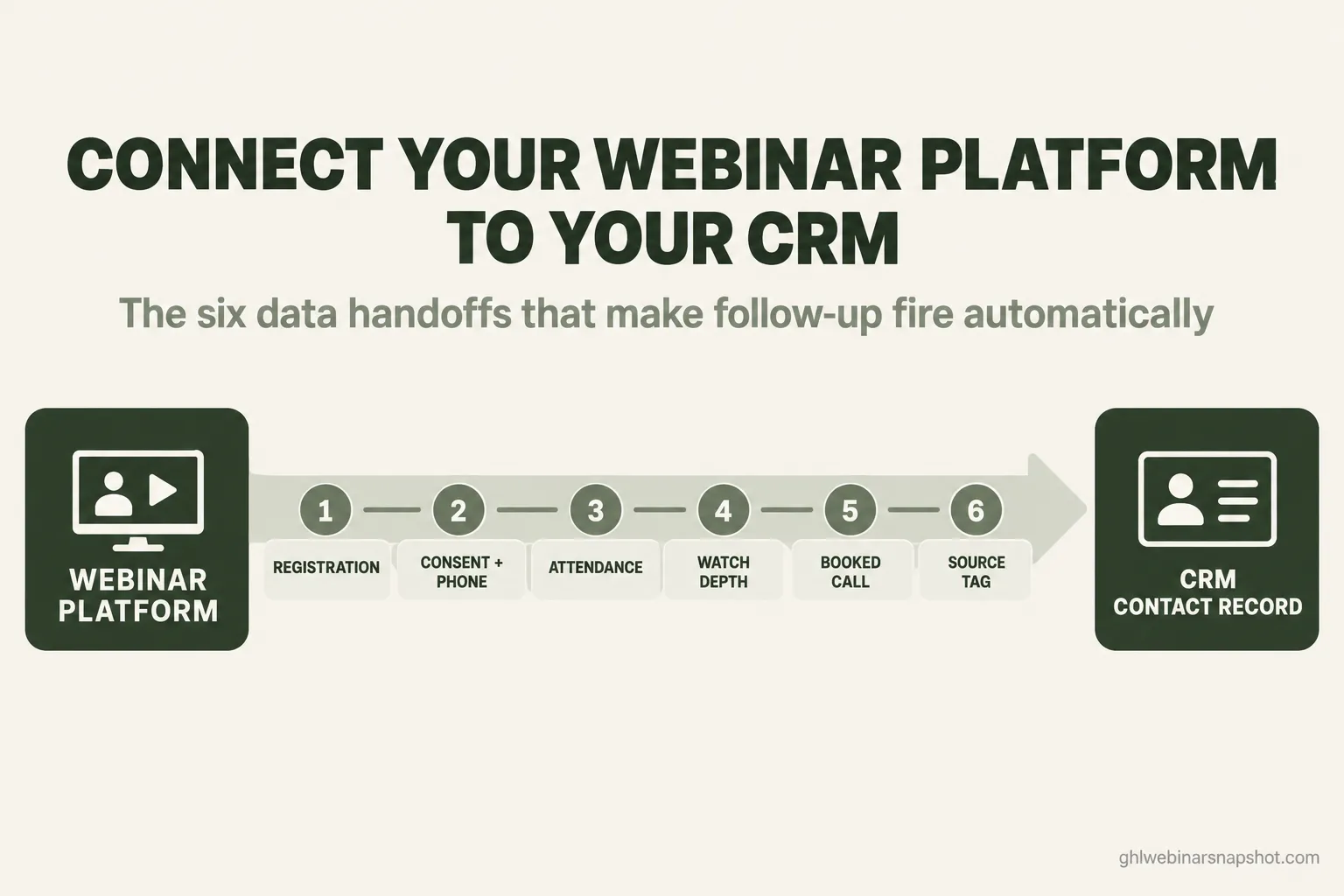
To connect your webinar platform to your CRM, you move six pieces of data across the gap between them: the registration, the consent and phone number, who actually attended, how far each person watched, the booked call, and the source that started the whole thing. Most operators wire the first one and stop. The registration lands in the CRM, a contact gets created, and everyone feels integrated. Then the webinar ends and the real data, who showed, who left early, who watched to the offer and never booked, stays trapped in the webinar tool where no automation can reach it. This guide walks all six handoffs in order, names the real way to move each one (native integration, Zapier, or a direct webhook), shows the exact fields and tags to map, and flags the failure mode that quietly breaks each step.
Here is the moment this always falls apart. You run a good webinar on Zoom or Demio. Two hundred people registered, ninety showed, and a dozen watched all the way to the pitch. You know that because you are staring at the attendance report inside the webinar tool. Now you want to send the twelve hot watchers a booking link within the hour and drop the no-shows into a replay sequence. But your CRM has no idea any of this happened. It knows two hundred people registered, and that is all it knows. So you export a CSV, sort it by hand, and by the time you have tagged everyone it is tomorrow and the moment is gone.
That gap between the webinar tool and the CRM is where the money leaks. Not the room, not the slides, the handoff. This piece is the plumbing: what has to flow, how to make it flow, and where it jams.
Table of contents
- What “connect to your CRM” actually means
- The three ways to move the data
- Handoff 1: The registration
- Handoff 2: Consent and the phone number
- Handoff 3: Attendance, the one everyone drops
- Handoff 4: Watch depth and engagement
- Handoff 5: The booked call
- Handoff 6: The source tag
- Steal this: the tag taxonomy and field map
- Three build plans: solo, mid-size, B2B
- The compliance layer that rides with the data
- Objections, answered
- FAQ
What “connect to your CRM” actually means
Connecting a webinar platform to a CRM means making six specific pieces of data flow from the tool where the webinar runs into the database where your automations live, so that each one can trigger a message, a tag, or a task without a human touching a spreadsheet. The phrase “we integrated Zoom with HubSpot” usually means one of those six is flowing. The registration. That is the easy one, and it is the one every native connector ships first.
The problem is that a registration is the least useful piece of the set. It tells you someone raised a hand. It does not tell you whether they showed, how engaged they were, or whether they are ready for a call. Those signals are generated during and after the event, and they are the ones that decide who gets a booking link and who gets a replay nudge. If your integration stops at the registration, your CRM is running every person down the same path, which is the same as having no integration at all.
This matters more now than it did two years ago because the audience has shifted. Live show-up is drifting down, and the on-demand crowd is growing. When a big slice of your real buyers are watching the replay at 11pm, the only way to know they exist is a replay signal that reaches the CRM. The webinar tool saw it. Your follow-up engine did not. That is the gap this guide closes. If you want the wider picture of where all these tools sit, we mapped the whole webinar tech stack separately; this is the wiring between two of its layers.
The three ways to move the data
Before the handoffs, pick your method. There are three, and you will probably use more than one.
Native integration. The webinar tool has a prebuilt connector to your CRM. You authenticate once, pick a few mappings, done. Demio, for example, has a direct Salesforce integration that syncs each person’s status, including whether they registered, attended, or registered and did not attend, and logs it as a timeline event. The upside is you do not maintain it. The downside is you get only the fields the vendor decided to pass, and those are often just name, email, and a coarse attended or not flag. If that is all you need, it is the fastest path.
Zapier or Make. A middle layer catches an event from the webinar tool (“new registration,” “webinar ended”) and writes it into your CRM. This is the flexible option: you choose exactly which fields map where and you can transform data in between. The cost is real, though. Zapier’s free tier caps at 100 tasks a month and paid plans start around $20 a month, and every registrant who fires a multi-step Zap burns multiple tasks, so a busy funnel climbs tiers fast. It is also one more service that can silently stop firing.
Pick your glue layer with the ongoing bill in mind, not just the setup.
Approximate monthly USD. Zapier Free is 100 tasks; paid starts near $20/mo (750 tasks) and the Team tier near $69/mo (annual). A one-platform CRM like GoHighLevel folds the glue into the $97/mo base so there is no separate task bill. Sources: zapier.com/pricing, gohighlevel.com/pricing, 2026.
Direct webhook or API. The webinar tool sends a raw event to a URL you control, or your system pulls data from the webinar tool’s API on a schedule. This is the most control and the most reliable at volume, but it needs a CRM that can receive a webhook and act on it. GoHighLevel does this with an inbound webhook trigger that starts a workflow: it hands you a unique endpoint URL, you point the webinar tool or your funnel at it, and a Create or Update Contact action maps the incoming fields onto the record. No task meter, no middle service.
The honest rule: use the native integration if it carries the fields you need, reach for Zapier when it does not, and move to a direct webhook once your volume makes the task bill or the reliability risk hurt.
Handoff 1: The registration
The data: name, email, the session they picked, and the time zone.
How to move it: this is the one native connectors and funnel forms handle well. The cleanest version skips the webinar tool’s form entirely. Collect the registration on a page inside your CRM, then push the registrant into the webinar platform by API so they get a real join link. That way the contact record is the source of truth from the first second, and the webinar tool is just the room.
The failure mode: a duplicate contact. If registration comes in by email and your CRM matches on email, fine. But if someone registers twice with two addresses, or the webinar tool sends a slightly different field (a phone with formatting, a name in a different case), you get two records for one human and your attendance data later splits across both. Set your CRM to deduplicate on email, and normalize the phone to one format on the way in.
Handoff 2: Consent and the phone number
The data: the phone number and a timestamped record that the person agreed to be texted.
How to move it: capture both on the registration form, in the CRM, with an explicit checkbox and clear language. This is the handoff that native webinar integrations almost never carry, because the webinar tool was not built to hold marketing consent. If you collect the phone in the webinar tool’s form, that consent record often does not travel, and you are left texting people on a number with no proof they said yes.
The failure mode: texting without a consent trail. SMS is the highest-return reminder channel, and it is also the one with legal teeth. If the number and the opt-in do not live together on the CRM contact record, you cannot prove consent and you cannot honor a STOP cleanly. We cover the setup end to end in SMS compliance for webinars; the integration point is simply that consent has to be captured where your sending engine lives, not stranded in the webinar app.
Handoff 3: Attendance, the one everyone drops
The data: did this person join, did they leave early, or did they no-show. This is the handoff that separates a connected stack from a disconnected one, and it is the one most integrations skip.
How to move it: after the session, the webinar tool knows exactly who joined and for how long. Your job is to get that back onto the contact record as a tag. Three realistic paths:
- Native, if it carries status. Demio’s direct CRM syncs do pass attended versus registered-did-not-attend. If your webinar tool and CRM pair offers that, use it.
- Webhook on “webinar ended.” Some platforms fire an event when the session stops. Zoom, for instance, sends a webhook when a webinar starts and stops, which you can use to trigger a pull of the attendee report.
- A scheduled report pull. The most reliable at volume. After the event, call the webinar tool’s participants report endpoint and write a tag per person.
The failure mode: this is where Zoom will bite you, so learn it before you build. Matching a person in the attendee data back to the registrant is not automatic. On Zoom, the meeting participant-joined webhook has no reliable registrant ID, so the standard advice is to match attendees using the participants report rather than the live webhook. Webinars behave better than meetings here, but the report is still the dependable source, and it is only available to account-level apps and only for the last six months. Two more traps: a recurring webinar’s API often returns attendees for the most recent occurrence only, so back-to-back sessions can mis-tag people, and Zoom’s practice session fires the same start and stop webhook as the real one, so filter it out or you will tag a room that had one person in it. Handle pagination too; a large list comes back in pages and a naive pull drops everyone past page one.
Once attendance lands as a tag, the whole engine wakes up. A no-show tag starts a replay sequence. An attended tag starts a thank-you and a next-step. A left-early tag starts a “here is what you missed” nudge. None of that can exist until the status crosses the gap.
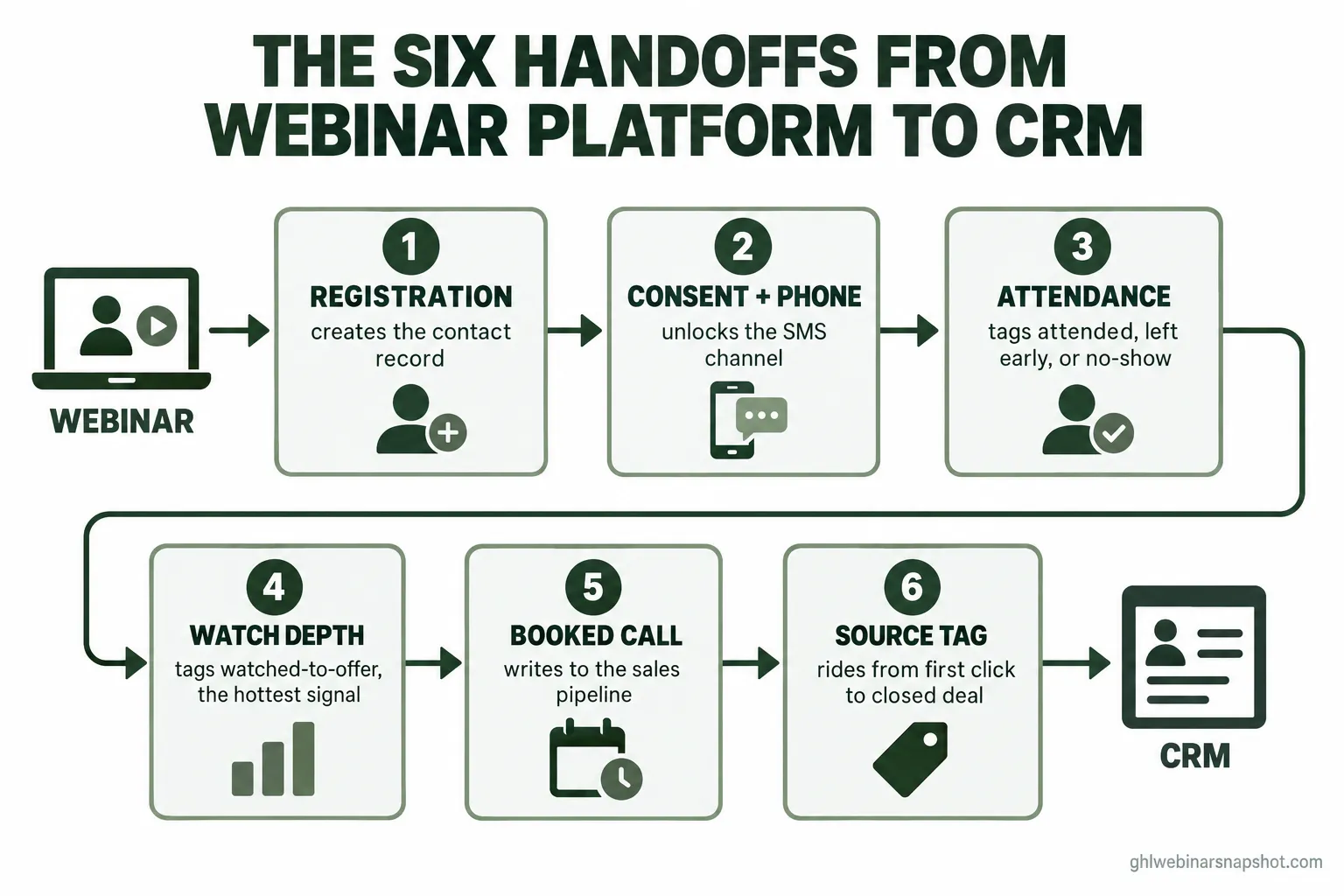
Handoff 4: Watch depth and engagement
The data: how far each person watched, whether they passed the offer, which polls they answered, whether they clicked the on-screen CTA. The behavioral signal that ranks intent.
How to move it: this is the richest handoff and the hardest, because most native connectors do not carry it. Watch depth usually lives only inside the webinar tool. To act on it, you either use a platform whose integration passes a “watched past X minutes” event, or you pull the engagement report after the session and translate it into tags. The signal you care about most is simple: did they watch past the point where you made the offer. That one line, “watched to the offer and did not book,” is the hottest lead in your database.
The failure mode: treating the replay as a single blast instead of a tracked behavior. If everyone who gets the replay email is tagged identically, a no-show who watched forty minutes of the replay looks the same as one who never opened it. The fix is a replay-tag pipeline that watches replay behavior and fires a buying signal when someone crosses the offer mark. With on-demand viewing now a large share of total engagement, this is not a nice-to-have, it is where a growing part of your pipeline is hiding.
Affiliate disclosure: the GoHighLevel links above are partner links. If you start GoHighLevel through them we may earn a commission at no extra cost to you, and it unlocks a discount on the snapshot.
Handoff 5: The booked call
The data: the person booked a call, from which webinar, and into which pipeline stage.
How to move it: the booking tool has to write back to the same contact record, not sit in a separate scheduling app. When the offer lands, the booking path should open everywhere at once: a link on screen, a message in chat, and, for consented contacts, an SMS with the calendar link. The moment someone books, the contact moves to a “call booked” pipeline stage and the hot-watcher sequence stops so you do not keep nudging a person who already said yes.
The failure mode: a scheduling link that does not write to the CRM, so a booked call looks identical to a no-booking and your sequences keep chasing someone who is already on your calendar. The other break is speed. An evergreen funnel that emails a booking link the next morning has already lost the person who was ready during the pitch; the five-minute window is worth 21 times the thirty-minute one. The full flow is in how to book sales calls from webinars.
Handoff 6: The source tag
The data: where this person came from, the ad, the post, the partner email, carried from the first click all the way to the closed deal.
How to move it: set the source as a field on the contact at registration (a hidden field on the form, populated from the URL parameters) and never overwrite it. Every later event, attendance, booking, purchase, attaches to the same record, so the source rides along for free. This is only possible because handoffs one through five already put everything on one record. If your webinar data, your email data, and your booking data live in three systems, the source tag cannot follow the person because there is no single person to follow.
The failure mode: vanity attribution. Bolt-on analytics that see the ad and the booking page but not the middle credit the last click every time, so your best-performing top-of-funnel source looks weak and gets cut. The fix is multi-touch tracking across the whole funnel, which we lay out in multi-touch attribution for webinars. The integration point is that attribution is a byproduct of doing the first five handoffs onto one record, not a separate tool you buy.
Steal this: the tag taxonomy and field map
Here is the tag set that makes every downstream automation possible. Create these in your CRM first, then wire each handoff to apply the right one.
And here is the shape of the inbound payload to map when you wire a webhook into your CRM. This is a registration event; map each field to a contact field, then set the source and the first tag.
{
  "event": "registration.created",
  "contact": {
    "first_name": "Jordan",
    "last_name": "Reyes",
    "email": "[email protected]",
    "phone": "+15125550199",
    "sms_consent": true,
    "consent_timestamp": "2026-11-06T14:02:11Z"
  },
  "webinar": {
    "title": "Evergreen Funnel Workshop",
    "session_time": "2026-11-08T17:00:00Z",
    "timezone": "America/Chicago"
  },
  "source": {
    "utm_source": "facebook",
    "utm_campaign": "nov-workshop",
    "landing_page": "/register/evergreen-workshop"
  }
}
The map is boring on purpose: email deduplicates the contact, phone plus sms_consent unlock the SMS channel, source writes once and never changes, and the event applies webinar:registered. Later events reuse the same email to find the record and add the next tag. If your webinar tool only passes name and email, that is your signal to move attendance and watch-depth to a report pull instead of relying on the native feed.
Native integration vs a Zapier glue layer
| Feature | Native integration | Zapier / Make glue |
|---|---|---|
| Setup effort | Lowest, authenticate once | Moderate, build per event |
| Fields carried | Only what the vendor passes | Any field you choose |
| Attendance + watch depth | Often missing | Yes, if the tool exposes it |
| Ongoing cost | Included | Per task, climbs with volume |
| Reliability | Vendor-maintained | One more service that can break |
| Best for | Simple registration sync | Custom mapping the native feed skips |
Three build plans: solo, mid-size, B2B
The six handoffs are the same for everyone. How you wire them is not.
Solo coach or course seller, list under 1,000. Keep it consolidated and cheap. Collect registration on a CRM page, push the registrant into a simple room (Zoom or an evergreen player), and lean on the native status sync or a light report pull for attendance. Do not over-build watch-depth scoring; a single watched-to-offer tag is enough to know who to call. Your biggest risk is skipping attendance entirely and blasting the same replay to everyone, so handoff 3 is the one to get right first. You can wire this in a weekend. If you would rather not touch Zoom’s API at all, the pattern most solo operators pick is to run the webinar funnel on one platform and point it at whatever room they already present in.
Mid-size seller, list 1,000 to 10,000. Now the report pull beats the native feed, because you need watch depth and the native connector probably will not carry it. Segment follow-up by a real lead score, not a single tag. Watch your SMS throughput: at this volume you need a registered A2P 10DLC campaign with headroom, or the “we’re live now” texts queue behind your marketing blasts. If you are on Zapier, audit the task count monthly, because a two-event funnel across thousands of registrants burns tasks faster than the pricing page suggests.
B2B demand-gen team, list 10,000+ or a long sales cycle. The room can justify a heavier platform (Zoom Webinars, GoTo, or an ON24-class tool), and here the direct API and webhook path is usually the right call for reliability at scale. The offer is a demo or a call, not a checkout, so handoffs 5 and 6 are the whole game: the booked call has to land in the CRM with the source attached, because a registrant who closes ninety days later has to trace back to this webinar for the revenue team. Push the score and the source onto every contact so sales sees context before the call. If you are weighing a full move rather than a sync, see how to migrate a webinar funnel to GoHighLevel.
Registration-only sync versus all six handoffs
The CRM knows 200 people registered and nothing else. Attendance lives in a Zoom report, watch depth is invisible, and the hot watchers get the same replay email as the no-shows. Follow-up is a manual CSV sort the next day.
Every person carries a status tag the moment the session ends. Watched-to-offer fires a booking push within the hour, no-shows drop into a replay sequence, booked calls stop their nurture, and the source rides to the closed deal.
The compliance layer that rides with the data
Integration is also where compliance either works or quietly fails, because the rules attach to the data you are moving.
- TCPA and A2P 10DLC. Texting registrants for marketing in the US is governed by the TCPA and needs a registered A2P 10DLC campaign with documented consent. The integration point: the consent record (handoff 2) must travel with the phone number onto the contact, or you are texting without proof. Honor STOP automatically at the CRM, not the webinar tool.
- CAN-SPAM. Every reminder and follow-up email needs a real physical address and a working one-click unsubscribe, enforced by the FTC’s CAN-SPAM rule. Your CRM sends these, so set it there.
- Recording and consent. If a live session captures attendee audio or video (a webcam Q&A, for example), two-party consent recording laws in states like California, Florida, Pennsylvania, and Illinois can apply. Most pre-recorded evergreen funnels avoid this, but check before you enable any live capture.
- Earnings claims. If you show income or results, the FTC Business Opportunity Rule (16 CFR 437) requires substantiation. A broader standalone earnings-claim rule was proposed in 2022 but was not final as of the last published guidance, so confirm its status before you lean on it. Keep proof documented and claims honest either way.
Consent and opt-out logic are set-once automations. Build them into the handoffs from the start and they run themselves.
Objections, answered
“My webinar tool already has a HubSpot integration. Isn’t that enough?” Check what it actually passes. Many native connectors carry the registration and a coarse attended flag, and nothing else. If yours does not write watch depth or a clean no-show status back to the contact, you have handoff 1 and part of handoff 3, and you are missing the signals that decide who to call. Open the field mapping and look; do not assume.
“Do I have to rip out Zoom or Demio?” No. Keep the room you like. Integration is about piping its data into your CRM, not replacing it. Run the webinar where it works and make sure the six handoffs reach the database where your automations live. That is a sync project, not a migration.
“Isn’t Zapier good enough for all of this?” For a small funnel, often yes. The watch-out is cost and reliability at volume. Zapier bills per task and a multi-step Zap fired by every registrant adds up, and it is a separate service that can stop firing without telling you. Once you are past a few thousand registrants a month, a direct webhook into a CRM that receives it is cheaper and steadier.
“Do I need to be technical to build this?” You need a plan and the right platform more than you need to code. The concepts are simple, six handoffs onto one record. The work is in the details: deduping on email, matching attendees to registrants, filtering Zoom’s practice session, and handling pagination on big reports. You can build it yourself over a focused weekend, or import a prebuilt system and skip the wiring entirely.
FAQ
Webinar-to-CRM integration FAQ
How do I connect my webinar platform to my CRM?
You move six pieces of data across the gap between them: the registration, the SMS consent and phone number, attendance (attended, left early, or no-show), watch depth, the booked call, and the source tag. Each one is moved by a native integration, a Zapier or Make workflow, or a direct webhook or API call, and each lands on the contact record as a field or a tag that an automation can trigger off. Most stacks only move the registration, which is why the CRM treats every registrant the same.
Why doesn't my CRM know who attended the webinar?
Because attendance is generated inside the webinar tool after the session, and it only reaches the CRM if you push it there. Native connectors frequently carry the registration but not a clean attended-versus-no-show status, so the data sits in the webinar report where no automation can read it. The fix is to pull the participants report after the event, or use a webhook, and write an attendance tag back to each contact.
Should I use a native integration, Zapier, or a direct webhook?
Use the native integration if it carries the fields you actually need, usually fine for a simple registration sync. Use Zapier or Make when the native feed skips fields you want, such as watch depth, since you can map anything, though it costs per task and adds a service that can break. Use a direct webhook or API once your volume makes the task bill or the reliability risk hurt, which needs a CRM that can receive and act on a webhook.
How do I match Zoom attendees back to registrants?
On Zoom, the meeting participant-joined webhook does not carry a reliable registrant ID, so the dependable method is to pull the participants report after the webinar and match on email or registrant ID there. Watch three traps: recurring webinars often return only the most recent occurrence's attendees, the practice session fires the same start and stop webhook as the real event, and large lists paginate, so a naive pull drops everyone past the first page.
What data should flow from the webinar to the CRM?
Six things: the registration (name, email, session, time zone), the phone number with a timestamped SMS consent record, attendance status, watch depth (especially whether they passed the offer), the booked call with its pipeline stage, and the traffic source carried from first click to closed deal. The single highest-value signal is 'watched to the offer and did not book,' which is usually the hottest lead in the database.
Does connecting the webinar to the CRM help with compliance?
It is where compliance works or fails. SMS consent has to travel with the phone number onto the contact record or you cannot prove opt-in under the TCPA and A2P 10DLC rules, and STOP has to be honored at the CRM that sends the texts. CAN-SPAM unsubscribe and physical address also live in the CRM. Doing the handoffs cleanly puts consent, opt-out, and the sending engine in one place, which is exactly what the rules expect.
If you would rather not wire six handoffs and Zoom’s report quirks by hand, the GHL Webinar Snapshot installs registration, consent capture, attendance and replay tagging, lead scoring, booking, and attribution as one import, with the TCPA and A2P pieces handled from the start. Point it at whatever room you present in.
About the author: Derek Haywood, GHL Automation Engineer (Denver, CO). Derek is the person operators call when a workflow “just isn’t firing.” A former B2B SaaS sales engineer, he moved into GoHighLevel implementation and now obsesses over the plumbing behind webinar funnels: tags, triggers, lead scoring, and the replay-tag pipelines that surface buyers without manual CSV scrubbing. He has a low tolerance for broken automations and an even lower one for vague compliance hand-waving.
Related posts: The webinar tech stack in 2026 · The replay-tag pipeline · Multi-touch attribution for webinars · Webinar lead scoring · How to migrate your webinar funnel to GoHighLevel · SMS compliance for webinars