
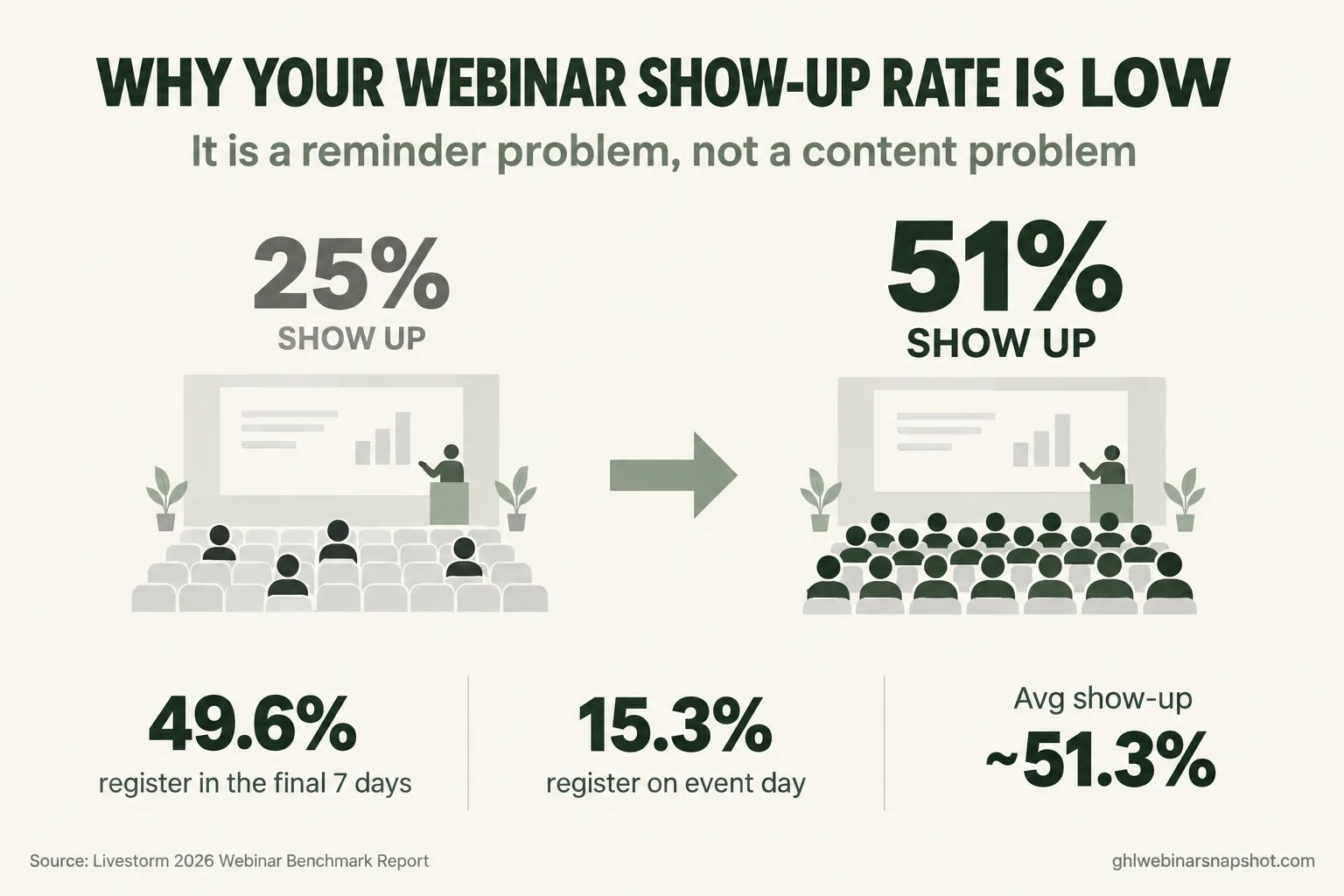
It is 10:58am on webinar day. You have 312 people registered. You spent three weeks and real ad money filling that list, and you keep refreshing the attendee count. At 11:00 it reads 71, and by the time you start teaching it has crawled to 84. You are talking to a quarter of the people who said they would be here, and the pitch you built the whole thing around is about to land in a near-empty room.
That gap between “registered” and “actually here” is the most expensive leak in your business, and almost nobody fixes the real cause. They blame the topic, the time of year, or the audience. The truth is simpler: your show-up rate is low because of what happens in the days between the moment someone says yes and the moment you go live. That stretch is where attendance is won or lost.
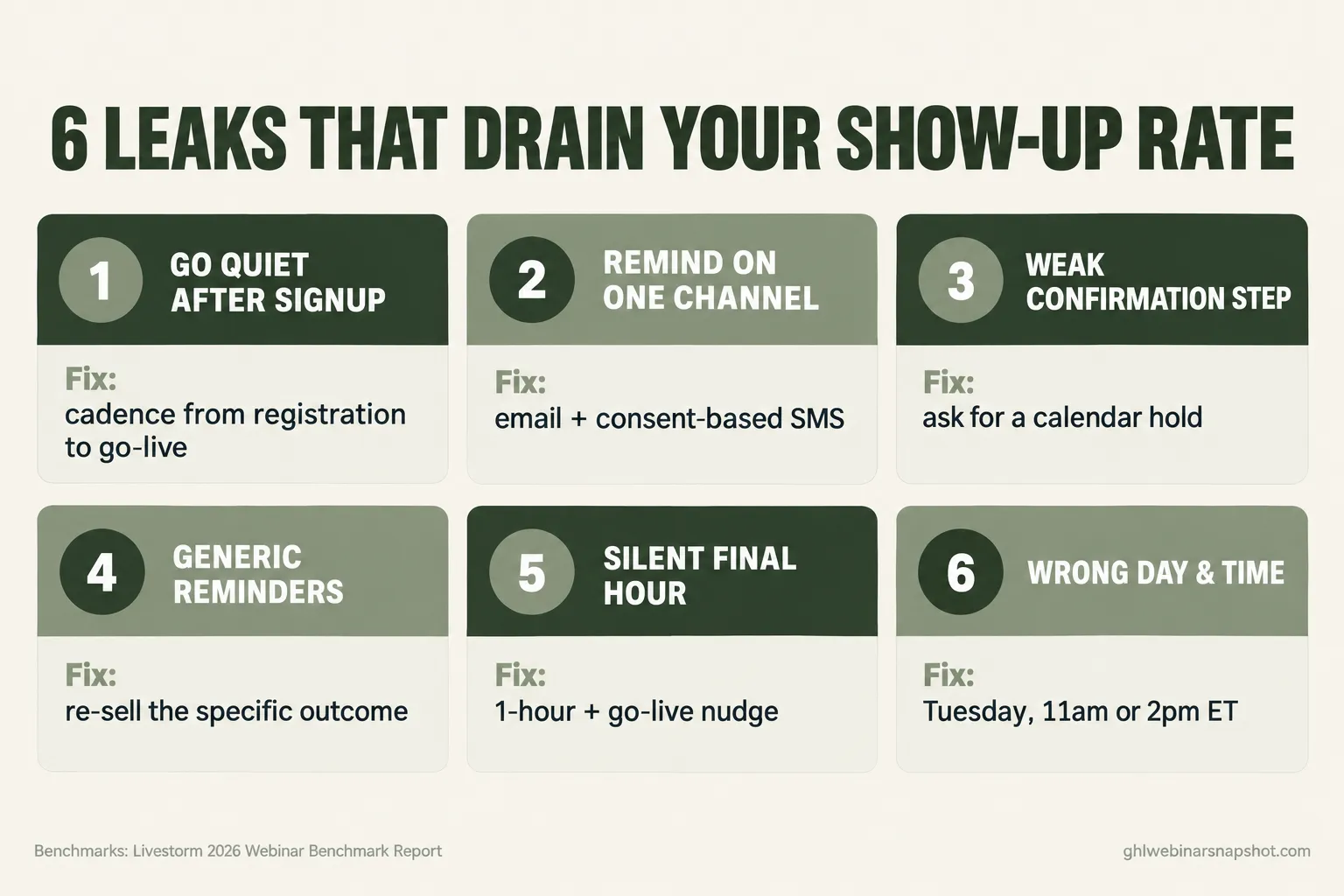
Here is the short answer: a low show-up rate is a reminder problem, not a content problem. Close the gap between registration and the live room with a multi-channel reminder cadence, a confirmation step that earns a small commitment, and a final-hour push, and you move from a quarter of the room to roughly half. This guide walks the six leaks that drain your show-up rate, with the fix and steal-this copy for each.
Table of contents
- What a low show-up rate actually costs you
- The real reason show-up collapses
- Leak 1: You go quiet after the registration
- Leak 2: You remind on one channel
- Leak 3: Your confirmation step asks nothing of them
- Leak 4: Your reminders are generic and skippable
- Leak 5: You disappear in the final hour
- Leak 6: You booked the wrong day and time
- The same problem at three sizes
- The compliance line you cannot skip
- Objections, answered
- FAQ
What a low show-up rate actually costs you
Run the math once and you will stop treating show-up rate as a vanity number. Say you pay $6 per registrant and fill a room of 300. That is $1,800 to build the list. At a 25% show-up rate, 75 people hear your offer, so your real cost per live attendee is $24. Lift that to 50% and the same spend puts 150 people in the room at $12 each. You did not spend another dollar; you just stopped leaking the audience you already paid for.
Across a dataset of 33,786 webinar sessions from 3,199 organizations, the average show-up rate lands around 51.3%. So a 25% or 30% room is not the floor. It is a signal that the machinery between signup and start time is broken, and every point you claw back is pure margin.
The real reason show-up collapses
Here is the thing almost everyone misses. A no-show is rarely someone who decided your webinar was not worth it. It is someone who meant to come, then got pulled into a meeting, a school pickup, or a full inbox. Intent was there. Follow-through was not.
That tells you where the fix lives. You fix it by closing the gap between the yes and the live room with reminders that reach people at the moments they are most likely to forget. And since most registrations come in late, your reminders in that window are what carry people into the room. Everything below is a version of that one problem.
Leak 1: You go quiet after the registration
The most common mistake is treating registration as the finish line. Someone signs up, gets one confirmation email, then hears nothing until a lonely reminder an hour before, and the excitement that made them register cools to nothing. Since half your registrations come in the final seven days, the week before the event is your most valuable promotion window. Send value, not silence.
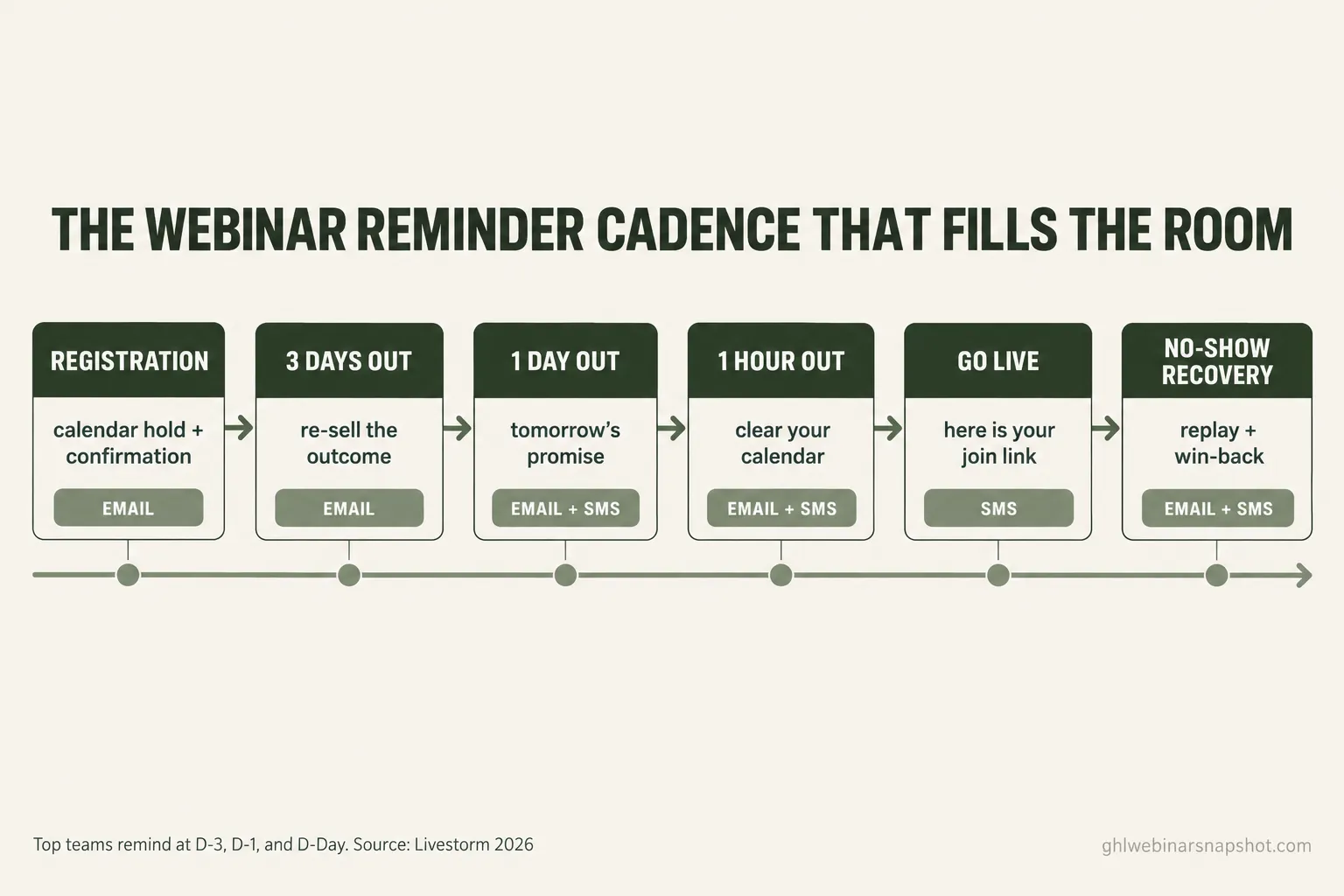
The fix: build a cadence that runs from registration to go-live. At minimum, reach the registered-but-not-yet-live window at three days out, one day out, and on the day itself, the rhythm the highest-attendance teams use.
Steal this three-days-out email:
Subject: Quick heads up about Thursday
Hi [First name], you are registered for [webinar title] this Thursday at [time + time zone]. One thing to do now so you do not miss it: add it to your calendar here [calendar link]. On the session I will walk through [the one concrete outcome], with time for questions.
How this breaks: sending the cadence to everyone, including people who already attended or bought. A reminder that ignores what someone did makes you look like a robot, so the cadence has to drop people the moment they show up or convert. That is a job for behavioral logic, not a blast.
Leak 2: You remind on one channel
Email-only reminders are the single biggest structural weakness in most webinar funnels. Not because email is bad, but because one channel is one point of failure: your reminder lands in a promotions tab or does not get opened in the sixty minutes that matter. A text behaves differently. It arrives on the device in someone’s hand and gets read in minutes, exactly what you want for a “we are live in 15 minutes” nudge. SMS does not replace email; it gives your reminder a second chance to land and reaches people email misses.
The fix: run email and SMS together, each doing what it is good at. Email carries the context and the calendar link. SMS carries the urgent nudges: the day-of reminder and the one that fires as you go live.
Steal this go-live SMS (consented registrants only):
[First name], we are live right now for [webinar title]. Here is your link to join: [link]. Grab a seat, we are starting with [the hook]. Reply STOP to opt out.
Illustrative show-up rates by reminder setup. The ~51% ceiling reflects the cross-industry average from Livestorm’s 2026 Webinar Benchmark Report; the lower figures show the typical drop-off when reminders are thin or single-channel.
How this breaks: adding SMS without consent. A text to someone who never opted in is a compliance violation. More on that below.
Leak 3: Your confirmation step asks nothing of them
The confirmation page is the most wasted real estate in the funnel. Most say “thanks, check your email” and move on. But right after someone commits, they are most willing to take one more small action, so ask for a micro-commitment while motivation is at its peak. The best one is a calendar hold: a webinar on someone’s calendar with an alert is far more likely to be attended than one living only in an inbox.
The fix: rebuild the confirmation step to do three jobs: confirm the registration, deliver a one-click calendar link front and center, and set one expectation that makes them want to be there live, like a room-only bonus. Our webinar confirmation page guide covers the layout, and the registration page playbook covers the step before it.
Steal this confirmation-page copy:
You are in. Here is the one thing to do right now so you do not miss it: [Add this to your calendar]. On [date] at [time], everyone who shows up live gets a [specific bonus or resource] I am not sending to the replay list. Watch your email and texts for your join link.
How this breaks: burying the calendar link down the page or skipping it. If the micro-commitment is not the first thing they see, they will not take it.
Leak 4: Your reminders are generic and skippable
A reminder that reads like a system notification gets treated like one. “This is a reminder that your event is tomorrow” does nothing to rekindle the reason someone registered. The reminders that work re-sell the specific outcome the person signed up for and feel like they came from a human. Name the concrete thing they will learn, not “valuable insights,” and write a subject line a real person would.
The fix: write every reminder to answer one question, “why should I stop what I am doing and show up for this?” Lead with the payoff, keep it short, make the next step obvious. The webinar email sequence playbook has the full cadence written out.
Steal this one-day-out email:
Subject: Tomorrow: the [specific outcome] walkthrough
Hi [First name], tomorrow at [time + time zone] I am showing you exactly how to [specific, concrete result], live and step by step. Your join link hits your inbox and phone right before we start. Catch this one live, because [reason the live room beats the replay].
How this breaks: clever subject lines that hide the value. “You won’t believe this” gets ignored; “Tomorrow: the 3-email sequence that doubled my show-up rate” gets opened.
Leak 5: You disappear in the final hour
Even operators with a decent cadence tend to stop too early. They send a reminder the night before, then nothing until the webinar starts, and the final hour, the most important stretch, goes silent. But the final 60 minutes are when the room actually forms. A nudge here is a service, and it is where SMS earns its place: a text that lands as you go live catches people an email never will.
The fix: add two final touches. A “starting in one hour” message and a “we are live now, here is your link” message that fires the moment you open the room. Send the one-hour note by email and SMS, and the go-live push by SMS. This single addition moves the needle more than any other.
Steal this one-hour-out SMS (consented registrants only):
[First name], [webinar title] starts in 1 hour (at [time]). Your join link is coming the moment we open the room. Clear 45 minutes for the live walkthrough of [outcome]. Reply STOP to opt out.
How this breaks: treating the final-hour push as optional because it feels pushy. It is not. These people asked to be reminded, and silence is what fails them.
Leak 6: You booked the wrong day and time
Sometimes the leak is upstream of your reminders. If you host at a time your audience cannot make, no cadence saves you. The timing data is clear enough to act on: Tuesday posts the strongest show-up rate at 51.7%, and 11:00am and 2:00pm ET land as the best start times. But the benchmark is a starting point, not a law: a B2B crowd behaves differently from course buyers across every time zone, so use it as your default, then test.
The fix: default to a Tuesday or Wednesday late-morning slot, confirm the time zone in every message, and if you serve multiple regions, run the same session twice. Our best time to host a webinar guide breaks down the day, hour, and time-zone data in full.
How this breaks: listing a time without a time zone. “2pm” means four different things to a national audience, and every person who does the mental math wrong is a no-show you created. Write “2:00pm ET (11:00am PT)” every time.
The same problem at three sizes
The leaks are the same at every scale. What changes is how you plug them.
The solo coach or course seller. You run everything, usually selling live from a masterclass, so this is where automation pays for itself first. Set the cadence once, wire in the calendar hold and the go-live SMS, and let it run every launch. Your biggest single move is the final-hour push, because with a smaller list, every attendee you recover is a real slice of the room.
The coach or creator with a small team. A VA can own the cadence and watch the day-of numbers, but it still has to be automated underneath, because a human sending texts by hand will miss the go-live window. Add behavioral logic so attendees and buyers drop out automatically, and segment reminders by lead source.
The B2B demand-gen team. You run webinars for pipeline, so show-up rate is about how much of your sourced pipeline engages. You need the full cadence plus clean attribution, so a registrant who shows up and later closes traces back to the webinar. Our B2B webinar demand generation system connects show-up rate to closed pipeline.
The compliance line you cannot skip
The moment your reminder system includes text messages, you are in regulated territory, and “it is just a reminder” is not a defense.
SMS needs documented consent. In the US, your reminder texts require express consent from each registrant, and for most senders a registered A2P 10DLC campaign to deliver them at all. A webinar registration alone is not consent to text unless your form captured it clearly, and every message must honor opt-outs. The plain-English version is in our SMS reminder compliance guide.
Email falls under CAN-SPAM. Your reminders need accurate subject lines, honest sender details, a physical address, and a working unsubscribe link, with no exception for business-to-business email. None of this is legal advice, so confirm your setup with a qualified source.
Objections, answered
“Won’t more reminders annoy people and get me unsubscribes?” A few will opt out, and that is fine: someone who opts out of reminders was never going to show up anyway. Reminders that re-sell the value and respect opt-outs read as helpful, not spam, and a half-empty room costs far more than a handful of unsubscribes.
“I do not have time to build all of this before my next webinar.” You build it once, and it runs on its own for every future launch. Setup takes an afternoon, or about 24 hours with a done-for-you system. What you cannot afford is hand-sending reminders every single event.
“My show-up rate is low because my topic is not interesting enough.” Rarely true. If people registered, the topic earned a yes. The drop happens after the yes, in the follow-through gap, which is a mechanics problem. Fix the cadence first.
“I run evergreen webinars, so this does not apply to me.” Some of it shifts, but the core holds. An evergreen funnel still sends reminders between signup and the session and still loses people in the final hour. Our evergreen webinar funnel setup guide covers the reminder logic for just-in-time scheduling.
FAQ
What is a good webinar show-up rate in 2026?
Around half of registrants is the benchmark. Livestorm's 2026 report puts the cross-industry average near 51.3% across 33,786 sessions. If you are consistently under 40%, the issue is almost always your reminder mechanics, not your topic.
Why is my webinar show-up rate so low?
The most common cause is the gap between registration and the live event. If people register and then hear little from you until the event starts, the intent that made them sign up fades. Nearly half of registrations come in the final seven days, so the week before is your most important promotion window, not a quiet period.
How many reminders should I send before a webinar?
At a minimum, reach the registered-but-not-yet-live window at three days out, one day out, and on the event day, the rhythm the highest-attendance teams use. Add a one-hour-before nudge and a go-live message for the biggest single lift. Pair email with consent-based SMS.
Does SMS really improve webinar attendance over email alone?
Layering SMS on top of email gives your reminder a second channel, and a text reaches people in the final hour in a way a buried email often does not. It does not replace email, it covers the moments email misses. You must have documented consent and, for most US senders, a registered A2P 10DLC campaign before you text registrants.
What day and time gets the best webinar show-up rate?
Livestorm's data points to Tuesday as the strongest day at a 51.7% show-up rate, with 11:00am and 2:00pm ET as the best start times. Treat that as a default and test against your own audience, and always state the time zone in every message.
Are no-shows worth following up with?
Yes. A no-show is usually someone who meant to attend and got busy, not someone who lost interest, so they are a warm segment, not a dead one. Send the replay with a clear reason to watch, and run a short recovery cadence.
About the author
Mara Delgado is a Webinar Funnel Strategist based in Austin, TX. She has spent close to a decade turning empty registration pages into packed live rooms, and writes about reminder cadences, replay windows, and the small timing tweaks that move attendance from the high 20s to north of 50%.
Related reading
- Why Show-Up Rate Is the Only Webinar Metric That Actually Compounds
- The 7 Webinar Automations That Push Show-Up Rate From 28% to 54%
- The Webinar Email Sequence: The 9-Email Cadence That Fills the Room and Books Calls
- Webinar No-Show Recovery: Win Back the Registrants Who Didn’t Attend
- Best Time to Host a Webinar: Day, Hour & Time Zone (2026)
Sources
- Livestorm, 2026 Webinar Benchmark Report (average show-up rate 51.3% across 33,786 sessions from 3,199 organizations; 49.6% of registrations in the final 7 days and 15.3% on the event day; Tuesday best day at 51.7%; best start times 11:00am and 2:00pm ET; top teams send reminders at D-3, D-1, and D-Day).
- U.S. Federal Trade Commission, CAN-SPAM Act: A Compliance Guide for Business (no B2B exception; required unsubscribe, accurate headers, and physical address).