
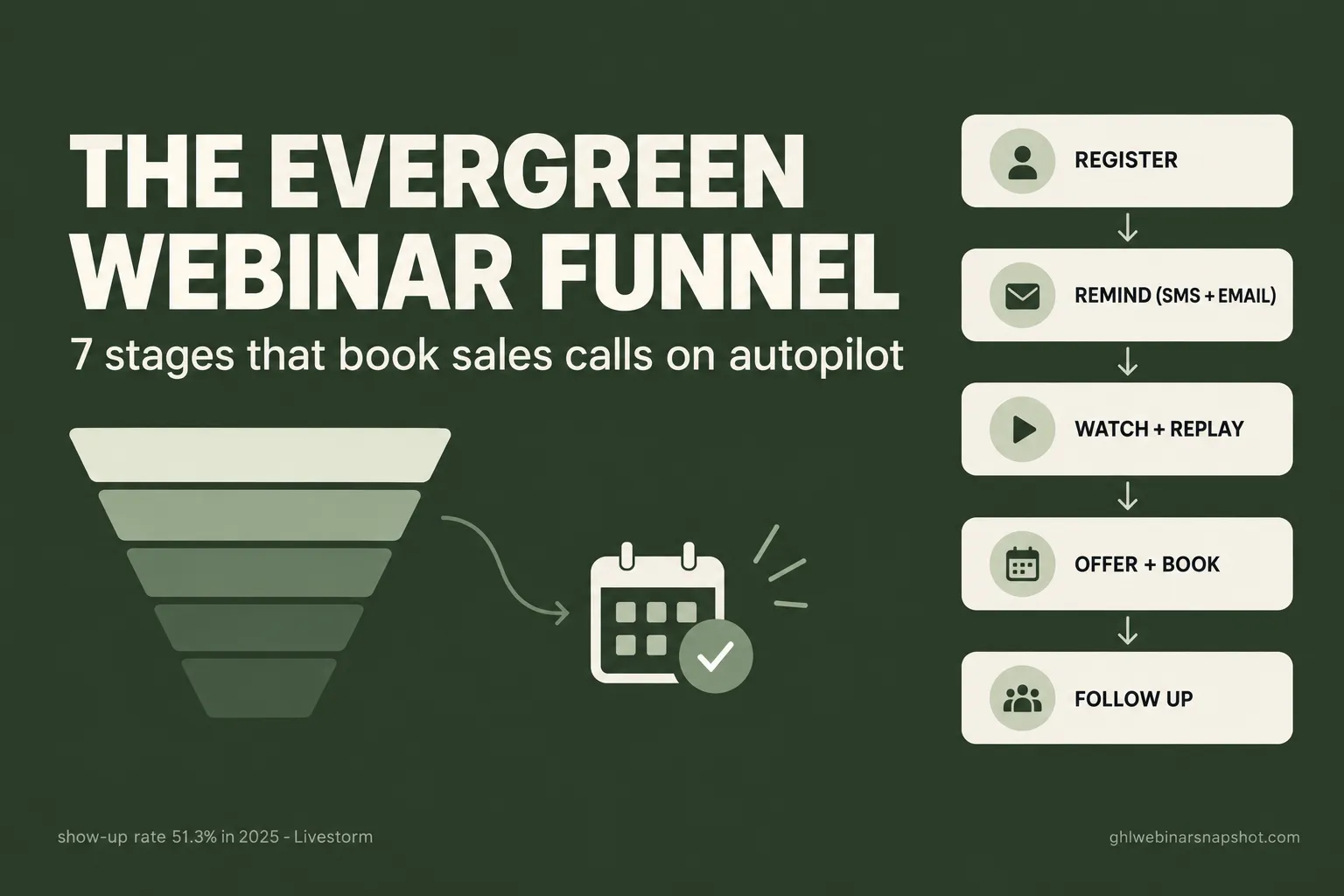
An evergreen webinar funnel is a pre-recorded webinar plus the automation around it, so that a stranger can find your registration page at 11pm on a Sunday, pick a session that starts in fifteen minutes, get reminded, watch, see the offer, and book a call, all without you being online. To build one that actually books calls, you assemble seven stages: a registration page with a scheduling model, an instant confirmation, an email and SMS reminder cadence, the webinar room and replay delivery, an in-event offer and booking link, behavior-based follow-up, and an attribution loop. The funnel is not “record once and forget.” It is a system where each stage passes a fraction of the audience forward, and the automation exists to stop the leaks between them.
Most people who try evergreen do one of two things. They record a webinar, drop it on an “watch now” page, and wonder why nobody books. Or they buy a dedicated evergreen tool, get the video-playback part working, and never wire up the reminders, the replay tracking, or the follow-up that does the actual selling. Both versions treat evergreen as a video-hosting problem. It is a funnel problem. The playback is maybe 20% of the work. The other 80% is the same registration, reminder, and follow-up machinery a live webinar needs, running on a schedule instead of on a calendar date. This guide walks all seven stages, with the real message copy, the timing, and the way each one breaks.
Table of contents
- What is an evergreen webinar funnel?
- What a broken evergreen funnel costs you
- The seven stages, in order
- Stage 1 — Registration and the scheduling model
- Stage 2 — Confirmation and the calendar hold
- Stage 3 — The reminder cadence (email + SMS)
- Stage 4 — The room and the replay
- Stage 5 — The offer and the in-event booking
- Stage 6 — Behavior-based follow-up
- Stage 7 — Attribution and the optimization loop
- Three scenarios: solo, mid-size, and B2B team
- The compliance layer you cannot skip
- Objections, answered
- FAQ
What is an evergreen webinar funnel?
An evergreen webinar funnel is an always-on version of a live webinar funnel: the same registration, reminder, attendance, and follow-up flow, but built around a pre-recorded session that runs on a repeating schedule instead of a one-time live date. The word “evergreen” describes the availability, not the format. From the registrant’s side it should feel like a real event with a real start time. From your side it runs while you sleep.
The distinction that trips people up is evergreen versus true on-demand. On-demand is “click here, watch now, no schedule.” Evergreen usually means “just-in-time” or scheduled sessions: the page shows a session starting in fifteen minutes, or a few fixed times today, and the registrant picks one. That small design choice is the difference between a funnel that mimics the urgency and reminder logic of a live event and one that lets people bookmark a link they never open. We cover the strategic trade-off in live versus evergreen webinars; this guide is about the build.
Here is why the format is worth the work. Webinars remain one of the channels B2B marketers rate most highly: 52% name webinars among their most effective content types for thought leadership in the 2026 B2B content research. The problem live webinars have is that they demand your calendar. Evergreen removes that constraint, so your best sales presentation runs every day. The catch is that automation replaces the energy of a live host, so the funnel around the video has to be tighter, not looser.
What a broken evergreen funnel costs you
Run the numbers and the leaks are obvious. Take 1,000 people who hit your registration page. A weak page opts in maybe 25%. A passive “watch anytime” model gets maybe 20% of those to actually watch, because there is no scheduled moment and no reminder pressure. Of the ones who watch, a fraction reach the offer, a fraction of those book, and a fraction of those buy. Miss the scheduling model and the reminders, and you are down to a handful of watchers before the offer even appears.
The scheduled build produces nearly three times the offer-viewers from the exact same traffic. Nothing about the video changed. The urgency of a start time plus a reminder cadence did all the work. That is the whole thesis of this guide: the money in evergreen is in the funnel around the recording, not the recording.
The seven stages, in order
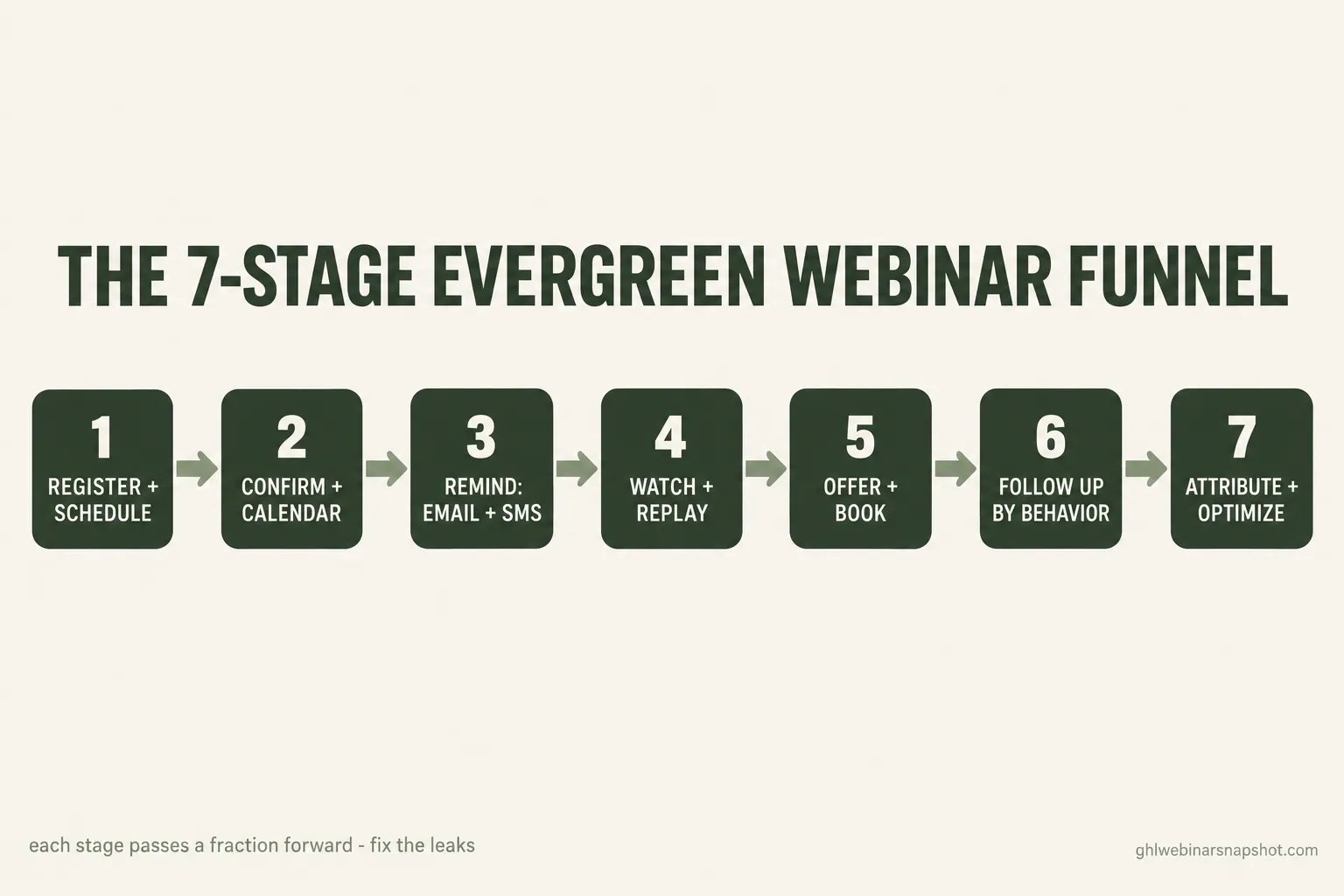
Every evergreen funnel that books calls has these seven stages. Skip one and the funnel leaks there.
- Registration and the scheduling model. The page and the choice of just-in-time, fixed sessions, or hybrid.
- Confirmation and the calendar hold. The instant page and email that lock in the commitment.
- The reminder cadence. Email plus SMS, timed to the session, ending with a “we are live now” push.
- The room and the replay. The playback experience and fast, tracked replay delivery for no-shows.
- The offer and the in-event booking. The pitch, the on-screen booking link, and the instant nudge.
- Behavior-based follow-up. Scoring watchers by behavior and sequencing the right message to each.
- Attribution and the optimization loop. Tying booked calls back to source so you know what to tune.
The rest of this guide takes each stage in turn: what to set up, the real copy, and the failure mode that quietly kills that stage.
Stage 1 — Registration and the scheduling model
Set up: a single-purpose registration page with one promise, name and email, and a phone field only if you will actually send SMS (you should). The scheduling model is the decision that defines the whole funnel. You have three options:
- Just-in-time (JIT). The page always shows a session starting in 5 or 15 minutes. Highest urgency, closest to live behavior, best for cold traffic that will not come back.
- Fixed daily sessions. A few set times per day (say 11am, 2pm, 7pm in the visitor’s zone). Feels like a real event schedule and spreads attendance.
- Hybrid. JIT for the next slot plus two or three later options. Captures the impulse watcher and the calendar planner.
For most solo operators and course sellers, JIT with one backup time later in the day converts best, because it removes the “I will watch it later” escape hatch. For B2B, fixed sessions read as more professional and fit a buyer who books around a workday.
Real copy for the page headline: trade a specific outcome for the registration, not a vague invite.
Weak:  "Register for our free webinar."
Strong:"Free 40-min class: the 3-part evergreen funnel that books
        sales calls while you sleep. Next session starts in 14 minutes."
How it breaks: the number-one evergreen failure is choosing pure on-demand and calling it evergreen. With no start time there is no reason to show up now, no reason to send a reminder, and the show-up rate collapses. The second failure is asking for a phone number and then never using SMS, which costs you conversions on the form for no benefit. If you collect the phone, use it, with consent (more on that below). For the page itself, borrow the mechanics from our webinar registration page teardown.
Stage 2 — Confirmation and the calendar hold
Set up: the instant a registrant opts in, three things fire. The confirmation page loads with the exact session time in their time zone and a one-click “add to calendar” button. A confirmation email sends within seconds with the join link and the calendar file. If you collected consent for texts, a confirmation SMS sends too. The confirmation page is your highest-intent, most-wasted piece of real estate, so use it to set the expectation that reminders are coming and to deliver a small piece of pre-webinar value (a one-page worksheet, a short “what to bring” note).
Real copy for the confirmation SMS:
You're registered for the [Topic] class at [TIME] [TZ] today.
Add it to your calendar here: [link]. We'll text you a join link
15 min before we start. Reply STOP to opt out.
How it breaks: the calendar hold is the single most underused evergreen tool. A registrant who adds the session to their calendar shows up at a dramatically higher rate than one who does not, because the calendar becomes the reminder you did not have to send. If your confirmation step is just a “thanks, check your email” page, you are throwing that away. The other break is a slow or missing confirmation email: if the join link does not arrive in seconds, late registrants (the majority) never get into the room. We break the confirmation flow down further in the webinar confirmation page guide.
Stage 3 — The reminder cadence (email + SMS)
This is the stage that decides your show-up rate, and it is the stage passive evergreen skips entirely. Two facts set the strategy. First, most registrations arrive late: roughly 59% land in the final week and about 17% on the day of the event, so people sign up with thin commitment and busy calendars. Second, the channel decides whether the reminder is seen. SMS is read almost immediately, with 90% of texts read within three minutes, while a reminder email can sit unopened until after your session has ended.
For an evergreen JIT funnel, the entire cadence compresses into the window between registration and the session start. Here is the exact sequence, ready to steal:
How it breaks: the most common failure is email-only. It caps your show-up rate well below what SMS-plus-email delivers, because the “we’re live now” moment simply is not seen in an inbox in time. The second failure is firing reminders on the wrong clock: an evergreen funnel has to compute the reminder times off each registrant’s chosen session, in their time zone, not off a fixed date. Get the time zone math wrong and your “we’re live now” text lands three hours late. For the full multi-touch build, see our webinar email sequence, and for the no-show branch specifically, the no-show recovery playbook.
Stage 4 — The room and the replay
Set up: the playback itself needs to feel like a scheduled session, not a YouTube link. The registrant lands on a branded room at the start time, the recording plays, and a chat or Q&A panel runs alongside (some tools simulate this with pre-set messages; be honest and light about it). The more important half of this stage is the replay, because roughly half of webinar attendees now engage on demand rather than live, per ON24. Every registrant who did not watch, or who dropped early, gets a replay email fast, and you track who watches and how far.
Real copy for the replay email (no-show branch):
Subject: The replay of [Topic] is up (expires in 48h)

You registered but couldn't make it, so here's the full class.
Heads up: the part most people find useful starts around the
18-minute mark. Watch here: [link]. Replay comes down [DATE].
How it breaks: treating the replay as a single “here’s the recording” email throws away half your audience. The operators who win this stage tag viewers by watch depth, because a no-show who watches 40 minutes of the replay is a hotter lead than a live watcher who left after five. Without a replay-tag pipeline, that signal is invisible, and you follow up with everyone the same way. The second break is a replay with no expiry: an always-available recording kills the urgency that gets people to watch it now.
Stage 5 — The offer and the in-event booking
Set up: the offer appears at a fixed point in the recording, and the moment it does, the booking path opens on every channel at once. A booking link appears on screen, a message drops into the chat panel, and, for registrants who consented, an SMS fires with the calendar link. The goal is to catch intent at its peak, which is during the pitch, not three hours later in an inbox.
Real copy for the in-event booking SMS:
Ready to map this to your business? Book your free 20-min
strategy call here: [calendar link]. Slots for this week are
limited. Reply STOP to opt out.
How it breaks: the fatal delay is routing intent into a “someone will reach out” holding pattern instead of a live calendar. The MIT and InsideSales.com Lead Response Management study found that contacting a lead within 5 minutes makes you 21 times more likely to qualify it than waiting 30, yet HBR found the average first response to an inbound lead takes 42 hours, and 23% of leads are never contacted at all. An evergreen funnel that emails a booking link the next morning has already lost. The fix is instant, one-step scheduling the moment the offer lands or a lead-score threshold trips, which is what appointment automation is for. The mechanics of booking from a webinar are in how to book sales calls from webinars.
Stage 6 — Behavior-based follow-up
Set up: not every watcher is a buyer, so you score them and route the follow-up by behavior. Attendance, watch depth, offer clicks, and replay behavior all feed a lead score. The hottest leads (watched to the offer, clicked the link, did not book) get the fastest, most personal follow-up. Mid-tier leads get a value-first nurture. Cold registrants who never watched go into a re-invite loop for the next session.
Route the follow-up by behavior, not by one blast to everyone
| Feature | Hot watcher (saw the offer, no booking) | No-show registrant |
|---|---|---|
| First touch | SMS within minutes: 'Saw you on the class, here's your call link' | Replay email within the hour, with a timestamp hint |
| Day 1 | Personal email answering the top objection | Reminder that the replay expires soon |
| Day 2-3 | Case-style proof + booking link | Invite to the next live session time |
| If no action | Move to nurture, revisit at next launch | Drop to monthly newsletter cadence |
Real copy for the hot-watcher day-1 email:
Subject: You watched the whole thing (here's the next step)

You stuck around to the end of the [Topic] class, which usually
means one of two things is on your mind: [objection A] or
[objection B]. Quick answer to both: [one-paragraph answer].
If it's worth 20 minutes to see how this maps to your setup,
here's my calendar: [link].
How it breaks: the classic failure is one follow-up sequence for everyone, which under-serves the hot leads and annoys the cold ones. The other break is doing it by hand: “check the attendance report tomorrow and email the good ones” loses the speed advantage and does not scale past a few sessions. Behavior scoring only works if it is automated, which is what webinar lead scoring sets up.
Stage 7 — Attribution and the optimization loop
Set up: tag every registrant with their source (which ad, post, or email brought them), carry that tag all the way through to the booked call and the sale, and review it. An evergreen funnel runs continuously, so you are not watching each cohort by hand; you need the reporting to tell you which traffic source produces booked calls, not just registrations. Then you tune: if one ad produces cheap registrations that never watch, it is not cheap, it is expensive. If a source produces fewer registrations but more booked calls, feed it.
How it breaks: measuring only the two ends, registrations in and revenue out, leaves everything between as a black box, so you cannot tell which stage or which source to fix. The other break is vanity attribution: crediting the last click (the booking page) instead of the source that actually started the journey. Multi-touch attribution across the whole funnel is the fix, and we lay it out in multi-touch attribution for webinars. The full stage-by-stage leak model, live or evergreen, is in the webinar conversion funnel.
Three scenarios: solo, mid-size, and B2B team
The same seven stages apply to everyone, but the right configuration differs by list size and offer. Here is how the build changes.
Solo coach or course seller, list under 1,000. Use just-in-time scheduling with one later backup slot. Lean hard on SMS, because your list is small and every show-up matters. Keep the offer a low-friction call or a self-serve checkout. Do not over-engineer scoring: a simple hot/warm/cold tag is enough. Your biggest risk is a passive on-demand link, so the scheduling model and the reminder cadence are 80% of your result. Budget a weekend to build it once, then it runs.
Mid-size course seller, list 1,000 to 10,000. Now segmentation pays off. Run fixed daily sessions so attendance spreads, and split the follow-up by behavior with a real lead score. Replay tracking becomes essential at this size because the on-demand audience is large enough to be a second funnel of its own. Watch your A2P 10DLC throughput: at this volume you need a registered campaign with headroom, or your “we’re live now” texts queue behind your marketing sends. Attribution matters here because you are likely running paid traffic and need to know which source books calls.
B2B demand-gen team, list 10,000-plus or long sales cycle. Fixed sessions read as more credible to a buyer booking around a workday. The offer is usually a demo or a call, not a checkout, so the booking-and-confirmation flow and speed-to-lead are the whole game. Attribution is non-negotiable because you are reporting pipeline to a revenue team, and a webinar registrant who becomes a closed deal ninety days later has to trace back to the funnel. Integrate the score and the source into your CRM so sales sees context on every booked call. This is where the live versus evergreen decision often lands on “both”: evergreen for top-of-funnel volume, live for high-intent segments.
The compliance layer you cannot skip
The SMS reminder cadence is the most powerful part of an evergreen funnel, and it is also the part with real legal exposure, so handle it as a first-class concern, not an afterthought.
- TCPA and A2P 10DLC. Texting registrants for marketing purposes is governed by the TCPA and, in the US, requires a registered A2P 10DLC campaign with documented consent. Collect explicit opt-in at registration with clear language, keep the record, and honor STOP automatically. This is the single most important compliance step because the SMS cadence is central to the funnel. Our TCPA-compliant webinar SMS guide covers the setup.
- CAN-SPAM. Every reminder and follow-up email needs a real physical address and a working one-click unsubscribe. Non-negotiable and easy to get right.
- Recording and consent. If your evergreen session captures any live attendee audio or video (some tools record chat or webcam Q&A), two-party consent recording laws in states like California, Florida, and Illinois can apply. Most pre-recorded evergreen funnels avoid this, but check before you enable any live capture.
- Earnings claims. If you show income or results, the FTC Business Opportunity Rule (16 CFR 437) requires substantiation. Keep your proof documented and your claims honest.
A compliant funnel is the only funnel worth building. The good news is that consent and opt-out logic are set-once automations. More detail lives in our SMS compliance for webinars post.
Objections, answered
“Won’t an automated webinar feel fake to people?” Only if you fake being live. Do not run a countdown that claims “247 people watching right now” or pretend a recording is a live broadcast. Be straight: it is a scheduled class that runs daily. The urgency comes from a real start time and a real replay expiry, not from lying about the audience. Handled honestly, attendees care about the content, not whether you are typing in the chat.
“Do I need to be technical to build this?” No, but you need the right tool and a plan. The seven stages are conceptually simple; the work is in the wiring, especially the time-zone-aware reminder logic and the consent handling. You can build it in GoHighLevel yourself over a weekend or two, or import a pre-built system. What you cannot do is skip the wiring and expect a bare video page to book calls.
“What if I already pay for a webinar platform like eWebinar or EverWebinar?” Keep it if it hosts the room well. Those tools are strong at the playback and the JIT scheduling. What most of them do not do is own your CRM, your lead scoring, your multi-touch attribution, and your cross-channel follow-up. That is the layer that turns watchers into booked calls, and it is exactly what a GoHighLevel funnel adds around your existing player. You can run the room in one tool and the funnel in GHL.
“Isn’t evergreen just worse than live?” For raw energy and Q&A, live wins. For volume, consistency, and your calendar, evergreen wins. The honest answer for most operators is to run both: evergreen for always-on top of funnel, live for launches and high-intent segments. The funnel machinery is the same either way, which is the point of building it once.
“Won’t the SMS reminders annoy people?” Not if they opted in and the texts are useful and few. A registrant who signed up fifteen minutes ago is not annoyed by a “we’re live now” text, they are grateful you reminded them. The line you do not cross is texting people who did not consent, or over-texting after the event. Consent plus restraint plus a clean opt-out keeps SMS a welcome channel.
FAQ
Evergreen webinar funnel FAQ
What is an evergreen webinar funnel?
It is an always-on version of a live webinar funnel built around a pre-recorded session that runs on a repeating schedule. It uses the same registration, reminder, attendance, replay, and follow-up automation a live webinar needs, but it runs continuously instead of on a one-time date, so a stranger can register, get reminded, watch, and book a call at any hour without you being online.
Does evergreen convert as well as live?
It can, if you build the funnel around it. Live webinars average about a 51.3% show-up rate for 2025. Evergreen matches that only with just-in-time or scheduled sessions plus a real email and SMS reminder cadence. A passive 'watch anytime' link converts far worse because there is no start time and no reminder pressure. The recording is about 20% of the work; the funnel around it is the other 80%.
Just-in-time or fixed sessions, which is better?
Just-in-time (a session starting in 5 to 15 minutes) creates the most urgency and works best for cold traffic that will not come back, so it suits most solo coaches and course sellers. Fixed daily sessions feel like a real event schedule, spread attendance, and read as more professional to B2B buyers. A hybrid of the next JIT slot plus a couple of later times captures both the impulse watcher and the planner.
What tools do I need to build an evergreen webinar funnel?
You need a way to play the recorded session on a schedule (dedicated evergreen players like eWebinar or EverWebinar handle this, or you can build it in GoHighLevel) and, more importantly, the funnel layer: a registration page, an email and SMS platform with time-zone-aware reminders, replay tracking, lead scoring, a booking calendar, and attribution. GoHighLevel can run the whole funnel layer in one place, which is what the Webinar Snapshot installs.
Is SMS legal for webinar reminders?
Yes, with consent. Texting registrants for marketing in the US is governed by the TCPA and requires a registered A2P 10DLC campaign with documented opt-in. Collect explicit consent at registration, honor STOP automatically, and keep the consent record. SMS is the single most powerful channel in the funnel because texts are read almost immediately, so it is worth setting up correctly.
How do I track who watches an evergreen replay?
Use a replay page that reports watch depth back into your CRM and tags viewers by how far they got. That turns the replay from a single broadcast email into a scoring surface: a no-show who watches 40 minutes is a hotter lead than a live watcher who left after five. Since roughly half of webinar attendees now engage on demand, tracking replay behavior is essential, not optional.
If you want the whole thing built for you, the GHL Webinar Snapshot installs all seven stages as one import. And if you do not have GoHighLevel yet, you can start it through our partner link and unlock a discount on the snapshot.
Affiliate disclosure: the GoHighLevel links above are partner links. If you start GoHighLevel through them we may earn a commission at no extra cost to you, and it unlocks a discount on the snapshot.
About the author — Mara Delgado, Webinar Funnel Strategist (Austin, TX). Mara has spent the better part of a decade turning empty registration pages into packed live rooms. She started out producing launch webinars for coaches before going all-in on GoHighLevel automation, where she learned that show-up rate, not opt-in cost, is the metric that actually compounds. She writes about reminder cadences, replay windows, and the small timing tweaks that move attendance from 28% to north of 50%.
Related posts: Live versus evergreen webinars · The webinar email sequence · Webinar no-show recovery · The replay-tag pipeline · Webinar lead scoring · The webinar conversion funnel