
You are forty-two minutes into a live webinar. The teaching landed, the chat is warm, and you just said the line you rehearsed all week: “So here is what I put together for you.” You click to the offer slide and your screen freezes. Your audio cuts to a robotic stutter. The chat fills with “you’re breaking up.” Then the platform kicks you out, and you are staring at a reconnect spinner while the most valuable ninety seconds of your month evaporate.
That is not a rare horror story. It is the one failure that turns a profitable launch into a wasted one, and almost nobody plans for it. Operators plan the funnel, the reminders, and the pitch, then treat the live stream as something that will “probably be fine,” right up until the launch where it is not.
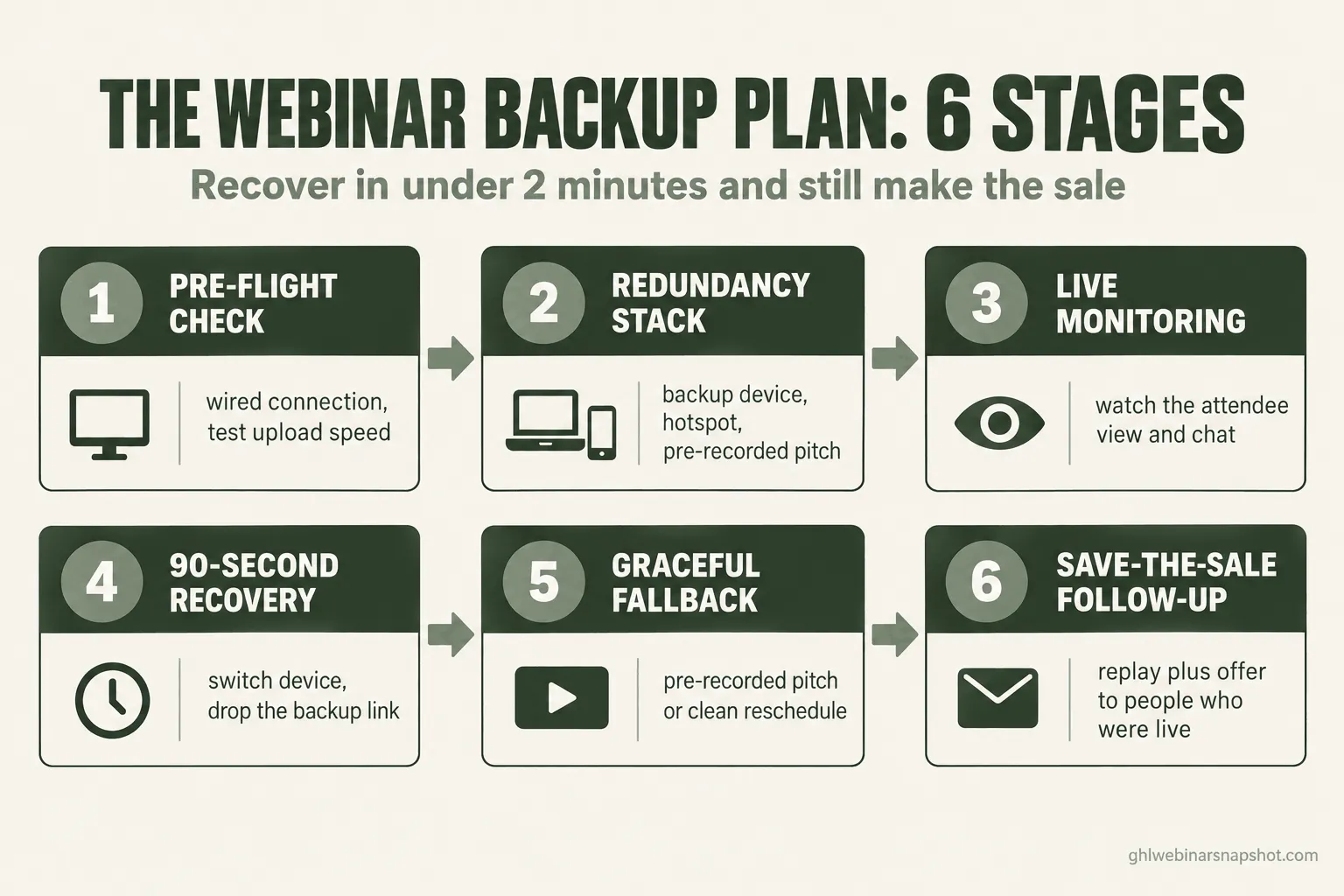
Here is the short answer: you cannot stop your tech from failing, so you build a backup plan that lets you recover in under two minutes and still make the sale. That means a pre-flight check, a redundancy stack you set up once, a recovery script you can run without thinking, and a follow-up that saves the pitch even if the stream never comes back. This guide walks all six stages, with the exact messages to send and how each one breaks.
Table of contents
- What a crashed pitch actually costs you
- The six-stage backup plan
- Stage 1: The pre-flight check
- Stage 2: The redundancy stack
- Stage 3: The live monitoring layer
- Stage 4: The 90-second recovery script
- Stage 5: The graceful fallback
- Stage 6: The save-the-sale follow-up
- The same plan at three sizes
- The compliance line most people skip
- Objections and FAQ
What a crashed pitch actually costs you
Do the math once and you will never wing it again. You spent real money and weeks of email to fill the room, and attendance held near the 2025 average of 51.3%. The point of the live event is the ten minutes where you make the offer, so if the tech fails there, you lost the return on the entire launch, not a few minutes.
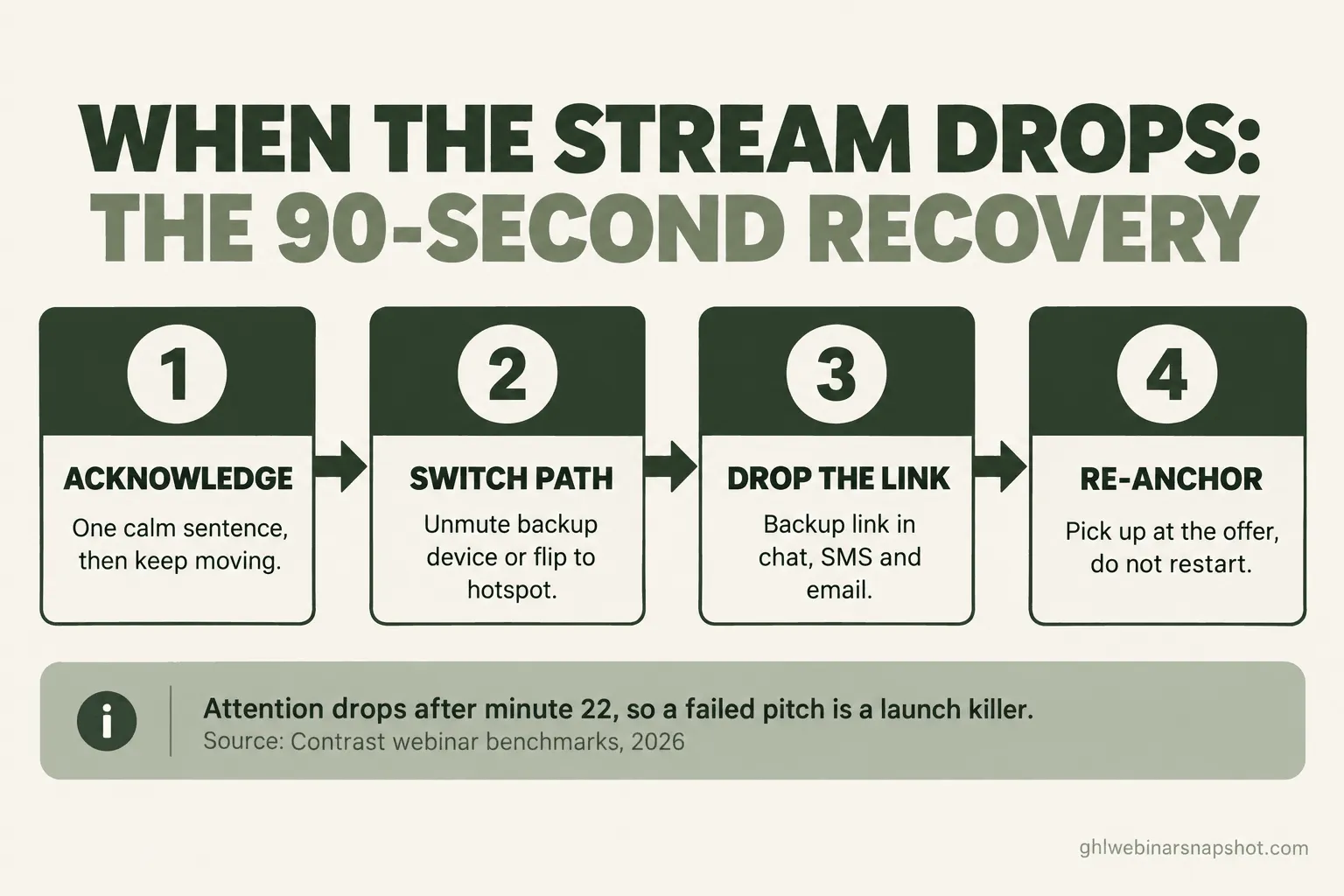
Timing makes it worse. Attention starts sliding around minute 22, usually right before the pitch, so the failure lands when the room is already deciding whether to stay. A frozen screen at minute 12 is annoying. A frozen screen at minute 42 is a launch killer, and people who watched you fumble are slower to register next time.
The six-stage backup plan
A backup plan is a system with layers, so when one fails the next catches you. The six stages below run in order: pre-flight check and redundancy stack are prevention, live monitoring and the recovery script are the live save, and the graceful fallback plus the save-the-sale follow-up are the parachute.
Stage 1: The pre-flight check
Most failures trace to the presenter’s setup, and the presenter’s own internet is the most common culprit. Run this every time:
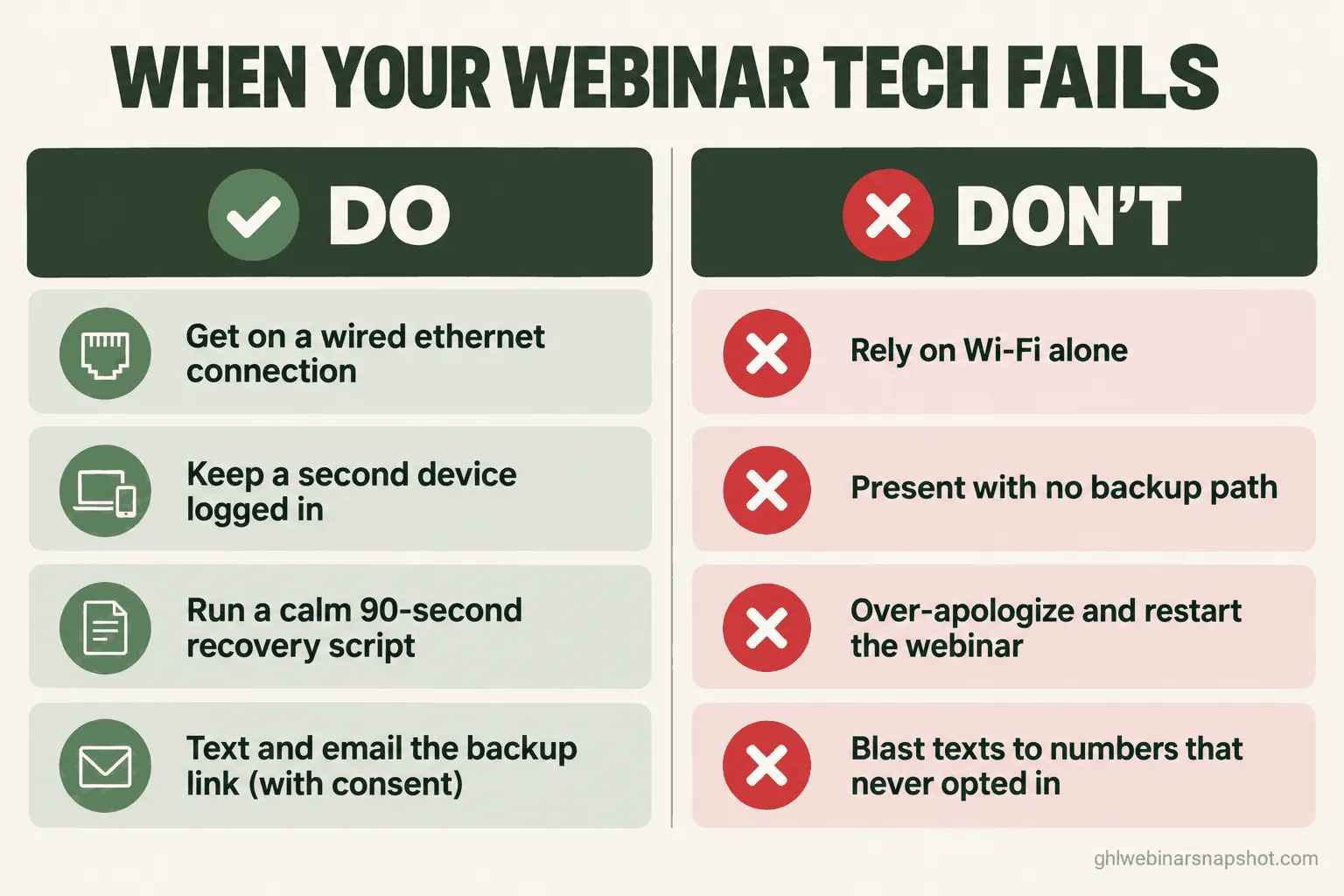
- Get on a wired connection. A dropped packet during your pitch is a bad time to learn your router flaked out.
- Test your upload speed. Streaming is an upload job. Zoom recommends around 3 Mbps upload for 1080p group video, and you want headroom above that. Test an hour before, not five minutes before.
- Restart the machine an hour ahead. A fresh boot clears the memory leaks that cause the freeze at minute 40.
- Close everything else. Every open tab, Slack, and sync app competes for the CPU and bandwidth your stream needs.
- Do a two-minute dry run in the actual room: share slides, play a video, confirm audio. The share-screen bug you find now is the one that would have hit you live.
How this breaks: treating the pre-flight as a checklist you skim instead of run. You “know” your internet is fine, skip the test, and find out live that a neighbor started a huge download. Run it as a ritual.
Stage 2: The redundancy stack
Some failures are not yours to prevent: the platform goes down, the ISP blinks, the laptop dies. So for every single point of failure you set up a second path in advance.
- A second internet path: your phone on cellular, ready as a hotspot. Test it first so you know it carries the stream.
- A second device, already logged in as a backup host, muted. If your laptop freezes, you unmute it and keep talking while you fix the main one.
- A backup room or link, with the URL saved where you can paste it fast.
- A pre-recorded fallback of the teaching and the pitch. If everything falls apart, you drop in the recording so the room still hears the offer. This has saved more launches than any other single step.
- A second human: a co-host who drops the backup link while you deal with the tech. If you run solo, this is the first part-time hire to make.
How this breaks: untested redundancy is theater. The hotspot has no signal in your office; the “backup device” was never actually logged in. Run a failover drill before your next launch: mid-dry-run, unplug your ethernet on purpose and time your recovery.
Stage 3: The live monitoring layer
You cannot recover from a failure you do not notice for two minutes. On your screen everything can look fine while attendees see a frozen slide, so you build a way to see what the room sees.
- Watch the chat like an instrument panel. “You’re cutting out” is almost always the first sign. Keep it visible; if you run solo, glance at it every pause.
- Join your own webinar as an attendee on the backup device. A second screen with the attendee view catches what your host view hides.
- Trust the silence. If an active chat goes suddenly quiet, ask “can everyone still hear me okay?” instead of assuming everyone is spellbound.
How this breaks: you get absorbed in your slides and stop looking. That is what the attendee-view screen is for.
Stage 4: The 90-second recovery script
This is the stage that saves the sale. When the stream breaks you do not improvise, you run a rehearsed routine.
- Acknowledge it in one sentence, then keep moving. Say it once and reassure them.
- Switch to your backup path: unmute the second device, flip to the hotspot, or move to the backup room.
- Drop the backup link everywhere: chat, and if the room is gone, the SMS and email blast.
- Pick up where you left off. Do not restart. Re-anchor and go straight back to the offer.
Keep this copy in your war-room doc and steal it word for word.
On-screen holding slide:
Brief technical hiccup, fixing it right now. Stay right here, we will be back in under a minute. If the room drops, check your email and texts for a link to rejoin.
What you say while you switch devices:
Looks like my connection hiccupped. Hang with me for ten seconds, I have a backup ready and we are not skipping the important part. Okay, we are back. I was about to show you exactly what is included, so let me get right to it.
Backup-link SMS (consented registrants only):
[First name], our webinar room dropped for a second. Jump back in here: [backup link]. We paused so you would not miss the offer. Reply STOP to opt out.
Backup-link email (whole live segment):
Subject: We are back, here is your link to rejoin
Hi [First name], we hit a snag and moved to a backup room. Rejoin now: [backup link]. We held the most important part for you. If you cannot get in, reply and I will send the replay plus everything I promised.
How this breaks: the failure is emotional. You panic, over-apologize, and telegraph that you are not in control. The script exists so you have words ready when your brain is not. And do not restart the whole webinar out of embarrassment: re-anchor and go straight to the pitch.
Stage 5: The graceful fallback
Sometimes you cannot recover live: the platform is down, or the failure is bigger than your stack. This is not the end of the sale, it is a pivot, and you have two graceful exits. First, drop to the pre-recorded pitch: if you can still reach the room, send the recording of the teaching and the offer with a live note, and the offer still lands. Second, reschedule cleanly and turn it into a second touch: if the room is gone, own it and reschedule. A well-handled reschedule can pull a bigger, warmer second showing.
Reschedule email (steal this):
Subject: Technical gremlins won today, here is what happens next
Hi [First name], straight answer: our tech failed today and I could not run the session the way you deserve. So I am running it again on [date and time], same content, and I am sending everyone the full replay plus the resource I promised right now: [link]. If you already know you want [the offer], you do not have to wait for the rerun. Reply “in” and I will take care of you personally.
How this breaks: silence. The operator is so embarrassed they go quiet and hope everyone forgets. Nobody forgets a webinar that broke and then vanished.
Stage 6: The save-the-sale follow-up
If the crash hit during the offer, your follow-up is where the sale gets made now. The people live when it broke are your hottest segment, because they stayed to the pitch.
- Within an hour: the replay plus the offer, to everyone who attended. Lead with “here is the part the tech interrupted” and put the offer at the top.
- Same day: personal outreach to people live at the moment it broke. A short note with the offer and your calendar link. Tag this segment during the event so you can find them.
- Extend the offer window, and say why: “Since the tech ate part of our time, I am keeping the offer open until [date].”
- Route replay watchers who reach the offer to a booking link. That is a raised hand.
This is where a tagging and automation layer earns its keep: track who attended, who was live at the break, and who watched the replay to the offer, and this all runs automatically instead of by hand. See our replay-tag pipeline playbook and the attendee-to-consult booking playbook. For the deeper win-back cadence, the no-show recovery guide covers it.
How this breaks: a generic “sorry you missed it” email insults them, because they did not miss it, your tech failed them. Segment them and lead with the offer.
The same plan at three sizes
The plan is the same shape at every scale; the specifics change with your setup.
The solo coach or course seller. You run everything yourself, often selling live. Your redundancy is lean: a wired connection, your phone as hotspot and backup host, a pre-recorded pitch, and a war-room doc on your phone. With no producer, your recovery script matters most. If you sell high-ticket, the pre-recorded offer segment is non-negotiable: one saved launch pays for a year of prep.
The high-ticket coach with a small team. A VA can be your producer, which unlocks real-time monitoring: they watch the attendee view, drop the backup link, and trigger the SMS blast. Redundancy adds a separate backup room and a failover drill before every launch, and someone tags the live-at-the-break segment during the event, so a broken pitch costs you almost nothing.
The B2B demand-gen team. You run webinars for pipeline, so the stakes are attribution and reputation. You need a dedicated producer, a redundant streaming setup, and someone watching stream health, because a failed webinar in front of enterprise buyers is a brand problem. At this scale the reliability layer is often a custom build; our note on custom webinar software covers when that move makes sense.
The compliance line most people skip
The moment your recovery plan involves texting and emailing registrants, you are in regulated territory.
SMS: the backup-link text is still a message under the rules. In the US, your recovery texts need documented consent and, for most senders, a registered A2P 10DLC campaign. You cannot legally blast a “rejoin here” text to a number that never opted in, even in an emergency, and every text must honor opt-outs. Collect consent at registration. For the plain-English version, read our SMS reminder compliance guide.
Email: your reschedule and replay emails fall under CAN-SPAM. That means accurate subject lines, honest sender details, a physical address, and a working unsubscribe in every message. The rules make no exception for business-to-business email, and penalties run into tens of thousands of dollars per message, so the panic blast still has to be compliant. None of this is legal advice, so confirm your setup with a qualified source before you launch.
Objections, answered
“This is a lot of setup for something that probably will not happen.” You set most of it up once. The pre-flight becomes a ten-minute ritual and the redundancy stack sits unused until the day it saves an entire launch. Cheapest insurance you will buy.
“Won’t a backup plan make me look like I expect to fail?” The opposite. Attendees never see the plan unless something breaks, and if it does, a calm ninety-second recovery makes you look like a pro.
“I use a big-name platform, so I am covered.” No platform stops your internet from dropping, your laptop from freezing, or your power from going out. The tool is one layer; the backup plan protects the ones it cannot touch.
“I run evergreen webinars, so this does not apply.” The live-stream risk goes away, but your registration page, reminders, and delivery links can still fail and cost you the same registrant. The prevention and follow-up stages still apply. If you are weighing formats, our evergreen versus live framework covers the trade-offs.
FAQ
What should I do the moment my webinar tech fails?
Acknowledge it in one sentence, then switch to your backup path: unmute a second logged-in device, flip to a cellular hotspot, or move the room to a pre-built backup link. Have a producer or automation drop that link in the chat, by SMS to consented registrants, and by email. Then re-anchor and go straight back to where you were, especially mid-offer. Do not restart and do not over-apologize.
What is the most common cause of a webinar crashing?
The presenter's own internet connection, ahead of the platform itself. A wired ethernet connection, an upload-speed test before you go live, and a cellular hotspot as a backup path solve most real-world failures. Zoom recommends around 3 Mbps upload for 1080p group video, and you want headroom above that.
How do I keep a sale alive if the stream dies during my pitch?
If you can reach the room, drop in a pre-recorded version of your offer so the pitch still lands. If the room is gone, send the replay and offer within the hour, do same-day outreach to everyone live when it broke, and extend any deadline that fell during the outage. The people live at the moment of failure are your hottest segment.
Is it legal to text attendees a backup link during a webinar?
Only if those attendees consented to texts, usually at registration, and for most US senders you are sending through a registered A2P 10DLC campaign. An emergency does not override consent rules, and every recovery text has to honor opt-outs. This is general information, not legal advice, so confirm your setup with a qualified source.
Do I need a producer to run a backup plan?
No, though a producer makes real-time recovery smoother. A solo operator can run the whole plan with a rehearsed recovery script, a second logged-in device, a hotspot, and an automated backup-link and follow-up sequence. Automation is the second set of hands when you cannot hire a human one yet.
About the author
Derek Haywood is a GoHighLevel Automation Engineer based in Denver, CO. A former B2B SaaS sales engineer, he builds the plumbing behind webinar funnels: the triggers, tags, and recovery sequences that keep a launch running when something breaks.
Related reading
- Why Show-Up Rate Is the Only Webinar Metric That Actually Compounds
- Webinar No-Show Recovery: Win Back the Registrants Who Didn’t Attend
- The Webinar Conversion Funnel: Where Registrants Leak and How to Fix Every Stage
- SMS Reminder Compliance for Webinars (TCPA + A2P 10DLC, Plain English)
Sources
- Livestorm, 2026 Webinar Benchmark Report (average live show-up rate 51.3% in 2025, up from 48.9% in 2024).
- Contrast, Webinar Benchmarks from 1M+ Registrants (attention begins to decline around the 22-minute mark).
- WebinarNinja, Top Webinar Technical Issues and How to Prevent Them.
- Airmeet, Troubleshooting Webinars: The Most Common Issues and How to Prevent Them.
- BroadbandNow, Zoom Bandwidth Requirements.
- U.S. Federal Trade Commission, CAN-SPAM Act: A Compliance Guide for Business.