
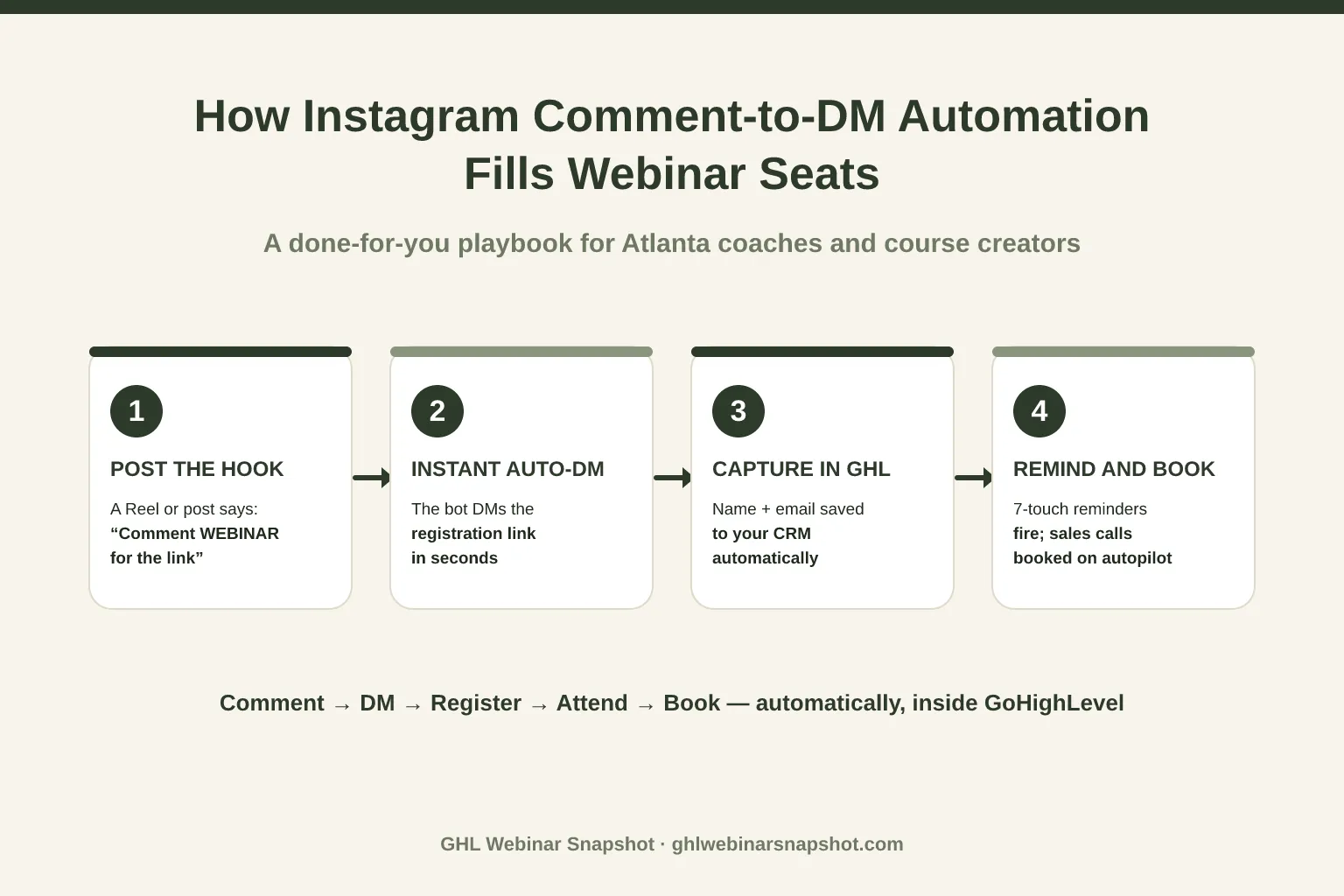
To automate Instagram and Facebook DMs for webinar registrations, you post a Reel or graphic that tells people to comment a keyword, an automation instantly replies in their DMs with the registration link, and — the part most creators skip — that DM captures their name and email straight into your CRM so your reminder and booking sequence takes over automatically. Done right, a single “comment WEBINAR for the link” post can fill more seats than a week of feed posts pointing to a link in bio, because it removes every click between interest and registration.
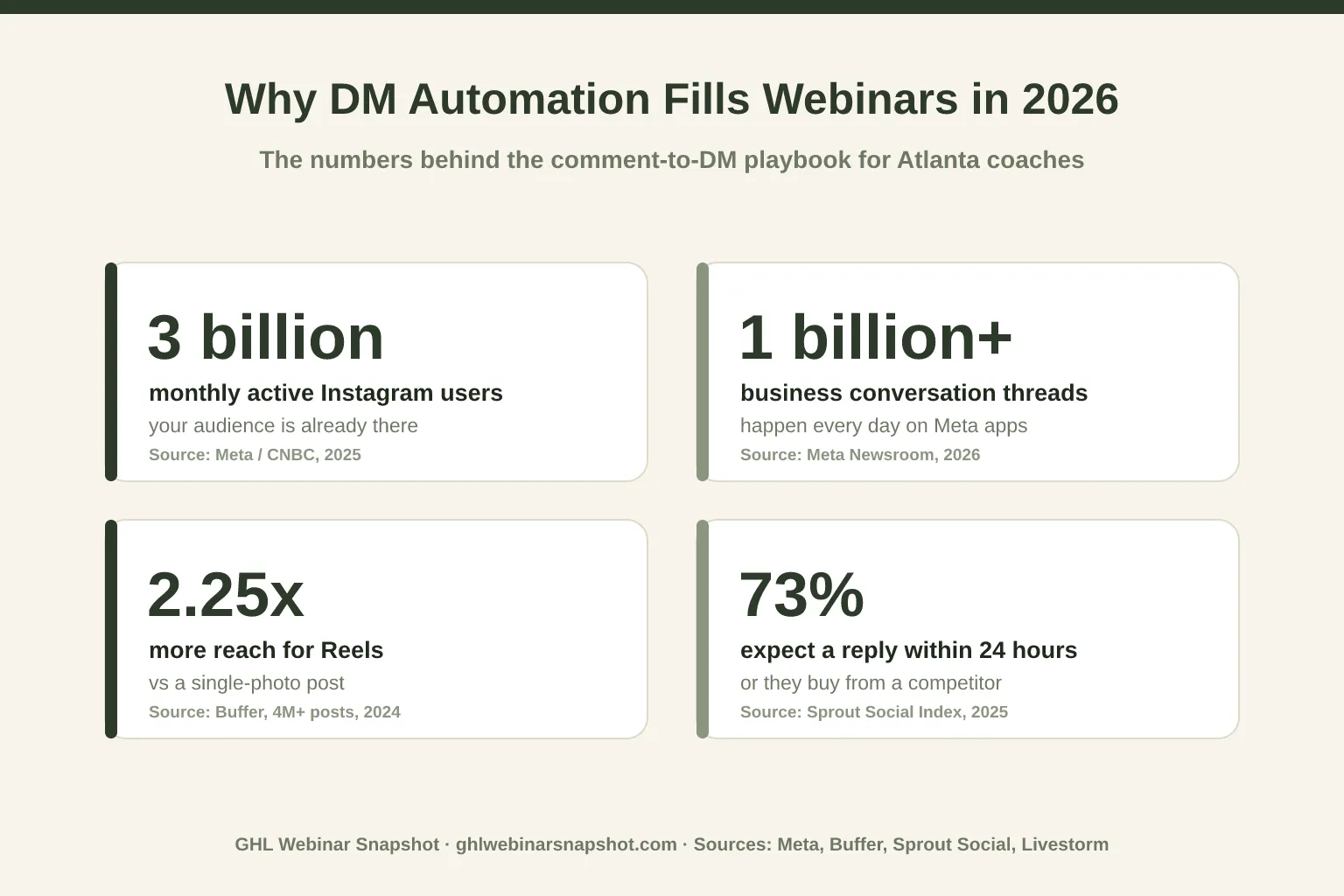
For an Atlanta coach or course creator, this is the highest-leverage social play available in 2026. Your audience already lives in the DMs — Instagram crossed 3 billion monthly active users in September 2025 (Meta, via CNBC), and people now hold over 1 billion active conversation threads with businesses every day across Instagram, Messenger, and WhatsApp (Meta Newsroom, 2026). This playbook shows you exactly how to build the comment-to-DM flow, wire it into GoHighLevel, keep it compliant, and hand it off so it runs without you.
Table of contents
- What is comment-to-DM automation for webinars?
- Why DMs fill more webinar seats than the feed
- The 6-step comment-to-DM playbook
- Keeping it compliant: Meta’s rules, consent, and TCPA
- What Atlanta coaches actually see
- DIY vs done-for-you: which should you run?
- Common mistakes that kill the flow
- FAQ
What is comment-to-DM automation for webinars?
Comment-to-DM automation is a workflow that watches a specific post for a keyword in the comments, then automatically sends the commenter a private message — with your webinar registration link — within seconds. It turns a public, low-intent interaction (a comment) into a private, high-intent one (a one-on-one DM), and it does it at scale without you touching your phone.
The mechanics are simple. You publish a post or Reel that says something like “Comment WEBINAR and I’ll DM you the free registration link.” When someone comments that keyword, the automation:
- Replies to their comment publicly (which boosts the post’s engagement signal), and
- Opens a DM thread and sends the registration link, often with a short qualifying question.
On its own, that’s a neat trick that other tools do too. The difference — and the reason this belongs in a GoHighLevel-run webinar business — is what happens after the link is sent: the DM captures the person’s name and email, drops them into your CRM as a registrant, tags them by source, and triggers the exact same reminder-and-booking machine your paid ads feed. The comment-to-DM flow becomes a free, organic top-of-funnel that plugs into the system you already run.
Why DMs fill more webinar seats than the feed
The old model — “post about the webinar, put the link in bio, hope people tap through” — leaks at every step. Every extra tap between “I’m interested” and “I’m registered” costs you attendees. DMs collapse that path to a single comment, and they meet your audience where their attention already is.
Three shifts make DMs the strongest organic channel for webinar registrations right now:
Your audience is already in the app — and already messaging businesses. With Instagram at 3 billion monthly active users and 1 billion+ business conversations happening daily across Meta’s apps, messaging a business isn’t a novelty anymore — it’s the default way people interact with brands they discover.
Speed decides the outcome, and only automation is fast enough. The 2025 Sprout Social Index found that 73% of consumers expect a brand to respond within 24 hours — and 73% say they’ll take their business to a competitor when a brand ignores them on social. A human replying to comments by hand can’t hit that consistently; an automation replies in seconds, every time.
Reels put the offer in front of new people. Buffer’s analysis of more than 4 million posts found Reels reach about 2.25x more accounts than a single-photo post. That reach is wasted if it dead-ends at a link in bio — pairing a Reel with a comment trigger turns discovery straight into registrations.
For context on the alternative channel most creators default to: email open rates average around 34% (Mailchimp benchmarks, a figure inflated by Apple Mail’s privacy pre-loading). Email still matters — it’s where your reminder sequence lives — but as a first-touch registration channel, a DM that lands in the primary inbox of someone who just raised their hand is a warmer, faster start.
Reels reach: why the hook matters
Because reach is what feeds the funnel, the format you choose for the hook post matters more than the caption. Here’s how the three main Instagram formats compare on reach.
The 6-step comment-to-DM playbook
Here’s the exact build. The featured diagram at the top of this post shows the four-stage arc — post, auto-DM, capture, remind and book — and the six steps below are how you actually wire it up inside GoHighLevel.
Step 1 — Create the hook post (lead with a Reel)
Make a short Reel that teases the webinar’s single biggest promise — the one outcome someone gets by attending — and end with a clear instruction: “Comment the word WEBINAR and I’ll send you the free registration link.” Pick a keyword that’s short, unique, and unlikely to appear in normal comments (WEBINAR, MASTERCLASS, or the webinar’s name). Because Reels out-reach every other format, this is the post that puts your offer in front of people who don’t yet follow you.
Step 2 — Set the comment trigger
In your automation tool (GoHighLevel’s social/DM automations, or a connected tool like Manychat), create a trigger that watches that specific post for that keyword. Scope it to the single post so you don’t accidentally DM people commenting on unrelated content. Add a public auto-reply to the comment too — something like “Just sent it! Check your DMs 📩” — which nudges the algorithm and reassures the commenter.
Step 3 — Send the auto-DM with the link and a consent line
The DM does three jobs: deliver the registration link, confirm what they signed up for, and capture consent. A clean template:
“Hey! Here’s your free registration link for the [webinar name] 👉 [link]. Want me to text you a reminder 15 minutes before we go live? Reply YES and I’ll set it up.”
That “reply YES” is not decoration — it’s how you collect the opt-in that makes the SMS reminders in Step 5 compliant. (More on that below.)
Step 4 — Capture the lead into GoHighLevel
This is the step that separates a real system from a party trick. When the person taps the link and registers — or replies with their details in the DM — that data flows into GoHighLevel as a new contact, tagged source: IG-DM and webinar: [name], and dropped onto your registrant pipeline. Now they’re not a comment you’ll forget; they’re a tracked lead. If you’re still hand-building your registration experience, our guide to a high-converting webinar registration page pairs directly with this step.
Step 5 — Trigger the reminder cadence
The moment the contact is tagged as registered, your automation fires the same proven sequence your ads feed: a confirmation, a series of email and SMS reminders, and the 15-minute “we’re live” push. This matters because more than half of registrants never attend live — the 47.7% average show-up rate means the reminders and no-show recovery are where the attendance actually comes from.
Step 6 — Route hot attendees to a booked call
After the webinar, the same system tags who attended, who watched the replay, and who hit your call-to-action, then routes the most engaged people into a booking flow — ideally an automated path from attendee to sales call. A website AI chat widget or chatbot can catch the stragglers who reply late in the DMs and book them too.
Keeping it compliant: Meta’s rules, consent, and TCPA
Automation without compliance is a fast way to get an account restricted or a TCPA complaint. Three rules to build in from day one:
Respect Meta’s 24-hour messaging window. Platform policy lets you message a user freely for 24 hours after they interact with you (like commenting your keyword). After that window, promotional messages are restricted. Your comment-to-DM flow fits neatly inside this — the person just commented, so you’re within the window — but don’t try to blast old DM contacts with new promos.
Get explicit opt-in before you text. The DM link and the “reply YES for reminders” line exist to capture real consent. Don’t scrape a phone number and start texting; get the person to affirmatively ask for SMS. For the full picture on A2P 10DLC registration and TCPA-aware setup, read our SMS compliance guide for webinars.
Honor opt-outs everywhere. STOP on SMS, and an easy way to end the DM conversation. Build these in once and every future campaign inherits them.
Speed is the other half of getting this right — and it’s why automation beats a human doing it manually. Consumer expectations have hardened: an unanswered DM doesn’t just sit there, it sends people to a competitor.
What Atlanta coaches actually see
Atlanta is one of the country’s densest creator and small-business markets, which cuts both ways for a webinar host. Georgia is home to roughly 1.4 million small businesses — about 99.7% of all businesses in the state (SBA Office of Advocacy, 2024), and metro Atlanta anchors a thriving coaching, course, and content economy. That means two things for a local operator.
First, the audience is here and active — Atlanta’s creators, consultants, and course sellers have engaged followings that respond to a good Reel. Comment-to-DM automation lets a solo Atlanta coach capture that engagement into registrations without hiring a social team to sit in the DMs all day.
Second, the market is crowded, so execution wins. When several local experts are all running webinars, the one whose funnel captures every hand-raise in seconds — and follows up relentlessly — books more calls. That’s not a talent advantage; it’s a systems advantage, and it’s exactly what automation industrializes. If page speed is also on your list (it should be — slow registration pages leak the traffic your Reels earn), our breakdown of webinar landing page speed pairs naturally with this play.
DIY vs done-for-you: which should you run?
You can absolutely build this yourself — the six steps above are the whole recipe. The real question is whether running it week after week, across every channel, is the best use of your time. Here’s the honest comparison.
Running comment-to-DM automation: DIY vs done-for-you
| Feature | Done-for-you social system | DIY, in-house |
|---|---|---|
| Setup time | Built for you in days | Your evenings for 2–4 weeks of trial and error |
| Channels covered | All 9 (IG, FB, TikTok, YouTube + more) | Usually one or two you can keep up with |
| Content that feeds it | Reels, carousels, posts produced weekly | You write, film, and edit everything |
| CRM + reminder wiring | Synced to GoHighLevel end-to-end | You build and debug every trigger |
| Compliance setup | Consent + opt-out built in | You research TCPA/A2P yourself |
| Ongoing cost | From $397/mo, white-label | 'Free' — paid in your best hours |
For a coach whose highest-value hours are spent teaching and selling, handing off the content-plus-automation engine usually pays for itself in reclaimed time alone. If you’d rather run it yourself, the playbook above is complete — and if you’d rather it just run, that’s what we do.
Common mistakes that kill the flow
Even a well-built flow underperforms when these slip through:
- Dead-ending at the link. If the DM sends a link but nothing captures the registrant into your CRM, you’ve built a party trick, not a funnel. Capture is the point (Step 4).
- No reminder cadence. With show-up rates near 47.7%, skipping reminders throws away half your registrations. The DM must feed the email and SMS sequence.
- Texting without consent. Sending SMS to a number you grabbed without an explicit opt-in is a compliance risk. Use the “reply YES” step and follow A2P/TCPA best practices.
- A generic keyword. If your trigger word shows up in normal conversation, you’ll DM the wrong people. Keep it specific.
- Boring hooks. The whole flow depends on reach. If the Reel doesn’t stop the scroll, there are no comments to convert.
- Set-and-forget. Automations drift — links expire, tags stop firing. Someone has to check them, or a GoHighLevel VA who does it for you.
FAQ
What is comment-to-DM automation for webinars?
It's a workflow that watches a specific Instagram or Facebook post for a keyword in the comments, then automatically sends the commenter a direct message containing your webinar registration link. In a GoHighLevel-run business, that DM also captures the person's name and email into your CRM, tags them as a registrant, and triggers your reminder and booking automations — so a public comment becomes a tracked lead and, eventually, a booked call.
Is automating Instagram and Facebook DMs allowed by Meta?
Yes, when you use approved tools and stay within Meta's rules. Platform policy generally lets you message a user for 24 hours after they interact with you — commenting your keyword counts — which is exactly the window a comment-to-DM flow operates in. Use an official Meta Business integration (such as GoHighLevel's social automations or Manychat), avoid blasting old contacts with promos outside the window, and always honor opt-outs.
Do I need SMS consent to text people who came through a DM?
Yes. Getting the registration link in a DM is not consent to text. You need an explicit opt-in — which is why the DM template includes a 'reply YES for reminders' step. Collect that affirmative opt-in, register your A2P 10DLC brand and campaign, and honor STOP requests. See our SMS compliance guide for webinars for the full setup. Final compliance responsibility always rests with you as the operator.
Why use a Reel instead of a regular post for the hook?
Reach. Buffer's analysis of more than 4 million Instagram posts found Reels reach about 2.25 times more accounts than a single-photo post. Since comment-to-DM converts reach into registrations, leading with the format that reaches the most new people gives the automation more hand-raises to work with. Carousels tend to win engagement, so they make good secondary hooks.
How does this connect to GoHighLevel?
The DM automation passes each new registrant into GoHighLevel as a contact — tagged by source and webinar — on your registrant pipeline. From there, GoHighLevel runs the confirmation, the email and SMS reminder cadence, no-show recovery, and the post-webinar booking flow. The comment-to-DM step is simply a new organic front door into the system your paid traffic already uses.
Can I get this built for me instead of doing it myself?
Yes. A done-for-you social media system produces the hook content (Reels, carousels, posts), builds the comment-to-DM automations across all nine channels, and wires everything into GoHighLevel with consent and opt-outs handled — starting from $397/mo, white-label. Many Atlanta coaches start there so the whole engine runs without them living in the DMs.
About the author
Priya Shankar is a Course Launch & Conversion Coach based in Seattle, WA. She works with course creators and founders who teach to sell — masterclasses, demos, and high-ticket coaching webinars — and thinks as much about the offer and the room energy as the automation underneath it. She writes about turning social attention into registered attendees, and registered attendees into booked calls.
Related reading
- DIY vs Done-For-You Social Media for Chicago Coaches: Which Fills More Webinar Seats?
- Webinar Chatbot: How to Fill Seats and Book Sales Calls With AI
- The Webinar Email Sequence That Actually Gets People to Show Up
- Webinar No-Show Recovery: Win Back the Registrants Who Didn’t Attend
- How to Book Sales Calls From Your Webinars — Automatically
Sources
- CNBC — Instagram now has 3 billion monthly active users (Meta, Sept 2025)
- Meta Newsroom — 1 billion+ active business conversation threads daily (June 2026)
- Buffer — Instagram Reels reach vs engagement analysis (4M+ posts)
- Sprout Social — Social Media Customer Service Statistics (2025 Index)
- Livestorm — 2026 Webinar Benchmark Report (47.7% average show-up rate)
- Mailchimp — Email Marketing Benchmarks (~34% average open rate)
- SBA Office of Advocacy — 2024 Georgia Small Business Profile (~1.4M small businesses, 99.7%)