
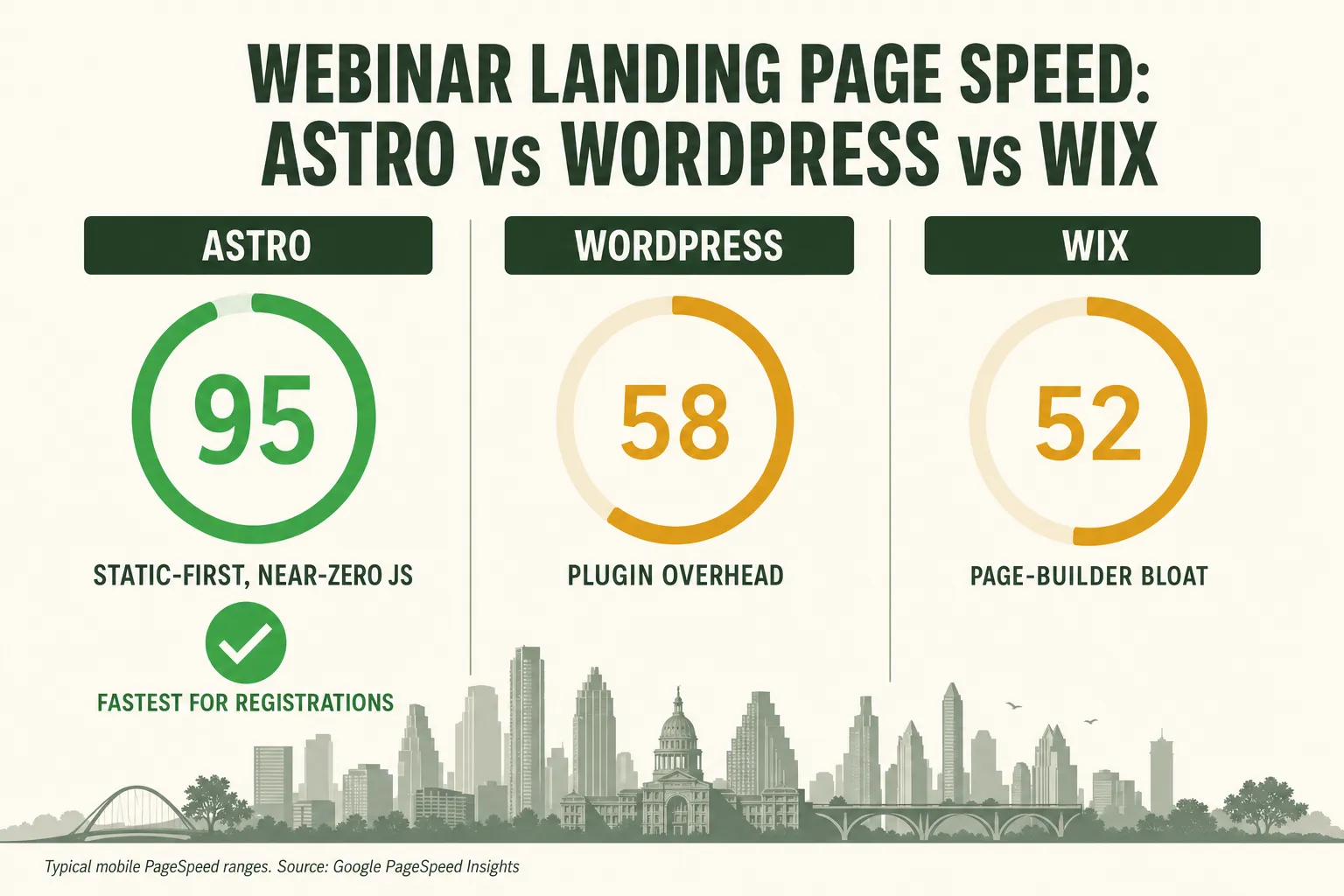
For a webinar registration page, Astro is the fastest of the three by a wide margin: it ships static-first HTML with near-zero JavaScript, so it routinely scores 90–100 on Google PageSpeed and passes Core Web Vitals out of the box, while typical WordPress and Wix pages carry plugin and page-builder overhead that drags them into the 40–70 range on mobile. For an Austin coach or course creator paying for traffic to fill a webinar, that gap is not cosmetic — it’s the difference between keeping the registrant who clicked your ad and losing them before the form even loads.
Speed is the most under-priced lever in webinar marketing. You can obsess over your headline, your ad creative, and your reminder cadence, and still quietly leak a third of your paid clicks to a registration page that takes four seconds to become usable on a phone on Austin’s spotty downtown LTE. This comparison breaks down how the three most common platforms — Astro, WordPress, and Wix — actually perform, why it maps directly to your registration rate, and what the right setup looks like for a webinar business here in Central Texas.
Table of contents
- Which is fastest for a webinar landing page?
- Why landing page speed decides your registration rate
- Core Web Vitals: the 2026 speed scorecard
- Astro vs WordPress vs Wix: the head-to-head
- What this means for Austin webinar hosts
- Keep GoHighLevel for automation, put the page on Astro
- FAQ
Which is fastest for a webinar landing page?
Astro is the fastest platform for a webinar registration page, WordPress is the most flexible but the heaviest to keep fast, and Wix is the easiest to launch but the hardest to make genuinely fast on mobile. If your only goal were speed, Astro wins without much of a contest — and for a page whose entire job is to load instantly and convert a paid click into a registrant, speed is close to the only goal.
The reason is architectural, not a matter of who tunes their site better. Astro is a static-first framework that ships almost no JavaScript to the browser; it renders your page to plain HTML at build time and serves it from a global edge network, so the registration form is visible and interactive almost immediately. WordPress and Wix both do meaningful work in the browser — themes, plugins, page-builder runtimes, tracking scripts — before the page settles. That work is what shows up as a lower PageSpeed score and a slower, jumpier experience on a mid-range phone.
Here’s the practical shape of the three, before we get into the numbers:
Those PageSpeed bands are directional, not a lab result — a heavily optimized WordPress build can climb higher, and a bloated Astro page can fall — but they reflect the default gravity of each platform. You have to fight WordPress and Wix to be fast; Astro is fast unless you actively break it.
Why landing page speed decides your registration rate
Every extra second your registration page takes to load statistically costs you registrants — and because webinar traffic is usually paid, those aren’t free visitors you’re losing, they’re clicks you already paid for. This is the part most operators underweight. They treat the landing page as a formality and the ad as the expensive part, when the page is where the money leaks out.
The data is remarkably consistent across a decade of studies:
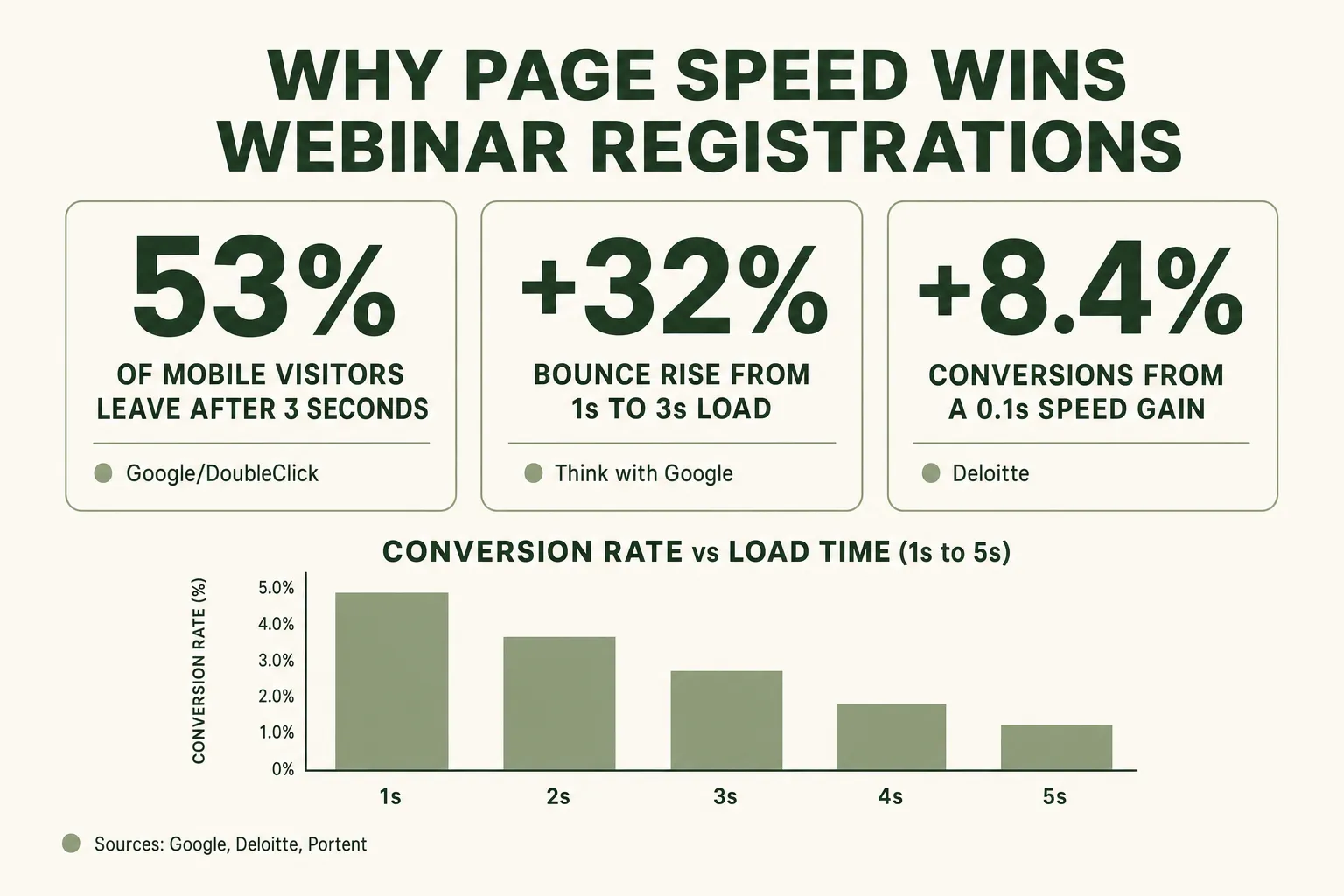
- Bounce climbs fast. Google’s analysis of mobile pages found that as load time goes from 1 to 3 seconds, the probability a visitor bounces increases 32%; from 1 to 5 seconds it jumps 90%, and from 1 to 6 seconds, 106%.
- The 3-second cliff. 53% of mobile site visits are abandoned if a page takes longer than 3 seconds to load, per Google/DoubleClick — and most webinar registrations now happen on a phone.
- Conversion tracks speed. Portent’s study of load time and conversion found the rate peaks around a 1-second load and falls off sharply after, with B2B sites that load in one second converting roughly three times higher than those that load in five.
- Even tenths matter. Deloitte’s “Milliseconds Make Millions” report found that a 0.1-second improvement in mobile site speed increased conversions by 8.4% and average order value by 9.2%.
- Delay compounds bounce. Akamai/SOASTA measured that a 100ms delay can cut conversion rates by up to 7%, and a 2-second delay increases bounce rate by 103%.
Put a chart to the bounce data and the shape is unmistakable — the penalty isn’t linear, it accelerates:
If you’re spending, say, $6 a click to send Austin coaches to a webinar registration page, and half your mobile visitors bounce before the page is usable, you’ve effectively doubled your true cost per registrant — before a single reminder email goes out. The registration page is the narrowest part of your webinar conversion funnel, and speed is the cheapest widening you can buy.
Core Web Vitals: the 2026 speed scorecard
Core Web Vitals are Google’s three real-user speed metrics, and in 2026 the “good” thresholds are LCP under 2.5 seconds, INP under 200 milliseconds, and CLS under 0.1 — a page has to clear all three, at the 75th percentile of real visitors, to be rated good. They matter for two separate reasons: they’re a proxy for the experience your registrant actually feels, and Google uses them as a ranking signal.
Here’s what each one measures, in plain terms:
- LCP (Largest Contentful Paint) — under 2.5s. How long until the biggest thing on screen (usually your headline or hero image) has painted. This is “did the page show up.” Threshold source: web.dev.
- INP (Interaction to Next Paint) — under 200ms. How quickly the page responds when someone taps the registration button. INP replaced FID in 2024, so a 2026 audit must use it.
- CLS (Cumulative Layout Shift) — under 0.1. How much the page jumps around as it loads. High CLS is why a visitor taps the wrong button when a late-loading ad or font shoves the form down.
The connection to platform choice is direct. LCP and INP both suffer when a page ships a lot of JavaScript that has to download, parse, and execute before the page is ready — exactly the tax that plugin-heavy WordPress themes and Wix’s page-builder runtime impose. CLS suffers when elements load in unpredictable order, which is more common on template systems that inject content client-side. A static-first Astro page starts from a structural advantage on all three.
Astro vs WordPress vs Wix: the head-to-head
Astro is the best fit for a conversion-critical webinar landing page, WordPress is the best fit when you need a sprawling content site with a specific plugin ecosystem, and Wix is the best fit when a non-technical owner wants to self-serve a simple site and speed is genuinely secondary. For the specific job of a registration page that turns paid clicks into attendees, the priorities line up in Astro’s favor.
Astro vs WordPress vs Wix for a webinar registration page
| Plan | Astro recommended | WordPress | Wix |
|---|---|---|---|
| Price | Fastest | Flexible | Easiest |
| Feature 1 | Static-first, near-zero JS by default | Huge plugin & theme ecosystem | Drag-and-drop, no developer needed |
| Feature 2 | 90–100 PageSpeed, passes Core Web Vitals | Fast is possible but you fight for it | Page-builder runtime adds weight |
| Feature 3 | Served from the global edge | Plugin bloat & updates slow it down | Weaker mobile Core Web Vitals |
| Feature 4 | Full control of schema, meta & llms.txt | Hosting, security & maintenance overhead | Limited custom code & schema control |
| Feature 5 | Needs a developer to build/change | Best for large content sites | Best for simple, speed-secondary sites |
Astro — static-first, near-zero JavaScript
Astro’s whole design philosophy is to send the browser as little as possible. It renders to HTML at build time and uses “islands” so that interactivity is added only where you actually need it, rather than shipping a heavy framework runtime for the whole page. For a registration page — mostly text, an image, and a form — that means the visitor gets a fully-painted, tappable page almost instantly. The trade-off is that Astro is a developer’s tool: you (or a done-for-you provider) build it, and content changes go through a build step rather than a drag-and-drop editor.
WordPress — powerful, but you fight for speed
WordPress runs a huge share of the web for good reason: the ecosystem is enormous and there’s a plugin for everything. But that flexibility is also the speed problem. Each plugin, each page-builder (Elementor, Divi), and each third-party script adds JavaScript and database queries. You can get a WordPress registration page fast with aggressive caching, a lightweight theme, and disciplined plugin hygiene — but it’s ongoing work, and one plugin update can undo it. For a large blog or membership site, that trade is often worth it. For a single high-stakes registration page, it’s a lot of overhead to manage.
Wix — easy to launch, hard to make fast
Wix’s appeal is that anyone can build a site without touching code. The cost is that the page-builder generates heavier markup and relies on a client-side runtime to render, which tends to depress mobile Core Web Vitals. You also get less control over the technical SEO details — schema depth, meta structure, and files like llms.txt — that increasingly decide whether you show up in Google’s AI results and in tools like Perplexity and ChatGPT. If speed and search visibility are secondary and you value pure self-service, Wix is defensible. For a paid-traffic registration page, it usually isn’t.
The dollars-and-tenths side of the argument looks like this:
What this means for Austin webinar hosts
Austin’s density of coaches, course creators, and B2B founders means you’re competing for the same webinar audience against people running the same ads — so the registration page that loads faster and ranks locally is a real, compounding edge. Speed isn’t just a conversion lever here; it’s a local-SEO lever too.
Two Austin-specific realities make this concrete:
- Your audience is mobile and on the move. Whether you’re filling a live workshop for South Austin creatives or an evergreen B2B demo for downtown SaaS teams, a large share of your clicks come from phones on cellular. That’s exactly the environment where a heavy WordPress or Wix page stalls and a static Astro page still opens in a blink.
- Local search is winnable with the right technical setup. Because Core Web Vitals feed Google’s ranking systems, a fast page with proper location pages and schema can rank for searches like “marketing webinar Austin” or “[your topic] masterclass Texas” — the kind of free, high-intent traffic that lowers your blended cost per registrant over time. That requires control over schema, meta, and location pages, which is precisely where page-builder platforms fall short.
If you’re weighing the whole picture — not just the landing page but show-up rate and booked calls — pair this with our 2026 webinar benchmarks and the case for treating show-up rate as the metric that compounds. A fast page fills the top of the funnel; the automation behind it decides how much of that becomes revenue.
Keep GoHighLevel for automation, put the page on Astro
The best setup for most Austin webinar hosts isn’t “GHL or Astro” — it’s both: a blazing-fast Astro registration page as the public front door, feeding registrants straight into GoHighLevel for reminders, tagging, and booking. GoHighLevel is excellent at what it does — the CRM, the 7-touch reminder cadence, the pipelines, the AI follow-up. It was never designed to be the fastest public-facing landing page on the internet, and it doesn’t have to be. Let each tool do the job it’s best at.
That’s exactly the model our Get a Website service is built for. We build your webinar site on Astro with a guaranteed 90+ PageSpeed score (often a perfect 100), proper location pages, schema/AEO/GEO structure, managed Cloudflare hosting, and an AI chat widget — for $497 one-time plus $97/month — and wire the registration forms into your GoHighLevel (or any CRM) so every sign-up flows into your reminder and booking automation instantly. You get the speed and the automation, without maintaining a plugin stack.
FAQ
What is the fastest platform for a webinar landing page?
Astro is the fastest of the mainstream options for a webinar registration page. It's a static-first framework that ships almost no JavaScript to the browser by default and serves pages from a global edge network, so a well-built Astro page routinely scores 90–100 on Google PageSpeed and passes Core Web Vitals on mobile. Typical WordPress and Wix pages carry plugin or page-builder overhead that usually lands them in the 40–70 range on mobile, though a heavily optimized WordPress build can score higher.
Does page speed really affect webinar registrations?
Yes, directly. Google found that as mobile load time goes from 1 to 3 seconds, bounce probability rises 32%, and 53% of mobile visits are abandoned if a page takes longer than 3 seconds. Portent's research shows conversion rate peaks around a 1-second load and falls sharply after, and Deloitte found a 0.1-second speed improvement lifted conversions 8.4%. Because webinar traffic is usually paid, every bounce caused by a slow page is a registrant you already paid to acquire.
What are the Core Web Vitals thresholds in 2026?
The 'good' thresholds are Largest Contentful Paint (LCP) under 2.5 seconds, Interaction to Next Paint (INP) under 200 milliseconds, and Cumulative Layout Shift (CLS) under 0.1, each measured at the 75th percentile of real users. INP replaced FID as a Core Web Vital in 2024, so a current audit must use INP. A page must pass all three to be rated 'good,' and Google uses Core Web Vitals as a ranking signal.
Is Astro better than WordPress for a webinar site?
For a conversion-critical registration page, yes — Astro is faster by design and easier to keep fast. WordPress is more flexible and has a larger plugin ecosystem, which makes it a strong choice for large content or membership sites, but that flexibility is also its speed problem: plugins, themes, and page-builders add JavaScript and maintenance overhead. If your priority is a fast page that converts paid clicks, Astro is the better tool; if you need a sprawling site with specific plugins, WordPress may win.
Can I keep GoHighLevel and still use a fast Astro landing page?
Yes, and it's the setup we recommend. Use a fast Astro page as the public registration front door and connect its forms to GoHighLevel (via native integration, Zapier, Pabbly, or Make) so every sign-up flows into your CRM within seconds and triggers your reminder cadence, tagging, and booking automation. You keep GHL for what it's best at — automation and follow-up — while the landing page gets the speed and SEO control GHL-built pages can't match.
How do I check my webinar page's speed?
Run your live registration URL through Google PageSpeed Insights on the mobile setting — it reports both a lab performance score and your real-user Core Web Vitals field data. If your mobile score is under 70, or LCP, INP, or CLS is failing, your page is likely costing you registrations. Test on mobile specifically, since that's where most webinar sign-ups happen and where heavy platforms struggle most.
About the author
Mara Delgado is a Webinar Funnel Strategist based in Austin, TX. She has spent the better part of a decade turning empty registration pages into packed live rooms — first producing launch webinars for coaches, then going all-in on GoHighLevel automation, where she learned that show-up rate, not opt-in cost, is the metric that actually compounds. She writes about reminder cadences, replay windows, and the small technical tweaks — including page speed — that move attendance from 28% to north of 50%.
Related reading
- The Anatomy of a Webinar Registration Page That Converts
- The Webinar Conversion Funnel: From Click to Booked Call
- Why Show-Up Rate Is the Only Webinar Metric That Actually Compounds
- Webinar Benchmarks 2026: Show-Up Rates & Conversion Data
- The Best Time to Host a Webinar in 2026
Sources
- Astro Docs — Why Astro (zero JS by default, static-first)
- Think with Google — Mobile Page Speed New Industry Benchmarks
- Marketing Dive — 53% of mobile users abandon sites that take over 3s to load
- Portent — Site Speed Is (Still) Impacting Your Conversion Rate
- web.dev — Milliseconds Make Millions (Deloitte)
- web.dev — Defining the Core Web Vitals thresholds
- Google Search Central — Understanding Core Web Vitals and Google Search
- Akamai — Spring 2017 State of Online Retail Performance (SOASTA)