
GoHighLevel pipeline design for registrant boards
GoHighLevel pipeline design, done in a click: 12 opportunities board designs that make Registered, Attended, Replay, Booked and Won readable from across the room. Try them on the board below, then apply the one you like yourself.
Now showing: Midnight Neon. A copy of the GoHighLevel opportunities board with a sample pipeline, restyled by the real engine. Stage colours follow column position, so your own stages (Registered, Attended, Booked, Won) pick them up whatever they are called.
What the pipeline designer does
The pipeline board designer restyles the GoHighLevel opportunities board (lanes, cards, headers and stage colours) with one of 12 designs. It changes how the board looks, never how opportunities move, so your workflows and reports keep working.
Five columns, five colours
Stage colours follow column position. Here is how a typical registrant-to-buyer pipeline reads once a design is applied.
- Column 1Registered
Signed up for the webinar. The reminder cadence is running; nobody needs to touch these cards yet.
- Column 2Attended live
Showed up and stayed. These are the warmest cards on the board on the night itself.
- Column 3Watched replay
Missed the live session but watched the replay. Often the busiest column in the 72 hours after.
- Column 4Booked call
Took the strategy call or demo. Closers work from here.
- Column 5Won
Bought the offer. The column you want to read at a glance on cart-close day.
Neon for launch night, clean for evergreen
A dark board for the team working the live room and the replay window; a light board for accounts people check once a day.
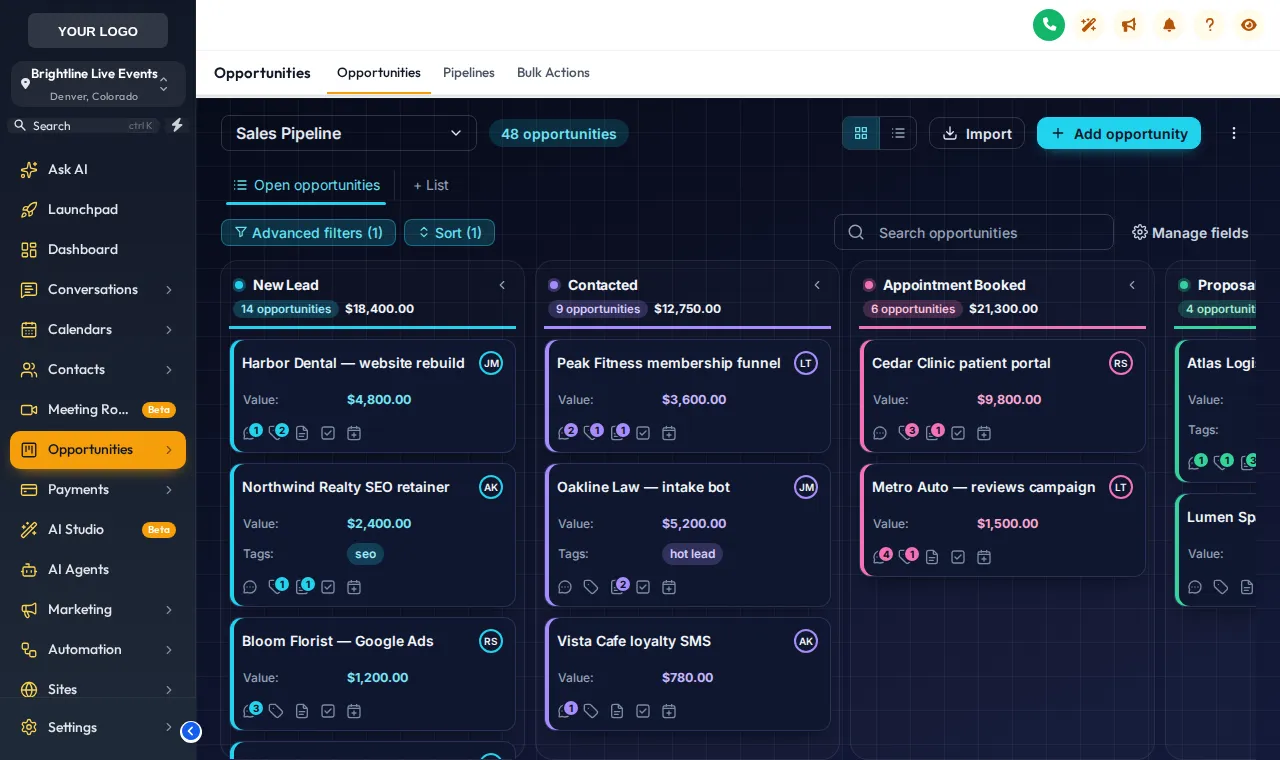
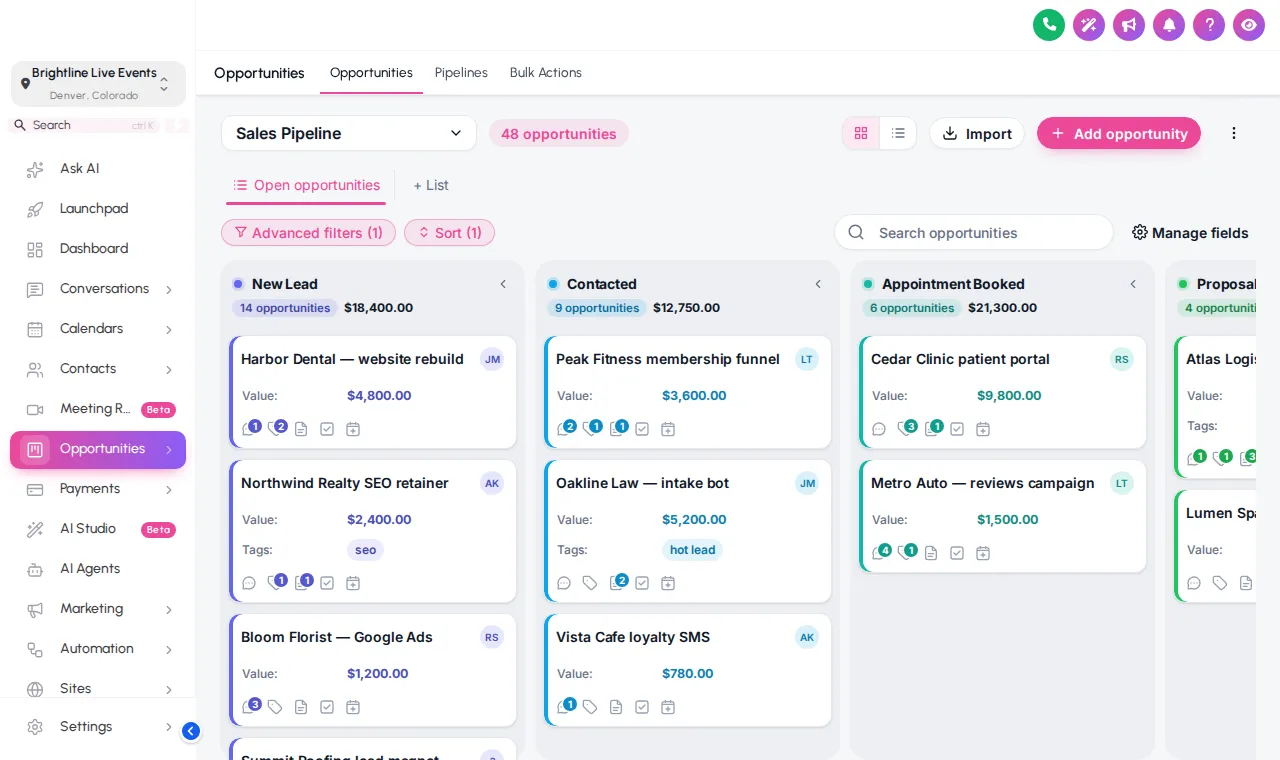
Find the hot replay watcher before the cart closes
On a stock board every card and every lane looks the same, so the person who watched 40 minutes of the replay sits next to someone who never opened the email. Distinct lane colours and clearer cards make the columns that matter jump out.
Setters
Scan the Attended and Replay columns first thing, with stage colours doing the sorting.
Closers
Booked-call cards stand apart, so nobody double-books or misses a follow-up.
Clients
A coach checking their own account sees a board that looks finished, in their colours.
All 12 pipeline designs
Straight from the customizer catalogue.
- Clean Light: Soft grey lanes, white cards, colour dot per stage
- Frosted Glass: Colour-mesh board, see-through lanes and cards
- Neo Brutal: Thick outlines, hard shadows, loud stage colours
- Candy Pastel: Each lane softly tinted in its own pastel colour
- Gradient Headers: Bold gradient stage headers above clean cards
- Compact Pro: Dense and flat: more deals on screen at once
- Colour Ribbon: Stage-coloured ribbons and lightly tinted cards
- Ocean Pro: Corporate blues, solid header bands
- Emerald Calm: Fresh greens, soft tinted lanes
- Brand Match: Stage colours built from your primary colour
- Midnight Neon: Deep navy board, glowing stage lines, neon accents
- Obsidian Gold: Black and gold, premium and calm
From checkout to a new board
The board designer lives in your account's editor. The full install details are in the install guide.
- Cue 1Today
Choose a package and pay once
Pick Live Start, Stage Pro, Main Event and pay by card through Stripe. It is a one-time payment for a lifetime account: no subscription and no renewal.
- Cue 2Minutes later
Get your login by email
The account is created automatically and your login (email and a temporary password) arrives by email, usually within minutes and at most 24 hours.
- Cue 3Rehearsal
Customize in the live editor
Log in, pick a theme, login design, menus, dashboard and widgets, and watch every change on a live preview before anything reaches your clients.
- Cue 4Curtain up
Paste one line into GoHighLevel
Paste one line of code into Agency Settings, Company, White Label, Custom JS (plus one CSS line for the login page). About 2 minutes, once; later changes go live instantly.
Included from Stage Pro (and in Main Event)
Everything in Live Start plus mega menus, a floating menu, the dashboard and pipeline designers and the contact actions bar. One-time payment, lifetime access. Login emailed within minutes (max 24 hours).
GoHighLevel pipeline design questions
What the board designer changes, what it never touches, and which package includes it.
What does a GoHighLevel pipeline design change?
Which package includes the pipeline board designer?
Will the colours match my webinar stages?
Does it change how opportunities move between stages?
Can different pipelines have different designs?
Are there dark pipeline boards?
Does it work with a long pipeline of many stages?
Do I need GoHighLevel admin access to install it?
Can I preview a design on my real board before publishing?
Work the board faster
The contact actions bar adds one-tap tags to each record, and a dashboard design links straight to the board. Back to the GHL Customizer Studio overview.
Dashboard designs
Dashboard designer: 18 sub-account dashboard designs, tried live on a sample webinar launch dashboard.
From Stage ProThemes and dark mode
27 themes, 11 UI kits, dark mode, brand colours and logo for every GoHighLevel screen.
From Live StartMenus and navigation
Menu layouts: sidebar or top bar, 8 top-bar styles, 8 mega menu styles, 8 header styles and a floating quick menu.
From Live StartContact actions bar
Contact actions bar: quick tags, custom-field forms and workflow buttons on every GoHighLevel contact.
From Stage ProLogin page designs
16 animated login page designs for the GoHighLevel sign-in, two-factor and password reset screens.
From Live StartCalculator widgets
Calculators: 134 templates in 14 types (no-show, ROI, stack replacement, speed to lead and more) for websites and funnels.
From Main EventPopup templates
Popups: 43 templates in 7 formats for inside GoHighLevel and for websites and registration pages.
From Main EventSocial proof notifications
Notifications and social proof: 94 templates in 32 types, including live counters, video and countdown collectors.
From Main EventFloating widgets
Floating widgets: 51 templates in 7 types, with 34 networks and leads sent into GoHighLevel.
From Main EventMake the board read itself on launch night
The pipeline designer comes with Stage Pro, together with the dashboard designer, mega menus and the contact actions bar.
One-time payment · login emailed within minutes (max 24 hours) · we never ask for your GoHighLevel password
GHL Webinar Snapshot is an independent team and is not affiliated with, endorsed by or sponsored by HighLevel, Inc. GoHighLevel and HighLevel are trademarks of their owner and are used here only to describe compatibility. The GHL Customizer account runs on the GHL Customer Care customizer platform; you customize and install it yourself. Prices are one-time, in USD, and come from our pricing file (last updated 2026-10-02).