
GHL menu customization for teams who work fast
GHL menu customization without code: move the GoHighLevel sidebar left, right or into a top bar, open big sections in a mega menu, and park a floating quick menu over every page. Your launch team gets to Conversations, Calendars and the registrant pipeline in one move instead of three.
Layout
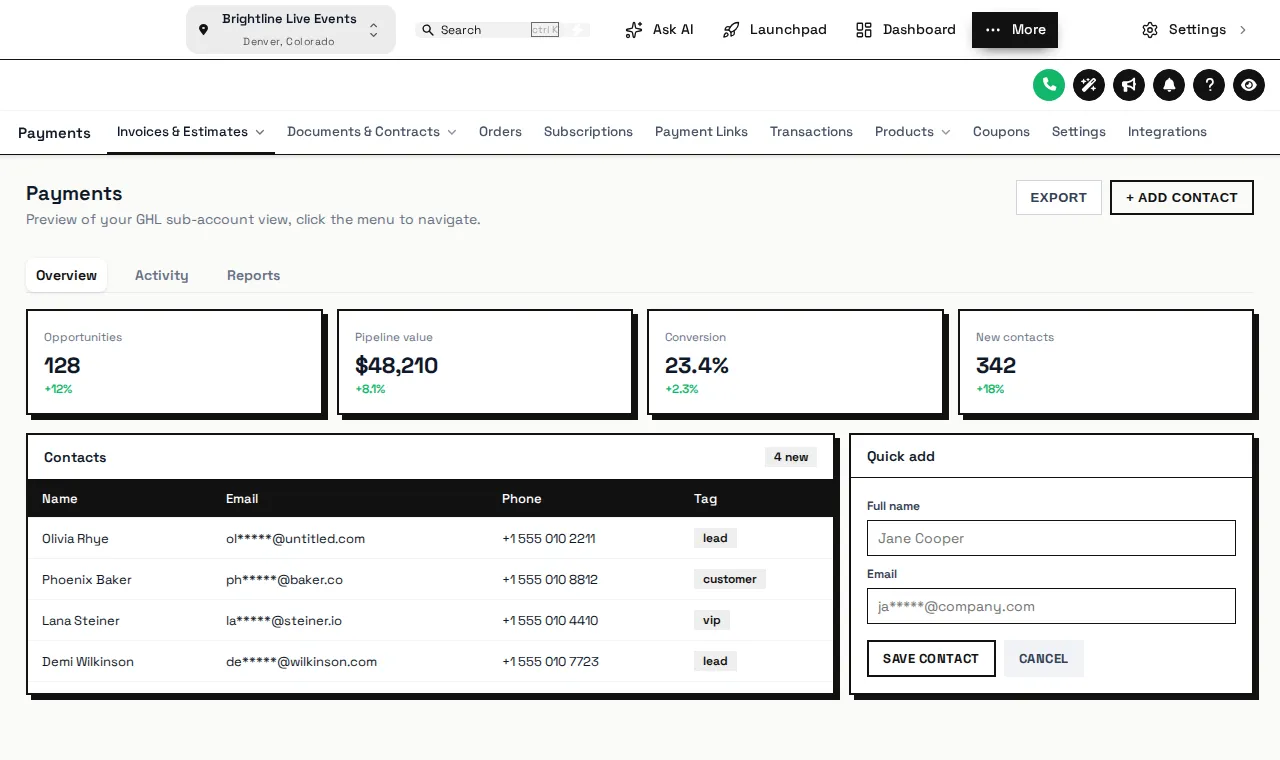
Left or right sidebar, top bar, merged header or collapsed icons, plus 8 top-bar styles and 8 header styles.
Mega menus and quick menu
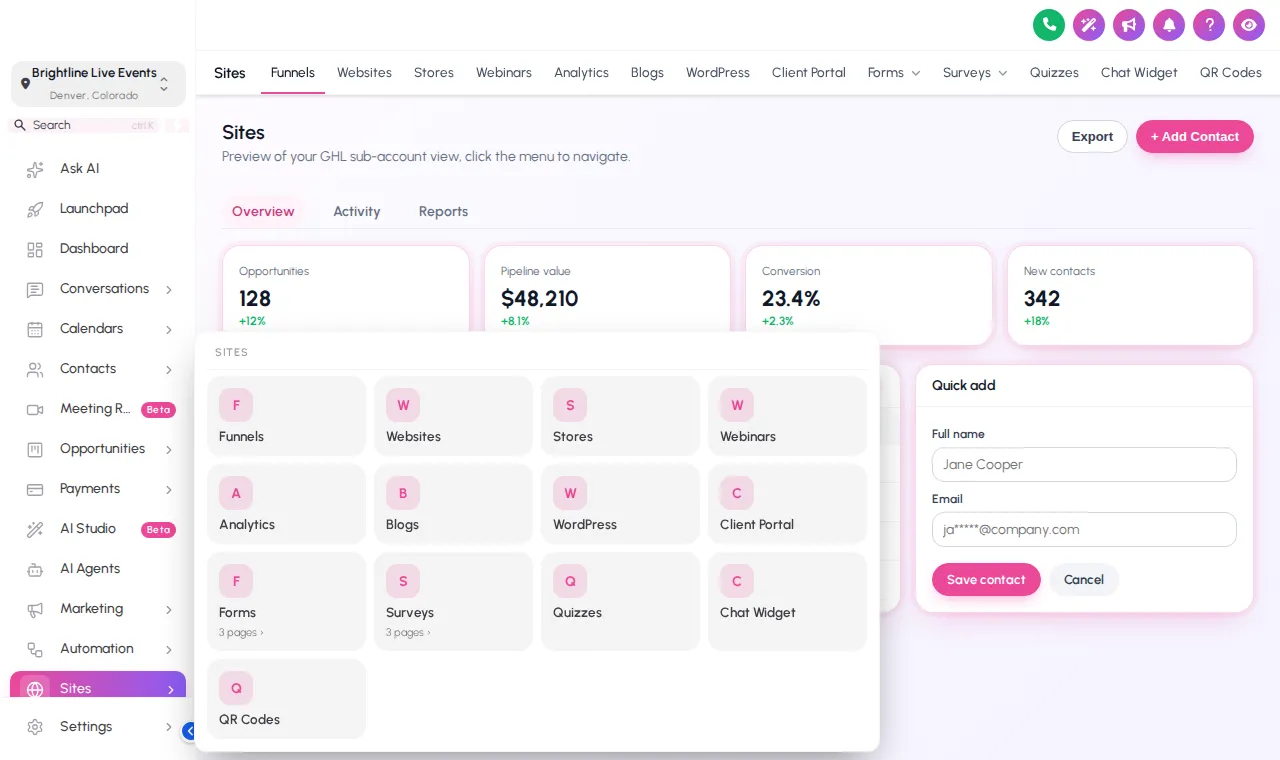
8 mega menu styles for big sections, and a floating quick menu in 3 layouts and 8 designs.
Rearrange the GoHighLevel sidebar
GHL menu customization means choosing where the menu sits, how sub-pages open and how the header looks; pick a layout below, then hover or click the menu inside the preview.
A top bar, or a mega menu
The top bar gives the whole width back to the page, which suits pipeline boards and long contact lists. A mega menu keeps the sidebar but opens big sections like Sites as a full panel, so funnels, webinars and forms are all one click away.
Top-bar styles
Solid, Floating, Glass, Brand gradient, Underline, Segmented, Centered, Slim.
Header styles
GoHighLevel default, Soft tint, Brand, Gradient, Aurora, Dark, Glass, Accent line.
A floating quick menu over every page
Included from Stage Pro. Click the bubble inside the preview to open its grid, or switch to the dock or rail; drag it by its grip to park it out of the way.
Scroll, hunt, click, click
- A long sidebar where Opportunities sits below the fold on small laptops
- Sub-pages hidden behind narrow fly-outs
- The same three pages opened a hundred times a day
Everything one move away
- A layout that fits the screens your team actually uses
- Mega menus that show a whole section at once
- A quick menu with the pages used most, on every page
Who notices a better menu
Menus are the part of GoHighLevel people touch most and think about least. These are the people who feel the difference in a launch.
VAs answering registrants
A quick menu with Conversations, Contacts and Calendars keeps them out of the sidebar during the busy hour before going live.
Funnel builders
A mega menu on Sites puts funnels, webinars, forms and surveys in one panel when registration pages need a last-minute fix.
Clients who log in rarely
A tidy top bar with fewer, clearer items helps a coach find their registrations without a walkthrough.
Included from Live Start (and in Stage Pro and Main Event)
Sidebar or top-bar layout, top-bar and header styles, collapsed icons. One-time payment, lifetime access. Login emailed within minutes (max 24 hours).
Included from Stage Pro (and in Main Event)
Mega menus for big sections and the floating quick menu, on top of every layout option. One-time payment, lifetime access. Login emailed within minutes (max 24 hours).
GHL menu customization questions
Layouts, mega menus and the quick menu: what each does and which package includes it.
What can I change with GHL menu customization?
Which package includes which menu features?
What is a mega menu in GoHighLevel?
What is the floating quick menu?
Does changing the menu hide pages from my team?
Can I move the GoHighLevel sidebar to the right?
Does the top-bar layout work on smaller laptops?
Will my custom menu links still work?
How do I roll back a menu change?
Dress the rest of the app
Menu layouts work hand in hand with GHL themes, and the contact actions bar adds shortcuts on each record. Back to the GHL Customizer Studio overview.
Dashboard designs
Dashboard designer: 18 sub-account dashboard designs, tried live on a sample webinar launch dashboard.
From Stage ProThemes and dark mode
27 themes, 11 UI kits, dark mode, brand colours and logo for every GoHighLevel screen.
From Live StartPipeline boards
Pipeline board designer: 12 opportunities board designs, tried live on a sample registrant pipeline.
From Stage ProContact actions bar
Contact actions bar: quick tags, custom-field forms and workflow buttons on every GoHighLevel contact.
From Stage ProLogin page designs
16 animated login page designs for the GoHighLevel sign-in, two-factor and password reset screens.
From Live StartCalculator widgets
Calculators: 134 templates in 14 types (no-show, ROI, stack replacement, speed to lead and more) for websites and funnels.
From Main EventPopup templates
Popups: 43 templates in 7 formats for inside GoHighLevel and for websites and registration pages.
From Main EventSocial proof notifications
Notifications and social proof: 94 templates in 32 types, including live counters, video and countdown collectors.
From Main EventFloating widgets
Floating widgets: 51 templates in 7 types, with 34 networks and leads sent into GoHighLevel.
From Main EventOne move to every page your launch needs
Layouts come with Live Start; Stage Pro adds mega menus and the floating quick menu, plus the dashboard and pipeline designers.
One-time payment · login emailed within minutes (max 24 hours) · we never ask for your GoHighLevel password
GHL Webinar Snapshot is an independent team and is not affiliated with, endorsed by or sponsored by HighLevel, Inc. GoHighLevel and HighLevel are trademarks of their owner and are used here only to describe compatibility. The GHL Customizer account runs on the GHL Customer Care customizer platform; you customize and install it yourself. Prices are one-time, in USD, and come from our pricing file (last updated 2026-10-02).