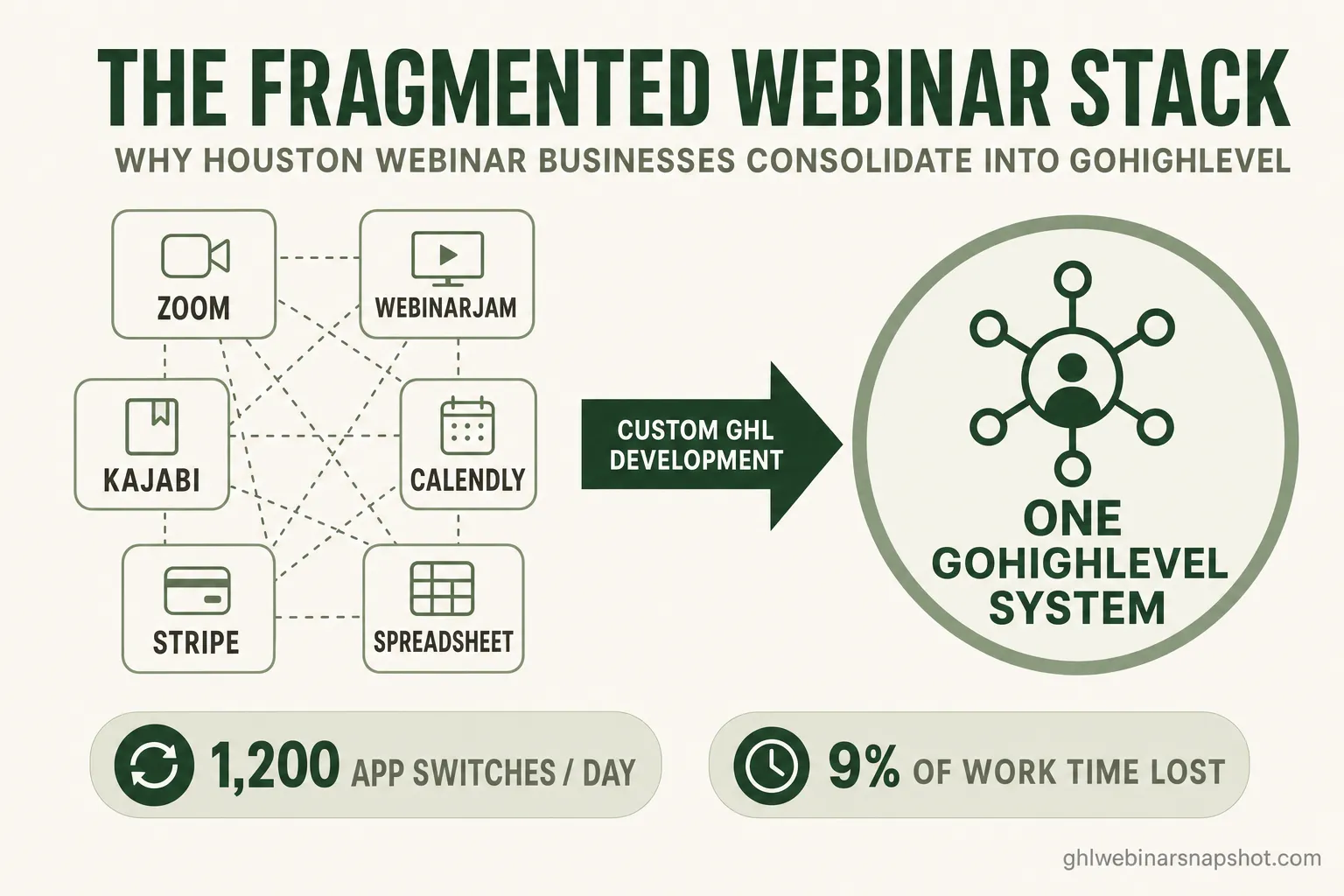
GoHighLevel custom development is engineering work that connects, extends, or migrates your webinar tools into a single GoHighLevel system — custom API connectors, dashboards, and workflows that off-the-shelf apps and no-code glue can’t deliver. For a Houston coach, course creator, or B2B founder running webinars off a patchwork of Zoom, WebinarJam, Kajabi, Calendly, Stripe, and a spreadsheet, it’s the point where you stop paying the “toggle tax” of six disconnected tools and start running one system that actually knows who registered, who attended, who watched the replay, and who’s ready for a call.
Most webinar operators don’t outgrow their tools all at once. They add one app to fix one problem, then another, then another — until a Tuesday-morning launch means copy-pasting a registrant list from WebinarJam into a Google Sheet, tagging no-shows by hand, and hoping the Stripe receipt matches the right contact in the CRM. This guide explains what GHL custom development is, the measurable cost of that fragmentation, the five signs a Houston webinar business has outgrown its stack, and how to decide between connecting, migrating, and custom-building.
Table of contents
- What is GoHighLevel custom development?
- The hidden tax of a fragmented webinar stack
- 5 signs your Houston webinar business has outgrown off-the-shelf tools
- What GHL custom development actually installs
- The ROI: what consolidation returns
- Why this matters for Houston specifically
- Connect, migrate, or custom-build: how to choose
- FAQ
What is GoHighLevel custom development?
GoHighLevel custom development is software engineering that makes GHL do things it can’t do out of the box — building custom API connectors to your webinar platform, custom dashboards and reports, custom AI agents, and full migrations — so your entire funnel runs as one system instead of six. It’s the layer above no-code. Where a Zapier zap can move a contact from one app to another, custom development builds the two-way sync, the attendance logic, and the reporting views that a webinar business actually depends on.
In practice, GHL custom development for a webinar operator usually means one of five things:
- Platform connectors — a webhook-driven bridge that syncs registration and live-vs-replay attendance between WebinarJam, Demio, Zoom Webinars, or EverWebinar and your GHL sub-account, updating pipeline stages and custom fields automatically.
- Custom dashboards — an attendee-operations view built on GHL data: registrant-to-attendee journeys, replay-watch percentage, and call-booked status, all in one screen instead of five tabs.
- Custom AI agents — a registration concierge or no-show recovery caller trained on your funnel (evergreen vs live, replay windows, buyer-signal thresholds) and wired straight into GHL.
- Data syncs — keeping GHL consistent with Stripe, Calendly, Kajabi, Teachable, or a custom warehouse via webhooks, polling, or scheduled jobs.
- Full migrations — moving your whole course and webinar funnel into GHL cleanly, then rebuilding pages, reminder cadences, and pipelines natively.
The through-line is consolidation. Every one of these exists to collapse a job you’re currently doing across multiple tools into a single, reliable system of record. That’s a different discipline from the snapshot most operators start with — and it’s exactly what our custom GHL development service is built for.
The hidden tax of a fragmented webinar stack
The cost of a fragmented stack isn’t the software bills — it’s the time and lost revenue that leak out of the gaps between tools that don’t talk to each other. This is the part operators consistently underprice. You can see the $99/month WebinarJam invoice; you can’t see the two hours every launch spent reconciling attendance, or the hot replay-watcher who never got a call because their behavior lived in a platform your CRM never saw.
Start with the raw friction. A Harvard Business Review analysis of 137 users across three Fortune 500 companies found that workers toggled between applications roughly 1,200 times per day, adding up to just under four hours a week — about 9% of their work time — spent reorienting after each switch. Over a year, that’s roughly five full working weeks lost to the overhead of moving between tools.
Now layer on how many tools that switching happens across. The average company today runs more than 100 SaaS applications, and a typical webinar funnel touches six or more of them: the webinar platform, the calendar, the payment processor, the email tool, the CRM, and whatever spreadsheet holds the parts nothing else tracks. Each handoff between those tools is a place data gets stale, duplicated, or dropped.
For a webinar business, the tax shows up in three specific places. Attribution breaks — you can’t tell whether the LinkedIn ad or the email drove the registration because the data never lands in one place (the fix is real multi-touch attribution). Behavior gets lost — the replay-watch signal that should trigger a sales call lives in the webinar platform, not the CRM, so nobody acts on it. And the manual work compounds — every launch means the same copy-paste reconciliation, which doesn’t scale past a couple of webinars a month. GHL custom development exists to close all three gaps at the plumbing level.
5 signs your Houston webinar business has outgrown off-the-shelf tools
You’ve outgrown off-the-shelf tools when the work of keeping them in sync starts costing more than the tools themselves — in hours, in missed follow-ups, or in launches you delay because the setup is too painful. If two or more of these sound familiar, it’s worth a scoping conversation.
- You reconcile attendance by hand. After every webinar you export a CSV from WebinarJam or Zoom and manually match it against your CRM to figure out who showed. That’s the single clearest signal — it’s exactly the job a platform-to-GHL connector automates.
- Replay watchers slip through. Someone watches 80% of your replay — your hottest possible buyer — and nothing happens, because the watch data never reaches the tool that books calls.
- Your dashboard is five browser tabs. To answer “how did last week’s webinar do?” you open the webinar platform, Stripe, Calendly, the CRM, and a spreadsheet, then do mental math.
- You’re locked inside a course platform. Your funnel, checkout, and community live in Kajabi or Teachable, and you want GHL’s automation but a migration feels too risky to attempt yourself.
- No plugin fits your model. You need an attendee portal, a show-up-rate report, or an evergreen-aware AI agent, and you’ve searched — nothing off the shelf understands live vs evergreen webinars.
What GHL custom development actually installs
Custom development replaces brittle manual steps and no-code glue with engineered connections that run reliably at scale — the difference between a zap that silently fails and a connector with error handling, retries, and two-way sync. Here’s how the common approaches compare for a webinar business.
How webinar operators connect their stack — three approaches
| Feature | Custom GHL development | Manual / no-code glue |
|---|---|---|
| Attendance sync (live vs replay) | Automatic, two-way, per-viewer | CSV export + manual tagging |
| Replay-watch → sales call trigger | Fires automatically on threshold | Rarely happens; data siloed |
| Reporting | One custom dashboard | Five tabs + a spreadsheet |
| Reliability at scale | Retries + error handling | Silent failures on edge cases |
| Platform lock-in | GHL as system of record | Data trapped per tool |
| Best for | Regular webinars, real volume | One-off or very low volume |
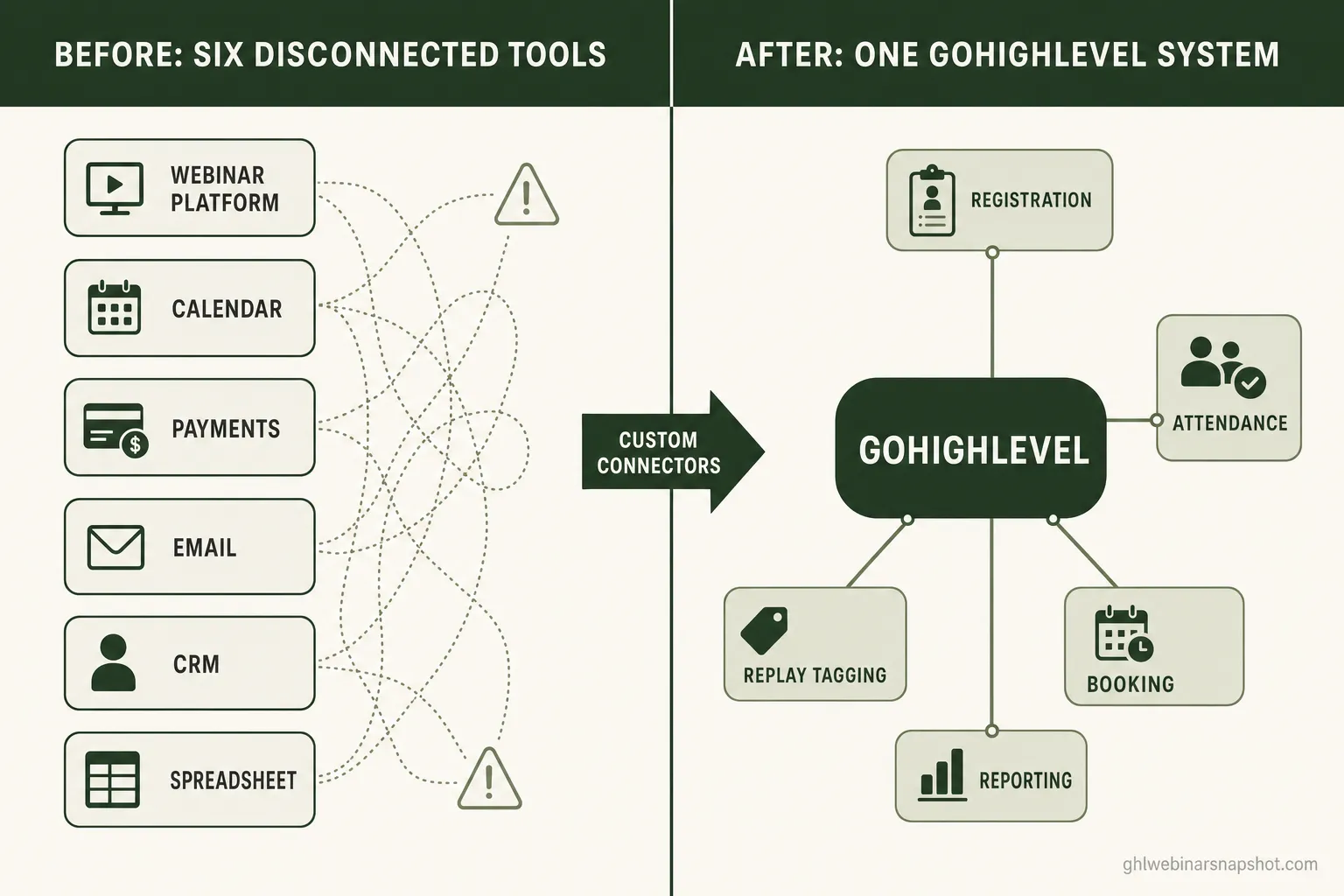
The engineering itself is unglamorous and specific. A WebinarJam-to-GHL connector, for example, listens for attendance webhooks, creates or updates the contact, writes a live-vs-replay custom field, moves the contact to the right pipeline stage, and — critically — handles the cases that break no-code tools: the duplicate registration, the person who joins late, the replay viewer who watches in three sittings. That reliability is the entire point. An automation that works 95% of the time isn’t an automation; it’s a 5% manual-cleanup job you now have to remember to do.
For operators who want the standard system first, the webinar snapshot covers the common cadences, and the 7 core webinar automations explain what “good” looks like before you invest in anything bespoke. Custom development is the next layer, not the starting point.
The ROI: what consolidation returns
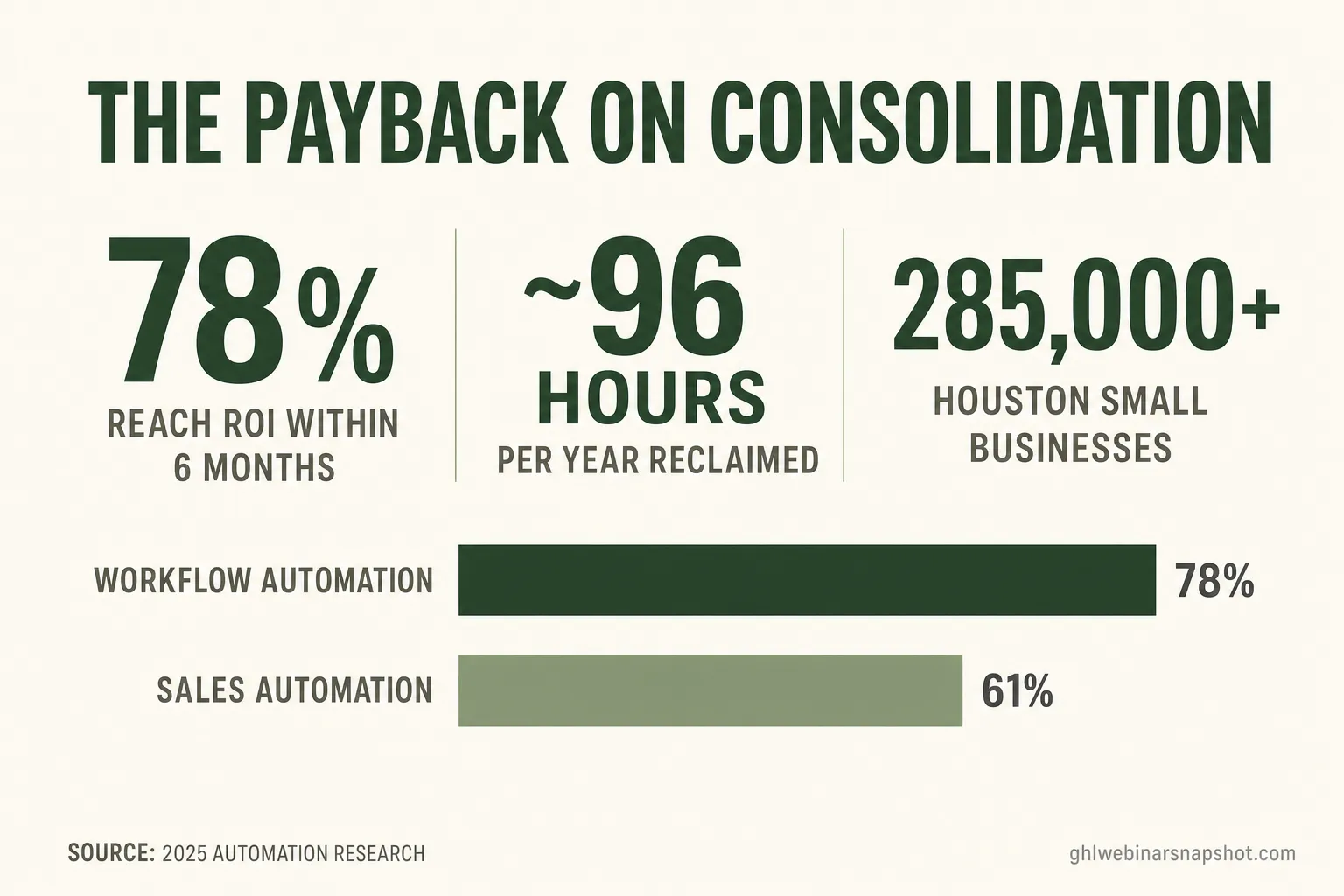
Consolidating a fragmented stack into GHL returns time first and revenue second — you reclaim the manual hours immediately, then capture the follow-ups you were previously dropping. The automation ROI data is consistent on the timeline: in roundups of workflow-automation deployments, about 78% of organizations reach ROI within six months, and sales-automation projects tend to pay back on a similar horizon.
The time math is what makes it concrete for a solo operator or a small team. If reconciling attendance and chasing the right leads costs you two hours per webinar and you run four a month, that’s roughly 96 hours a year of skilled work spent on copy-paste — before counting the revenue from replay watchers you never called. automation research attributes about 30% of sales activities as automatable to McKinsey’s estimates, and in a webinar funnel the automatable share of the operational work is higher — because it’s structured, repetitive, and rules-based.
There’s a second-order return that’s harder to chart but often larger: launches you no longer avoid. When setup is painful, operators run fewer webinars. When the system handles registration, attendance, tagging, and booking automatically, the marginal cost of one more webinar drops toward zero — and volume is what compounds. If you’re still sizing whether a build is worth it, our transparent development pricing and snapshot pricing give you both ends of the range.
Why this matters for Houston specifically
Houston is one of the densest small-business markets in the country, which means both a large audience for webinars and a lot of operators running them on fragile stacks — the exact conditions where custom GHL development moves the needle. The Greater Houston Partnership counts more than 285,000 small businesses across the nine-county region, spanning coaching, consulting, professional services, health and wellness, and B2B software — the core audiences for live and evergreen webinars.
Two local realities make consolidation especially worth it here. First, Houston’s business base is diverse and often bilingual, so the follow-up layer matters: a custom AI no-show recovery agent that runs separate English and Spanish scripts and logs everything back to GHL is a real, buildable use case, not a hypothetical. Second, the market is competitive enough that speed-to-follow-up decides deals — the hot replay watcher who gets a call in an hour, not three days later, is the one who books. That only happens when replay behavior and your calendar live in the same system.
If your audience finds you through local search as much as paid ads, pair the development work with the fundamentals in our Dallas-focused guide to getting webinars found in AI search — the same local-SEO and answer-engine principles apply directly to Houston.
Connect, migrate, or custom-build: how to choose
Choose a connector when your tools are fine but they don’t talk; choose a migration when a platform is actively holding you back; choose a custom build when you need something that simply doesn’t exist yet. Most webinar businesses need only one of the three at a time, and the right call depends entirely on where your funnel leaks.
- Connect if your webinar platform, checkout, and calendar each work well on their own but the data doesn’t flow. A custom connector is the cheapest, fastest option — typically the first thing to build.
- Migrate if you’re paying for a platform’s lock-in more than its value — for example, a course and funnel trapped in Kajabi when you want GHL’s automation. Our step-by-step migration guide walks through what that involves.
- Custom-build if you need a capability that doesn’t exist off the shelf — an attendee portal, a niche CRM view, an evergreen-aware AI agent. This overlaps with custom software when the build extends beyond GHL itself.
Whichever path fits, the sequence is the same: scope the actual bottleneck, quote a fixed timeline, build, test end-to-end, and cut over cleanly. The goal is never “more software” — it’s fewer tools you have to think about, and a funnel that runs the same whether you’re launching one webinar or ten.
FAQ
What's the difference between GHL custom development and just using Zapier?
Zapier and other no-code tools move data between apps for simple, one-directional tasks and are great for low volume. Custom development builds two-way syncs, attendance logic, error handling, and retries that survive edge cases — the duplicate registration, the late joiner, the replay viewer who watches in pieces. For a webinar business running regular launches, the reliability difference is the whole point: an automation that fails 5% of the time is a manual-cleanup job you now have to remember.
Can you connect WebinarJam, Zoom Webinars, Demio, or Kajabi to GoHighLevel?
Yes — any platform with an API or webhooks. We build custom connectors that sync registration and live-vs-replay attendance two-way between your webinar or course platform (WebinarJam, Zoom Webinars, Demio, EverWebinar, Kajabi, Teachable, Thinkific, and more) and your GHL sub-account, updating pipeline stages and custom fields automatically.
How much does GHL custom development cost for a webinar business?
It depends on scope. Platform-to-GHL connectors typically start around $3K–$8K, custom AI agents and chatbots run higher, and full migrations and dashboards are quoted individually. Every project is scoped with a fixed timeline before work starts. Book a call through our GHL development page for a specific quote.
Do I need custom development, or is the snapshot enough?
Most operators start with the webinar snapshot, which installs the standard registration funnel, reminder cadence, replay tagging, and lead scoring in about 24 hours. You only need custom development when a specific bottleneck appears that the standard system doesn't cover — a particular platform connector, a bespoke dashboard, or a migration. Start standard; build custom when you hit a real wall.
Is a migration to GoHighLevel risky for a live webinar business?
It's manageable when it's engineered rather than improvised. A proper migration moves members, enrollments, tags, offers, and email history, rebuilds your pages and cadences natively in GHL, tests end-to-end, and cuts over with no downtime. The risk comes from doing it by hand under time pressure — which is exactly what a scoped, tested migration avoids.
About the author
Derek Haywood is a GHL Automation Engineer based in Denver, CO. A former B2B SaaS sales engineer, he moved into GoHighLevel implementation and now obsesses over the plumbing behind webinar funnels — tags, triggers, lead scoring, and the replay-tag pipelines that surface buyers without manual CSV scrubbing. He has a low tolerance for broken automations and an even lower one for vague compliance hand-waving.
Related posts
- How to Migrate Your Webinar Funnel to GoHighLevel (2026 Step-by-Step)
- Custom Webinar Software for NYC Coaches: When Off-the-Shelf Tools Start Costing You Sales
- Multi-Touch Attribution for Webinars: Track What Actually Books the Call
- The 7 Webinar Automations That Push Show-Up Rate From 28% to 54%
- The Webinar Conversion Funnel: Where Registrants Leak and How to Fix Every Stage