If you’ve ever hosted a webinar only to see attendees vanish afterward without a trace, you’re not alone. Getting people to register is just half the battle; the real magic happens after the webinar ends. That’s where follow-up automation becomes your silent sales ninja, nurturing leads, overcoming objections, and gently guiding prospects toward a “yes.”
In this guide, you’ll learn five high-converting, ready-to-use webinar follow-up automations that will help you close more sales without burning out or chasing leads manually. These aren’t theory—they’re based on proven workflows used by top-performing coaches, consultants, and course creators.
Key Takeaways
- Learn the exact automation sequences to follow up after your webinar.
- Discover how to re-engage no-shows and replay viewers effectively
- Automate your sales call bookings without lifting a finger
- Use smart segmentation to personalize your follow-up
- Avoid the #1 mistake most Webinar hosts make after their event ends
Why Webinar Follow-Up Is the Hidden Sales Engine
- You stay top-of-mind while leads are still warm
- You can handle objections before they even arise
- You multiply your conversions without additional effort
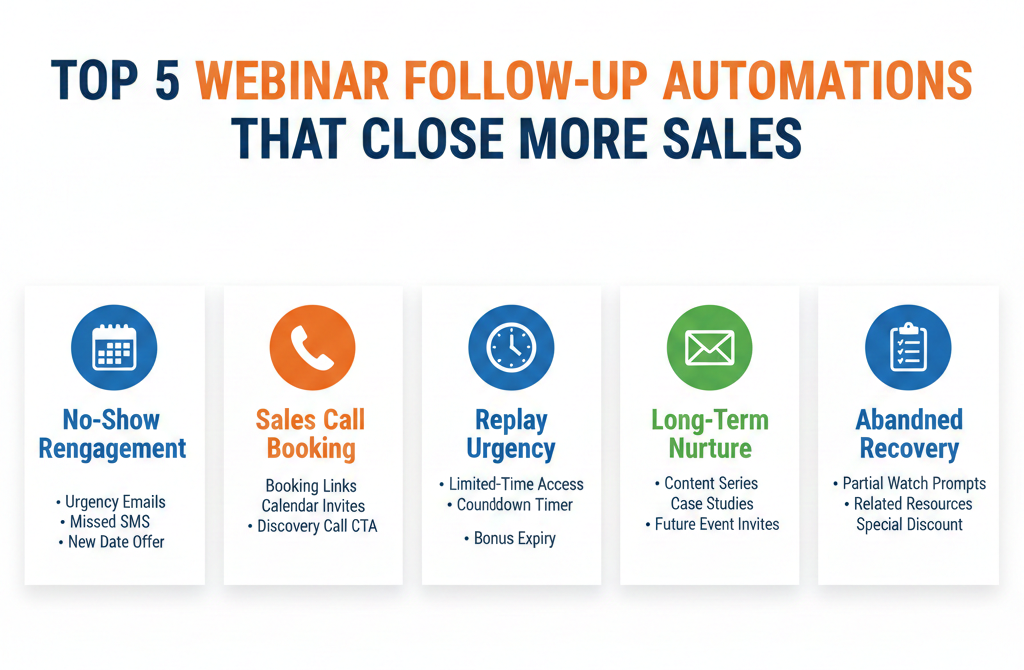
No-Show Re-Engagement Automation
Turn “No-Shows” Into Hot Leads With This Sequence
No-shows are not lost causes—they’re just busy. A well-timed re-engagement sequence can still convert these leads.
What this workflow includes:
- A friendly “Sorry we missed you” email
- Immediate access to the replay
- Objection-handling email on day 2
- Limited-time offer reminder on day 3
- Final call message with urgency on day 4
Pro Tip:
Include SMS and voicemail drop in your sequence for multi-channel visibility. Use calendar invites for replay sessions to increase engagement.
Example Tools to Use:
- GHL Snapshot Replay Campaign
- Conditional logic to segment based on attendance
Attendee Follow-Up With Sales Booking Automation
Convert Engaged Webinar Attendees Into Booked Calls
Attendees who stayed until the end are your hottest leads. Don’t leave them hanging—send them directly into a booking funnel.
Automation steps:
- Trigger: Attendee watched 75%+ of the webinar.
- Email/SMS with a thank-you and booking link
- Reminder sequence if no booking within 48 hours
- Follow up with testimonials or mini-case studies
- Last-chance email with a limited calendar slot
Pro Tip:
Use AI to qualify leads before booking using a chatbot or form logic (e.g., “What’s your biggest challenge?”). Route high-quality leads directly to a calendar.
Replay Viewer Urgency Sequence
Use Scarcity to Turn Replay Watchers Into Buyers
Replay viewers are still interested—they just couldn’t make it live. Use urgency-driven messaging to prompt fast action.
What to include in your sequence:
- Immediate replay email (with 48-hour access)
- “What you missed live” summary
- Countdown timer email (24 hours left)
- Objection handling via email/SMS on day 2
- Final reminder with an expiring bonus
Tools to amplify results:
- Countdown timers in emails (e.g., Deadline Funnel)
- Tags to track video opens or time watched
Pro Tip:
Include testimonials in the reply emails to build trust and increase conversions.
Long-Term Webinar Nurture Campaign
Typical campaign structure:
- Weekly value emails (educational content, tips)
- Case study spotlights
- Future Webinar invites
- Soft CTA (e.g., “Schedule a strategy call ”)
- Evergreen offers reminders every 30–60 days
Pro Tip:
Use smart tags and custom fields to personalize messaging by interest, industry, or engagement level.Abandoned Registration Recovery Sequence
Win Back Leads Who Started to Register But Didn’t Finish
Many people hit the registration page, start the form, and bounce. A recovery automation can bring them back and convert.
How it works:
- Trigger: Partial form fill or page visit without submission
- SMS reminder: “Did you forget to finish your webinar registration?”
- Email with 1-click registration completion link
- Optional bonus incentive (e.g., free guide or worksheet)
- Add to main Webinar reminder sequence if completed
Pro Tip:
Use dynamic retargeting ads to show reminders to these users across social platforms.
Webinar Automation Best Practices
To get the most out of these automations, keep these principles in mind:
Segment your audience
Treat attendees, no-shows, and replay viewers differently. They’re in different mindsets.
Keep messaging human and relevant
Even automated emails should sound like they’re written just for one person. Personalize with merge fields and a casual tone.
Test your sequences regularly
What works once may not work forever. A/B test subject lines, send times, and CTAs.
Use a platform that does it all
Tools like GoHighLevel (GHL) make this entire automation stack plug-and-play with a prebuilt Webinar Snapshot.
Frequently Asked Questions
How many days should my follow-up sequence last?
Can I use SMS and email together in Webinar automations?
What should my CTA be after a Webinar?
Do I need fancy tools to set this up?
How do I know if someone watched the Webinar?
Is there any recurring fee after the $997?
No. It’s a one-time fee for lifetime access.
Can I white-label this for clients?
Yes, especially if you’re on GoHighLevel SaaS mode.
Conclusion
Your Webinar is only as powerful as what comes after it. With the right follow-up automations, you can turn missed connections into closed deals, replay viewers into buyers, and leads into loyal clients all without lifting a finger.
Whether you’re a coach, consultant, or SaaS founder, these five automations will help you maximize every opportunity your webinar brings. Start simple, stay consistent, and watch your conversions soar.
Want a shortcut?
Use a Webinar Automation Snapshot built inside GoHighLevel that includes these workflows, templates, and triggers ready to go. You’ll save hours and close more deals automatically.