Running webinars can be one of the most powerful ways to generate leads, build authority, and close high-ticket sales. But without a proper system, things quickly fall apart. Missed reminders, lost leads, poor follow-ups, and manual tracking can kill your conversions.
That’s where a full webinar CRM setup comes in.
A well-built system manages everything from registration to post-webinar sales automatically. Instead of juggling multiple tools, you can run the entire process inside one platform.
In this guide, you’ll learn how to create a complete webinar CRM that tracks leads, automates communication, and maximizes conversions from every session.
Key Takeaways
- Build a structured pipeline to track every registrant
- Automate confirmations, reminders, and follow-ups
- Segment attendees, no-shows, and buyers
- Use multi-channel messaging for higher show-up rates
- Convert webinar interest into booked calls or purchases
- Create a repeatable system you can use for every event
Why You Need a Dedicated Webinar CRM
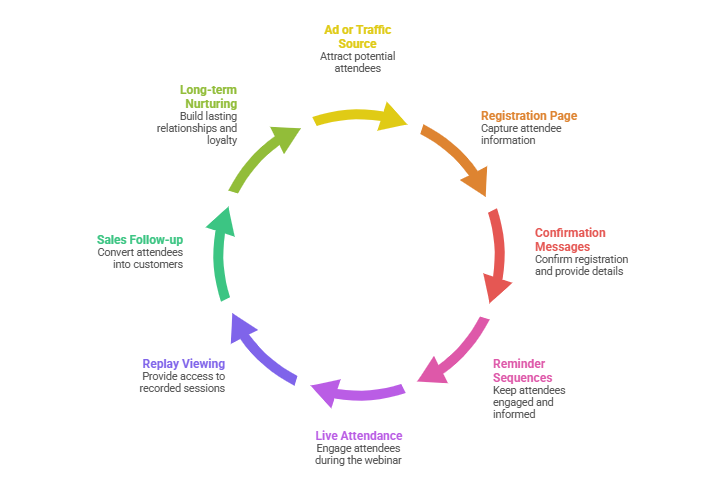
Webinars aren’t just presentations. They’re full marketing funnels.
A typical webinar journey includes:
- Ad or traffic source
- Registration page
- Confirmation messages
- Reminder sequences
- Live attendance
- Replay viewing
- Sales follow-up
- Long-term nurturing
If any step breaks, revenue drops.
A CRM designed for webinars ensures no lead slips through the cracks. Every interaction is tracked, automated, and optimized for conversion.
Setting Up Your Webinar Pipeline
Start by building a visual pipeline that reflects the attendee journey. This feature makes it easy to see where leads are and what action is needed next.
Typical pipeline stages include the following:
- Registered
- Confirmed
- Attended Live
- Left Early
- No-Show
- Watched Replay
- Booked Call
- Closed Won
- Closed Lost
Each stage represents a behavior, not just a status. Moving contacts automatically between stages gives you real-time insights into performance.
For example:
- If someone attends live, move them to “Attended Live”
- If they miss it, move them to “No-Show”
- If they book a consultation, move them to “Booked Call”
This visibility helps prioritize follow-ups and identify bottlenecks.
Creating High-Converting Registration Capture
Your CRM system is only as good as the leads entering it.
Build a registration form that collects:
- Name
- Phone number
- Optional qualifying questions
Adding phone numbers is critical for SMS reminders, which dramatically increase attendance rates.
After submission, redirect registrants to a confirmation page that includes:
- Webinar date and time
- Calendar add buttons
- Instructions for joining
- Expectations for what they’ll learn
This reduces confusion and drop-off.
Automated Confirmation and Reminder System
Reminders are the single biggest factor affecting attendance.
A strong sequence includes multiple touchpoints across channels.
Recommended reminder schedule:
- Immediately after registration
- 24 hours before
- Morning of the event
- 1 hour before
15 minutes before with the live link
Use a mix of:
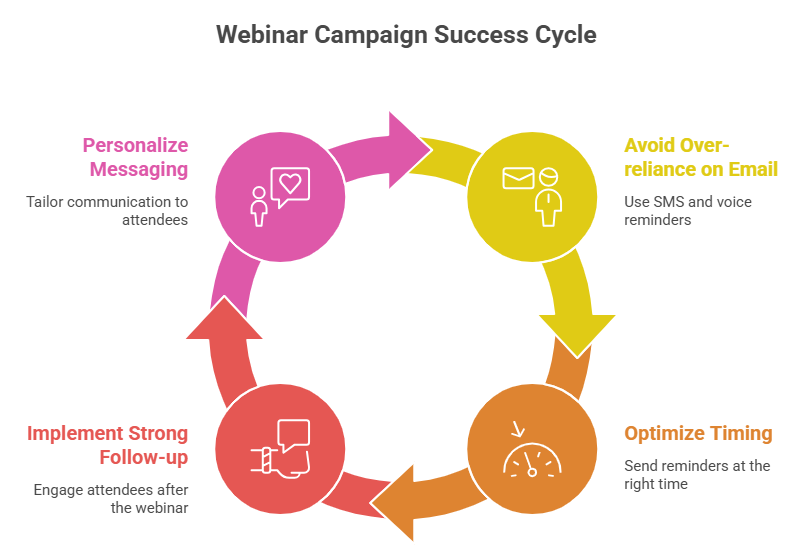
- SMS
- Optional voicemail drops
Keep messages short, clear, and action-focused.
Example SMS:
“Hi Sarah, your training starts in 15 minutes. Join here now: [link]”
Short messages outperform long ones during pre-event periods.
Using GoHighLevel for Webinar Automation
A major advantage of GoHighLevel is that it allows you to build this entire system in one place. You can manage pipelines, forms, messaging, and automation without switching tools.
Inside GoHighLevel, workflows can trigger actions based on behavior. For instance:
- Form submitted → send confirmation messages
- Webinar date approaching → send reminders
- Attendance recorded → move pipeline stage
- Link clicked → send targeted follow-ups
This behavior-driven automation ensures every lead gets relevant communication.
Instead of blasting generic emails, you respond to real engagement.
Attendance Tracking and Segmentation
Not all registrants behave the same. Treating them equally wastes opportunities.
Segment contacts into groups:
Attended Live
These leads are highly engaged and most likely to buy. Follow up immediately with:
- Offer a recap.
- Limited-time bonuses
- Direct booking links
Left Early
They showed interest but may have missed the pitch. Send:
- Key takeaway summary
- Replay link starting at important sections
- Answers to common objections
No-Shows
This group often represents the largest pool of lost revenue.
Send messages that acknowledge they missed it without blame:
“We noticed you couldn’t attend. Here’s the replay for the next 48 hours.”
Urgency encourages action.
Automated Replay and Sales Follow-Up
Most webinar sales happen after the event, not during it.
Create a sequence that includes:
- Replay delivery immediately after the webinar
- Reminder messages before the replay expires
- Testimonials and case studies
- Objection handling
- Strong call-to-action
Use deadlines strategically. Scarcity motivates decisions.
For example:
- Bonus expires in 48 hours
- Discount ends tonight
- Limited spots available
Avoid fake urgency. Authentic deadlines build trust.
Booking Calls and Converting Leads
If your webinar sells a high-ticket offer, the goal is usually a booked consultation.
Make booking frictionless:
- Include scheduling links in follow-ups
- Allow calendar sync
- Send automated reminders for calls
A good system continues nurturing leads until they either book or opt out.
This prevents warm prospects from going cold.
Frequently Asked Questions
Do AI calls feel robotic?
Is SMS automation legal?
Can this work for automated (evergreen) webinars?
Do I still need email marketing?
How much can attendance increase?
Conclusion
A Webinar Snapshot with built-in AI caller and SMS automation transforms webinar marketing from a manual, inconsistent process into a predictable conversion engine.
By combining multiple communication channels — email, text, and voice — you meet prospects where they are and keep your event top-of-mind. The result is higher attendance, stronger engagement, and more sales from every webinar you host.
If you’re serious about scaling your business through webinars, adopting an automated system like this isn’t just helpful — it’s a competitive advantage.